|
Forum Index : Microcontroller and PC projects : MMEdit V5.4.0
| Author | Message | ||||
TassyJim![]() Guru Joined: 07/08/2011 Location: AustraliaPosts: 6532 |
Sorry about that Fred, I will add USER_FUNCTIONS to the list. VK7JH MMedit |
||||
| Turbo46 Guru Joined: 24/12/2017 Location: AustraliaPosts: 1693 |
Thanks Jim, The "Next after replace" works well, very much appreciated. I think I must have somehow assigned the Action button to "Run in DOS" because that is what it does for me without using the CTRL key. Could it possibly be made to "Run MMB4W" by using the ALT key? Or if I did assign it to run in DOS can I reassign it to run MMB4W normally and MMBasic for DOS using the CTRL key? Bill Keep safe. Live long and prosper. |
||||
| Volhout Guru Joined: 05/03/2018 Location: NetherlandsPosts: 5898 |
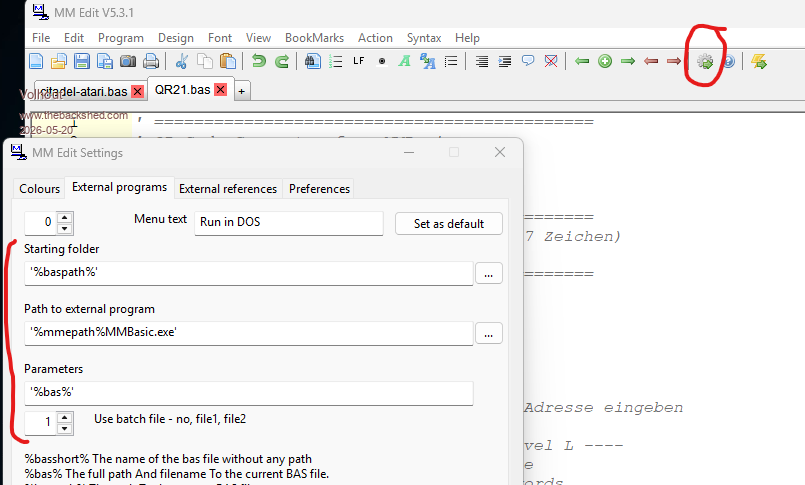
Hi Bill, In FILE/PREFERENCES/EXTERNAL PROGRAMS you can enter the desired incantation to start MMB4W (or MMB4L in Linux systems). This is activated by clicking the following icon: ![]() Volhout PicomiteVGA PETSCII ROBOTS |
||||
TassyJim![]() Guru Joined: 07/08/2011 Location: AustraliaPosts: 6532 |
Bill, Volhout is correct. Whatever is configured as External program "0" will be run with <ctrl>-Click Whatever you have set as "set as default" will be run by click without any modifier key. So, leave external program 0 as is pointing to DOS and switch to where-ever you have MMB4W and click on "Set as default" Jim VK7JH MMedit |
||||
| The Back Shed's forum code is written, and hosted, in Australia. | © JAQ Software 2026 |