Home
JAQForum Ver 24.01
Log In or Join  
Active Topics
Local Time 11:17 15 Feb 2026 Privacy Policy
Jump to

Notice. New forum software under development. It's going to miss a few functions and look a bit ugly for a while, but I'm working on it full time now as the old forum was too unstable. Couple days, all good. If you notice any issues, please contact me.

Forum Index : Microcontroller and PC projects : PicoMiteVGA: Framework for ray casting using the DDA method

     Page 2 of 2    
Author Message
Volhout
Guru

Joined: 05/03/2018
Location: Netherlands
Posts: 5684
Posted: 11:30am 10 Feb 2026
Copy link to clipboard 
Print this post

Hi Mick,

Both you and Tom are right. If I look at (but .. who am I ?) my personal application domain, I would
- on RP2040 VGA have loved to trade RAY with STRUCTURES.
- on RP2040 microcontroller domain have loved to trade STEPPER for STRUCTURES.
- on any RP2040 would have dismissed TURTLE.

But that is me. I do not see the value in structures. But I know from the enthusiastic communication at the introduction of structures, that many do love it.
And TURTLE has it's own audience (my grand children are to grown up, but they may have loved it once). Maybe for my grand-grand children in 10 years.

Anyway. It is what it is.

Volhout
PicomiteVGA PETSCII ROBOTS
 
mozzie
Senior Member

Joined: 15/06/2020
Location: Australia
Posts: 204
Posted: 01:34pm 10 Feb 2026
Copy link to clipboard 
Print this post

G'day,
It probably shows the strength of the whole MMbasic / Picomite platform that with so many different users and use cases, it appears to satisfy 99% of them 99% of the time.
This is a huge ask from any system.

I too look at a MicroMite / PicoMite as an embedded system, but am amazed at what can be done with some of the extended functions we now have access to with HDMI / VGA graphics and so many LCD displays.

On top of this we have an enormous amount of device support without resorting to libraries etc.

Whilst my own abilities as a programmer are pretty poor, trying out the new commands / functions / systems as they are added and reading the posts of how others are using them has taught me a lot, and inspired many ideas, whether I will ever use some of it is another matter.

Also only my 5c

Regards,
Lyle.
 
Martin H.

Guru

Joined: 04/06/2022
Location: Germany
Posts: 1354
Posted: 02:38pm 10 Feb 2026
Copy link to clipboard 
Print this post

The freely scalable sprites certainly have their appeal.
They  would also be useful in other applications (such as Leon's Outrun port etc.)
ym2c
Martin
'no comment
 
gadgetjack
Senior Member

Joined: 15/07/2016
Location: United States
Posts: 185
Posted: 04:53pm 10 Feb 2026
Copy link to clipboard 
Print this post

Just putting in my 2 cents worth. I understand all the ones using this for control projects , I did that for years till I retired. But the graphics capabilities of this little machine have caught my eye from the beginning. I have followed now for a few years after finding this site and really enjoy the games and demo programs so many capable people on here write. I tip my hat to all of you. I really would like to see the RAY functions added , they would not eat that much memory up. Most designs have SD cards anyway for saving your code to. I vote for the RAY functions.
Jack
 
bfwolf
Senior Member

Joined: 03/01/2025
Location: Germany
Posts: 159
Posted: 09:20pm 10 Feb 2026
Copy link to clipboard 
Print this post

The discussion here about whether "ray casting" should be done via built-in commands, CSUBs, or directly in MMBasic, has once again shown me how beneficial it would be if MMBasic supported DLLs and their subs and functions. This would allow for the elegant and efficient implementation of highly specialized tasks suitable only for a selected user group and very specific use cases. And the MMBasic core wouldn't grow every time.

bfwolf.
 
matherp
Guru

Joined: 11/12/2012
Location: United Kingdom
Posts: 10953
Posted: 10:23pm 10 Feb 2026
Copy link to clipboard 
Print this post

  Quote  has once again shown me how beneficial it would be if MMBasic supported DLLs and their subs and functions.


Can't be done - won't be done
 
homa

Guru

Joined: 05/11/2021
Location: Germany
Posts: 538
Posted: 03:12pm 14 Feb 2026
Copy link to clipboard 
Print this post

@Martin H. that's impressive.  

@LeoNicolas thank you for the great explanatory video. I only knew the solution with the individual steps.

@matherp Peter, is it possible to get the graphics for your example? I can't find them anywhere. I'm currently testing the version PicoMiteHDMI MMBasic USB RP2350A Edition V6.02.01b2 - i it

Matthias
Edited 2026-02-15 01:14 by homa
 
Martin H.

Guru

Joined: 04/06/2022
Location: Germany
Posts: 1354
Posted: 05:52pm 14 Feb 2026
Copy link to clipboard 
Print this post

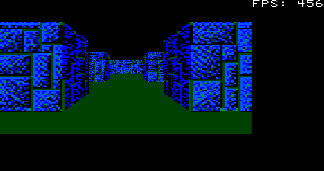
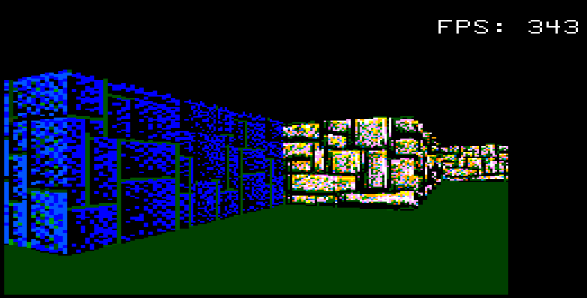
I have optimised this a little to keep the calculations within the DDA loop as low as possible.

' Raycaster 2 in MMBasic, DDA method (Digital Differential Analyser)
'V0.5
mmb4w=0
CLS
If mmb4w Then
   MODE -7 :CLS RGB(cyan)
PAGE WRITE 1
Else
   MODE 2: CLS RGB(cyan)
   FRAMEBUFFER create:FRAMEBUFFER write f
End If
CLS
mapS=64:mapy=24:mapx=24
' --- Labyrinth Definition ---
mapW = 57:mapH = 51
Dim integer m(mapW, mapH),Col%(3,2),cll
Restore MapData1
For y = 0 To mapH-1 :Read k$:k$=k$+"1"
For x=0 To Len(k$):m(x, y)=Val(Mid$(k$,x+1,1)):Next :Next

' --- Player Setup ---
px = 26.5 : py = 45.5
dx = 1 : dy = 0.5
planeX = 0 : planeY = 0.66
moveSpeed = 0.3
rotSpeed = 0.1
buffer = 0.2
' --- Grafic Setup ---
resStep = 3
scrW = MM.HRES*.75
scrH = MM.VRES*.75
' Flag to force the first frame
needsRedraw = 1
invScrW = 2 / scrW
halfScrH = scrH / 2
colWallA = RGB(GREEN)
colWallB = RGB(0,128,0)
colSky = RGB(0,128,255)
colFloor = RGB(0,0,0)
Do
 ' Only paint when something has changed
 If needsRedraw = 1 Then
 tt=Timer
   ' Ceiling and floor
   Box 0, 0, scrW, halfScrH, 0, colSky, colSky
   Box 0, halfScrH, scrW, halfScrH, 0, colFloor, colFloor
   'DDA
   For x = 0 To scrW - 1 Step resStep
     cameraX = x * invScrW - 1
     rayDx = dx + planeX * cameraX
     rayDy = dy + planeY * cameraX
     mx = Int(px) : my = Int(py)
       If rayDx = 0 Then
       dDx = 1e30
       Else
       invRayDx = 1 / rayDx: dDx = Abs(invRayDx)
       End If
       If rayDy = 0 Then
         dDy = 1e30
         Else
         invRayDy = 1 / rayDy :dDy = Abs(invRayDy)
         End If
   
     If rayDx < 0 Then
       stepX = -1 : sdX = (px - mx) * dDx
     Else
       stepX = 1 : sdX = (mx + 1 - px) * dDx
     End If
     If rayDy < 0 Then
       stepY = -1 : sdY = (py - my) * dDy
     Else
       stepY = 1 : sdY = (my + 1 - py) * dDy
     End If
     hit = 0
     Do While hit = 0
       If sdX < sdY Then
         Inc sdX,dDx:Inc mx,stepX : side = 0
       Else
         Inc sdY,dDy:Inc my,stepY : side = 1
       End If
       If m(mx, my)>0 Then hit = 1
     Loop
     cll=m(mx, my)
     If side = 0 Then pDist = (sdX - dDx) Else pDist = (sdY - dDy)
     If pDist < 0.1 Then pDist = 0.1

     lH = Int(scrH / pDist)
     yS = halfScrH - (lH/2)
     wallCol = colWallA
     If side = 1 Then wallCol = colWallB
     Box x, yS, resStep, lH, , wallCol,wallCol
   Next x
   If mmb4w Then
   PAGE WRITE 0:Blit 0,0,0,0,scrW,scrH,1
   Text scrW,0,"X="+Str$(Int(px))+" "
   Text scrW,12,"Y="+Str$(Int(py))+" "
   Text scrW,24,Str$(Timer-tt)+"   ":tt=Timer
   PAGE WRITE 1
   Else
   FRAMEBUFFER write n
   Text scrW,0,"X="+Str$(Int(px))+" "
   Text scrW,12,"Y="+Str$(Int(py))+" "
   Text scrW,24,Str$(Timer-tt)+"   ":tt=Timer
   FRAMEBUFFER write f
   Blit framebuffer F,N,0,0,0,0,scrW,scrH
   End If
   needsRedraw = 0 ' Reset Redraw Flag
 End If
 ' Wait for button (does not block, but checks efficiently)
 k$ = UCase$(Inkey$)
 Do :Loop Until Inkey$=""
   If k$ <> "" Then
   ' Enable redraw when a movement key is pressed
   If Instr("WASD", k$) > 0 Then needsRedraw = 1
   Select Case k$
       Case "W"
         If m(Int(px + dx * buffer), Int(py)) = 0 Then px = px + dx * moveSpeed
         If m(Int(px), Int(py + dy * buffer)) = 0 Then py = py + dy * moveSpeed
       Case "S"
         If m(Int(px - dx * buffer), Int(py)) = 0 Then px = px - dx * moveSpeed
         If m(Int(px), Int(py - dy * buffer)) = 0 Then py = py - dy * moveSpeed
       Case "D"
         oldDx = dx : dx = dx * Cos(rotSpeed) - dy * Sin(rotSpeed)
         dy = oldDx * Sin(rotSpeed) + dy * Cos(rotSpeed)
         oldPx = planeX : planeX = planeX * Cos(rotSpeed) - planeY * Sin(rotSpeed)
         planeY = oldPx * Sin(rotSpeed) + planeY * Cos(rotSpeed)
       Case "A"
         oldDx = dx : dx = dx * Cos(-rotSpeed) - dy * Sin(-rotSpeed)
         dy = oldDx * Sin(-rotSpeed) + dy * Cos(-rotSpeed)
         oldPx = planeX : planeX = planeX * Cos(-rotSpeed) - planeY * Sin(-rotSpeed)
         planeY = oldPx * Sin(-rotSpeed) + planeY * Cos(-rotSpeed)
   End Select
 End If
Loop Until k$ = Chr$(27)
If mmb4w Then PAGE WRITE 0
MapData1: '
Data "11111111111111111111111133333333333331111111111111111111"
Data "11111111111111111111111130000000000333331111111111111111"
Data "11111000011111111111111130000000000333331111111111111111"
Data "11111000011111110000000000000000000300331111111111111111"
Data "11111000011111110000000030000000000300331111111111111111"
Data "11111110111111110011111130000000000333331111111111111111"
Data "11111000000001110011111130000000000333331111111111111111"
Data "11111000000001110011111133333003333331111111111111111111"
Data "11111000000001000000111133333003333331111111111111111111"
Data "11111000000000000000111111333003333331111111111111111111"
Data "11111000000001000000111111333003311111111111111111111111"
Data "11111000000001111111111333333003333111111111111111111111"
Data "10011111001111111111111333333003333111111111111111111111"
Data "10011111001111111111111300000000333111111111111111111111"
Data "11011111001111111111111300333003333111111111111111111111"
Data "10011111001111111111111300333003333111111111111111111111"
Data "10000000001111111111111300333003333111111111111111111111"
Data "10010000001111111111111333333003311111111111111111111111"
Data "10011111111111111111111111113003111111111111122222222222"
Data "10011000000001111111111111110000111111111111122222222222"
Data "10011000000001111111111300000000000031222222222000000022"
Data "10011000000001111111111000000000000002222222222000000022"
Data "10001000000001111111111000000000000000000000002000000022"
Data "10000000000001111111111000000000000000000000000000000022"
Data "10001000000001111111111000000000000002000000222000000022"
Data "10011000000001111111111000000000000001122002222000000022"
Data "10011000000001111111111111110000111111122002222000000022"
Data "10011111011111111111111111112202211111122002222222222222"
Data "10011111001111111111111111122002211111122002222222222222"
Data "10010001001111111111111111122002211111122002222222222211"
Data "10000001001111111111111111122002211111122002222020022211"
Data "10011111001111111111111111122002211111122000000000000211"
Data "10011111001111111111111111122002211111122000000000002211"
Data "10000000000000010000011111122002211111122022002020220211"
Data "10000000000000000000000111122002211111122222222222222211"
Data "10000000000000010000011111122002211111111111111111111111"
Data "11111111111111110111111122222002222221111111111111111111"
Data "11111111110010000111111222222202222221111111111111111111"
Data "11111111110000011111111200000000000021111111111111111111"
Data "11111111111011111111111200002002000021111111111111111111"
Data "11111111111001111111111200002002000021111111111111111111"
Data "11111111111001111111111222222002222221111111111111111111"
Data "11111111111111111111111200002002000021111111111111111111"
Data "11111111111111111111111200000000000021111111111111111111"
Data "11111111111111111111111200002002000021111111111111111111"
Data "11111111111111111111111222222002222221111111111111111111"
Data "11111111111111111111111200000000000021111111111111111111"
Data "11111111111111111111111222222222222221111111111111111111"

I have revised the map again. Now you get different values when you hit a wall. Here, I have planned to colour different areas differently (as in Wolf3d), which should help with orientation. The value found is stored in 'cll' but not yet evaluated.
Have Fun
Cheers
Martin
'no comment
 
     Page 2 of 2    
Print this page


To reply to this topic, you need to log in.

The Back Shed's forum code is written, and hosted, in Australia.
© JAQ Software 2026