| Author |
Message |
Grogster

Admin Group

Joined: 31/12/2012
Location: New ZealandPosts: 10073 |
| Posted: 07:34am 20 Feb 2026 |
 Copy link to clipboard Copy link to clipboard |
 Print this post |
|
Hopefully, Rob will see this thread.
I want to run GFXterm in Puppy, which SHOULD not be THAT much of an issue, as many of the Puppies are based on Debian, and so is LMDE6, in which, I currently have GFXterm running fine.
WHY Puppy?
I need a sleek, cut-down version of Linux, JUST to run a terminal software on older hardware.
Nothing else. That's why Puppy sprang to mind.
However, I have not tried it yet - that is tomorrow's experiment.
Would I be barking totally up the wrong tree, so to speak, to expect I can get it running inside a Puppy Linux setup?
Puppy is based on Debian, LMDE6/7 is based on Debian......
My plan is to make a Puppy Linux USB + pupsave file, and then copy and TRY to just run GFXterm inside that.
False logic?
I will hopefully update this thread tomorrow, once I have done some experiments.
Smoke makes things work. When the smoke gets out, it stops! |
| |
JohnS
Guru

Joined: 18/11/2011
Location: United KingdomPosts: 4391 |
| Posted: 08:41am 20 Feb 2026 |
Copy link to clipboard |
Print this post |
|
If puppy will run as a "Live" OS from USB (and I expect it can but haven't looked) yes that's a good idea.
If it isn't happy, try
ldd gfxterm
(I've guessed its name is spelled gfxterm)
It may show any libs (.so files) it can't find (but which you may well be able to provide either paths to them or install them).
John |
| |
Volhout

Guru
Joined: 05/03/2018
Location: NetherlandsPosts: 6196 |
| Posted: 09:23am 20 Feb 2026 |
Copy link to clipboard |
Print this post |
|
Hi Grogster,
Puppy linux is much smaller in size compared to Debian/Ubuntu builds. So they strategically left out libraries, kernel modules, applications.
Maybe GFXterm is missing some of that. If GFXterm is supplied as an "appimage", containing required libraries, it would probably run OOTB if your kernel is not too far off.
Not sure what puppy you are using, a recent one ?
Volhout
Edited 2026-02-20 19:24 by Volhout
PicomiteVGA PETSCII ROBOTS |
| |
robert.rozee
Guru
Joined: 31/12/2012
Location: New ZealandPosts: 2552 |
| Posted: 12:33pm 20 Feb 2026 |
Copy link to clipboard |
Print this post |
|
GFXterm for Linux exists as just a standalone ELF binary, not any sort of "appimage" or similar, and primarily requires X11 and GTK2 be installed. Puppy Linux should provide these so should work without issue.
if there are problems, just run it from a command line and messages will be printed out for anything that is missing - one deficiency of Linux is that if you just click on a binary to run it (ie, not run from a command line) and something goes wrong, then you get no on-screen feedback; just nothing happens.
i'm interested to hear how small a system you can get GFXterm running on! remember, there is also the win32 version that can run on winXP, but should (in theory) work with win2000 or even win98SE. way back when i was developing it on winXP the machine i used was an EM350/NAV51 netbook that had a 10" screen, 1gb of RAM, and an Intel Atom N450 processor.
cheers,
rob :-)
Edited 2026-02-21 00:17 by robert.rozee |
| |
Grogster
Admin Group
Joined: 31/12/2012
Location: New ZealandPosts: 10073 |
| Posted: 06:11am 21 Feb 2026 |
Copy link to clipboard |
Print this post |
|
Thanks for the posts, chums. 
It worked the very first time I tried to run the GFXterm file in Puppy.
No error messages, no need to run in the terminal, it just popped up as expected. 
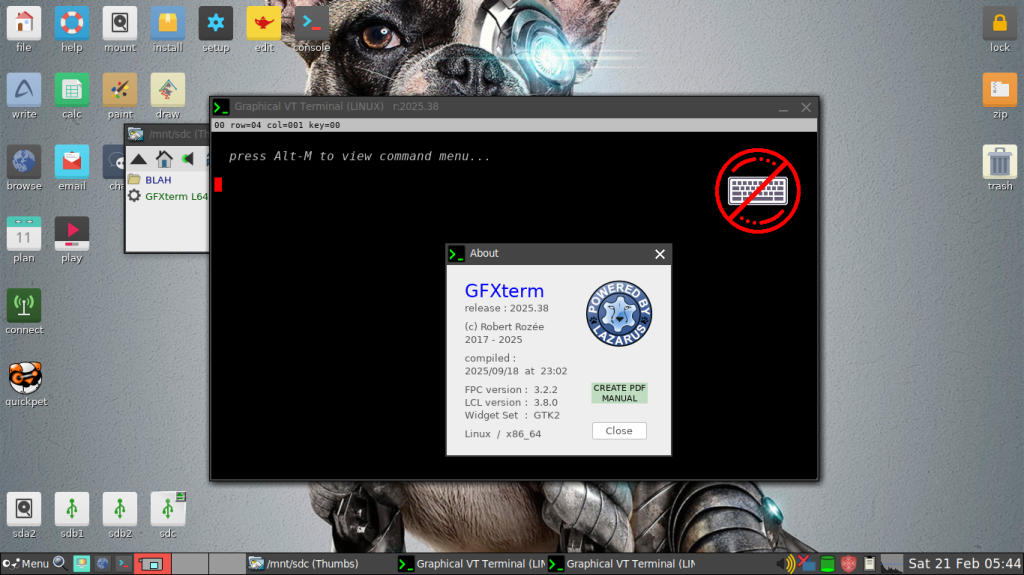
I'm using an old-ish Bionic64(v8.0) Puppy image using Linux Kernel 4.19 circa February 2019.
This is a small-ish ~300MB ISO, which is plenty small enough for my simple serial terminal and logging purposes.
I do note that the latest Puppy build(Trixie) is up to 1GB in size, which is starting to get away from the concept of Puppy being a lean and SMALL Linux install.
I downloaded Trixie anyway, and plan to boot that up, just to play about inside it, and see what has changed. 
But for running a logging terminal(GFXterm) in an isolated system(NOT connected to the internet), Puppy seems to be ideal.
The tinkering continues, but so far, so good. 
Edited 2026-02-21 16:18 by Grogster
Smoke makes things work. When the smoke gets out, it stops! |
| |
Grogster
Admin Group
Joined: 31/12/2012
Location: New ZealandPosts: 10073 |
| Posted: 06:57am 21 Feb 2026 |
Copy link to clipboard |
Print this post |
|
Also works fine ScPup64(Slackware Current), which has a default Windoze XP-ish GUI. This uses Linux Kernel 5.4.6(December 2019), so a little more up to date kernel-wise.
Smoke makes things work. When the smoke gets out, it stops! |
| |

 Notice. New forum software under development. It's going to miss a few functions and look a bit ugly for a while, but I'm working on it full time now as the old forum was too unstable. Couple days, all good. If you notice any issues, please contact me.