Notice. New forum software under development. It's going to miss a few functions and look a bit ugly for a while, but I'm working on it full time now as the old forum was too unstable. Couple days, all good. If you notice any issues, please contact me.
doesn't either. What's the procedure for using framebuffers with sprites? Can I use a standard multi-sprite file?
Martin H. Guru Joined: 04/06/2022 Location: GermanyPosts: 1573
Posted: 02:46am 09 Mar 2026
Copy link to clipboard
Print this post
Good morning, You're close... but has placed the screen output on the framebuffer. You can now use SPRITE LOAD fname$,1 to makesure that it is in Spritenummber 1 Edited 2026-03-09 12:50 by Martin H.'no comment
phil99 Guru Joined: 11/02/2018 Location: AustraliaPosts: 3416
Tested ok on Pico2VGA. Replace "mouse.spr" with "balloon.spr".
> Sprite load "mouse.spr",1,1 > x=99 :y=77 > Sprite show 1,x,y,1 > for n=10 to 199 : Sprite show 1,n,n,1 : pause 99 : next
Edited 2026-03-09 12:57 by phil99
Martin H. Guru Joined: 04/06/2022 Location: GermanyPosts: 1573
Posted: 04:30am 09 Mar 2026
Copy link to clipboard
Print this post
Here is a more detailed explanation.
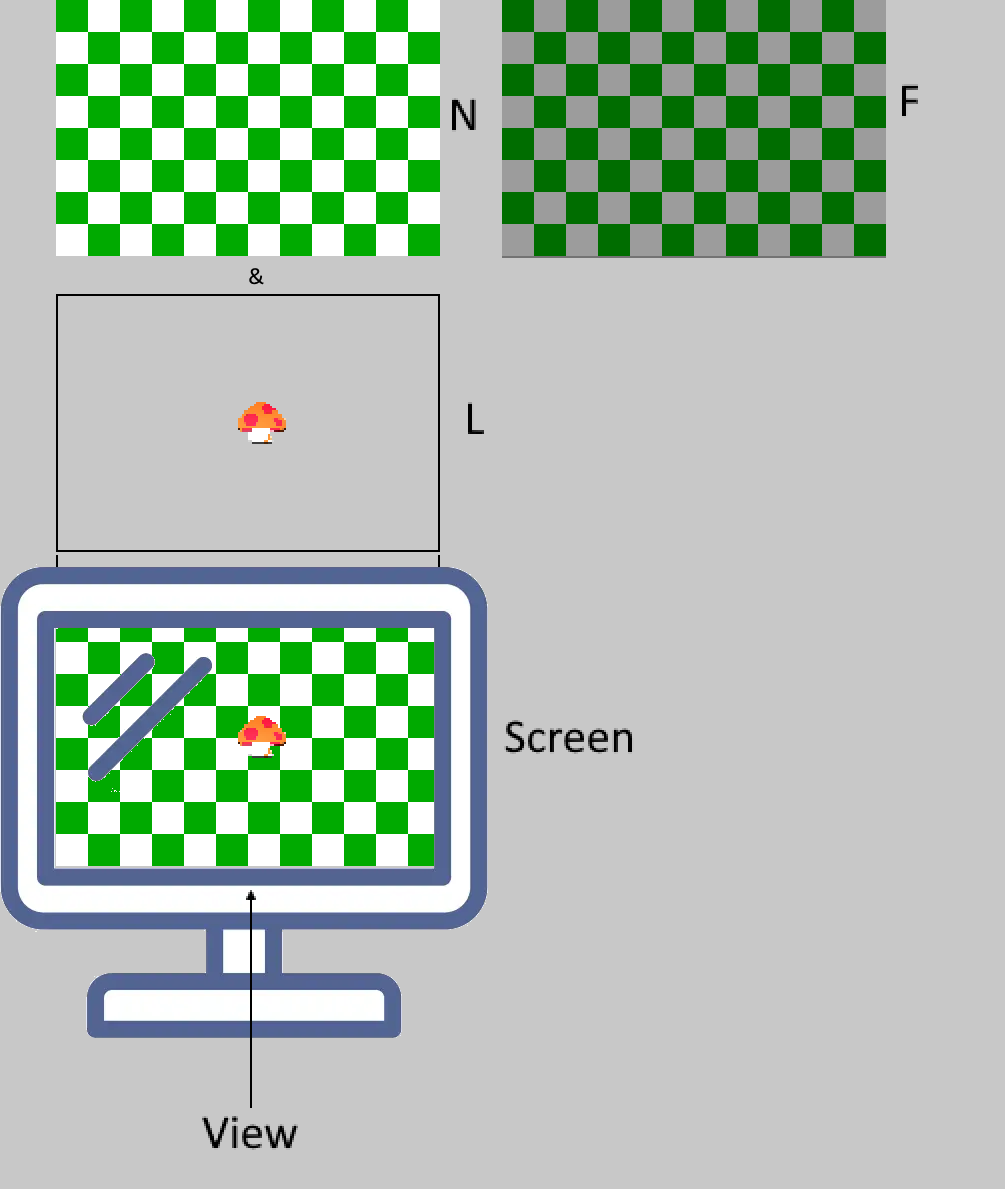
All graphic commands work on N F and L, depending on what you previously selected with the FRAMEBUFFER WRITE command.
Your normal screen is N If you have not set anything else, all outputs will take place here.
The optional framebuffer F is a hidden image memory that you can work on, but it is never displayed. However, you can copy its contents from and to N or L. This is useful for setting up a flicker-free image build-up by always working on F first and then copying the result to N (or L).
The optional layer L plays a special role. It is like a pane, placed over the screen (N). It has the ability (like Sprites) to be partially transparent, making it suitable for displaying objects or placing them over the visible screen without changing the content of N.
So you create your background on N and move your sprites over layer L without having to worry about your background. However, since the Pico has limited memory, it is advisable to use layers or frame buffers with care. Only use them when you really need them. I hope that makes sense. This all applies to Picomites with VGA or HDMI. PicoCalc uses an LCD for output. The function differs slightly here. To display F and L on the display, you have use the FRAMEBUFFER COPY or FRAMEBUFFER MERGE command. For more detailed information, please refer to the manual page 77,78. Cheers Martin Edited 2026-03-09 16:44 by Martin H.'no comment
Mixtel90 Guru Joined: 05/10/2019 Location: United KingdomPosts: 9238
Posted: 07:41am 09 Mar 2026
Copy link to clipboard
Print this post
OOH! Thanks, Martin. I actually understand what's going on now. :)Mick
phil99 Guru Joined: 11/02/2018 Location: AustraliaPosts: 3416
Posted: 07:52am 09 Mar 2026
Copy link to clipboard
Print this post
Martin's description is excellent, perhaps could be added to an expanded "SPRITE Command and Function Reference Manual".
Then renaming it "SPRITE and FRAMEBUFFER Reference Manual"
Volhout Guru Joined: 05/03/2018 Location: NetherlandsPosts: 6195
Posted: 08:06am 09 Mar 2026
Copy link to clipboard
Print this post
One thing to keep in mind.
The PicoCalc LCD screen has 65536 colors. This is N in above explanation. So N is physically the LCD itself. You can load a JPG onto it (LOAD JPG "xxx.jpg") using this color depth.
Due to memory restrictions inside the Pico, the framebuffers are RGB121 (16 colors). So the sprites are RGB121. And so is FRAMEBUFFER F (a shadow memory of N where you can "prepare" images before sending them over to the physical screen).
In essence: if you start using framebuffers, your visual screen is RGB121. Not 65536 colors, but 16.
toml_12953 Guru Joined: 13/02/2015 Location: United StatesPosts: 736
Posted: 11:10am 09 Mar 2026
Copy link to clipboard
Print this post
Well, I'm almost there! Below is what I have so far (recognize it, anyone?)
Now my problem is when the sprites pass over each other, they leave artifacts. Why? How can I get rid of them? Never mind! I figured it out. Below is the program that works. The addition of "safe" to the show command fixed my artifacts.
Thanks to all who responded! You've given me some good ideas.
FRAMEBUFFER layer FRAMEBUFFER write "L" SPRITE load "balloon.spr",1 FOR x=0 TO 280 SPRITE show safe 1,x,x,1 SPRITE show safe 2,280-x,x,1 FRAMEBUFFER copy L,N NEXT x

 Notice. New forum software under development. It's going to miss a few functions and look a bit ugly for a while, but I'm working on it full time now as the old forum was too unstable. Couple days, all good. If you notice any issues, please contact me.

 Print this post