Notice. New forum software under development. It's going to miss a few functions and look a bit ugly for a while, but I'm working on it full time now as the old forum was too unstable. Couple days, all good. If you notice any issues, please contact me.
And I use it regularly on 4 different hardware's that does as it says although I have found not so informative on early RP2040 modules.
'Seek and ye shall find' old but good saying.
Regards. Supertech.
mozzie Guru Joined: 15/06/2020 Location: AustraliaPosts: 469
Posted: 07:06am 21 Apr 2026
Copy link to clipboard
Print this post
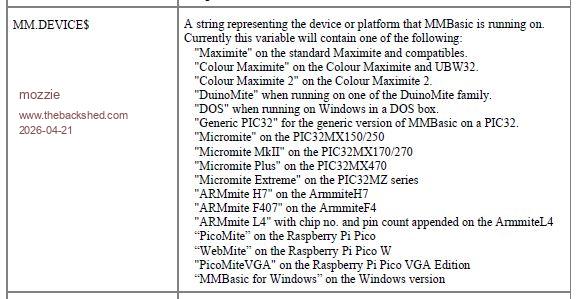
G'day Bill, Looks like the returns for MM.Device$ went missing from V5.08.00 to V6.00.01
This is the last version found:
I too would have sworn they were in the manual, defective grey matter once again
Regards, Lyle.
TassyJim Guru Joined: 07/08/2011 Location: AustraliaPosts: 6626
Posted: 07:07am 21 Apr 2026
Copy link to clipboard
Print this post
I haven't kept up with the latest work but this is my list for MMEdit.
; This file is 'devicelist.txt' and resides in the Data folder. ; The file is used by MMEdit and MMCC ; In MMEdit select the syntax to match your device as returned with MM.DEVICE$ ; In MMEdit, choosing the wrong syntax will result in keywords not showing in the correct colour ; In MMEDit, the syntax is only for visual effects and does not have any other purpose. ; In MMCC, the syntax is used to determine the commands required to transfer files by XMODEM or AUTOSAVE
; New devices can be added and mapped to an existing syntax or a newly created syntax. ; If you add a new syntax, the file 'devicetypes.txt' will also need editing ; Lines starting with ; are comments and the remaining lines are TAB delimited ; blank lines are ignored. ; MM.DEVICE$ Syntax
Geoffg Guru Joined: 06/06/2011 Location: AustraliaPosts: 3369
Posted: 12:15pm 21 Apr 2026
Copy link to clipboard
Print this post
With so many variations of MMBasic it became more and more impractical to list the various values of MM.DEVICE$ and keep the list accurate and complete. That is why the listing disappeared from the manual.
MM.DEVICE$ is quite handy if you want to check that the program is running on the platform that you wrote it for. In that case you can print its value on the console, then embed the response in the program. But, I agree, it is not that easy if you want to check if your program is running on a platform that you do not have access to.
Turbo46 Guru Joined: 24/12/2017 Location: AustraliaPosts: 1694
Posted: 12:22pm 21 Apr 2026
Copy link to clipboard
Print this post
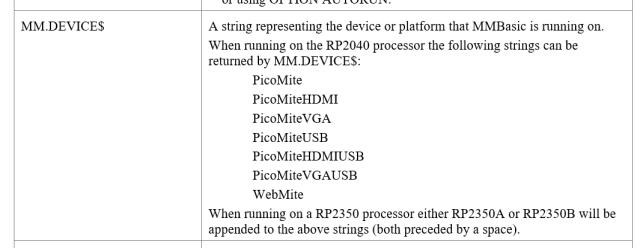
This is from the just downloaded manual. I want to configure a program to cater for various mites and this is no help.
Thanks Jim, I'll go with your information for now. It looks like the only way to find out is to program the Picomites with each version of the firmware and see what:
? MM.DEVICE$
Reports.
BillKeep safe. Live long and prosper.
JohnS Guru Joined: 18/11/2011 Location: United KingdomPosts: 4391
Posted: 12:41pm 21 Apr 2026
Copy link to clipboard
Print this post
Jim,
I think you should change the MMB4L string.
For MMBasic for Linux x86_64 v0.7-alpha.1
? mm.device$ MMB4L
John
Mixtel90 Guru Joined: 05/10/2019 Location: United KingdomPosts: 9238
Posted: 04:51pm 21 Apr 2026
Copy link to clipboard
Print this post
IMHO this isn't granular enough anyway. Your program needs to include a full database of all current and future models!
For a program to run it only needs:
MMBasic version Connected display (LCD resolution / VGA / HDMI) Connected touch (Yes / none) Connected keyboard (USB / PS2 / Serial / None) Connected mouse (USB / PS2 / None) Connected wi-fi (Pico / None) CPU speed (in case timings are critical)
These can generally be sorted out with MM.INFO()
The actual processor shouldn't matter really. A correctly written program will rarely care. The main differences between platforms are significant during program development.Mick
Turbo46 Guru Joined: 24/12/2017 Location: AustraliaPosts: 1694
Posted: 06:42am 22 Apr 2026
Copy link to clipboard
Print this post
Hi Geoff, I realize that there are 12 varieties of the firmware for the Pico and every aspect of them is documented in the manual except for MM.DEVICE$. If that information of what each version of the Pico firmware returns for MM.DEVICE$ was in the manual then it need not be changed.
I'm not suggesting that the manual should contain the MM.DEVICE$ text for other versions, just the Pico ones.
I hope you will reconsider your decision for the next manual update.
BillKeep safe. Live long and prosper.
Mixtel90 Guru Joined: 05/10/2019 Location: United KingdomPosts: 9238
Posted: 08:11am 22 Apr 2026
Copy link to clipboard
Print this post
Doesn't MM.INFO(version) give you that? MM.VER gives the info numerically. Don't expect it to be updated on beta releases though. It's your problem to track those.Mick
Mixtel90 Guru Joined: 05/10/2019 Location: United KingdomPosts: 9238
Posted: 08:42am 22 Apr 2026
Copy link to clipboard
Print this post
That makes sense. There's no need to return more than the basic platform name in DEVICE[$]. It's only useful for information really, not for program configuration.
You don't want to have to test the full list to see if your program will run on a particular platform. You *do* need to know if it has the correct display, keyboard, sound capabilities etc. though, and they aren't in DEVICE$. That's what MM.INFO() is for.Mick
Turbo46 Guru Joined: 24/12/2017 Location: AustraliaPosts: 1694
Posted: 09:16am 22 Apr 2026
Copy link to clipboard
Print this post
I'm using MMB4W to develop new and port existing game programs to the Game*Mite and PicoGamer using either the Pico 1 or Pico 2 processor. Each of which has different image and graphics capabilities and I need to cater for all. I don't have a working version of either Pico device at the moment. That is the reason for my question.
Getting a working device is difficult for me at the moment.
BillKeep safe. Live long and prosper.
Mixtel90 Guru Joined: 05/10/2019 Location: United KingdomPosts: 9238
Posted: 12:30pm 22 Apr 2026
Copy link to clipboard
Print this post
You can use:
MM.DISPLAY to check that there is a display connected MM.INFO$(LCDPANEL) to find out if it's a LCD display or not MM.INFO(LCD320) will let you know if the LCD panel can do 320x240 MM.VRES returns the current vertical display resolution (all displays) MM.HRES returns the current horizontal display resolution (all displays)
You can't check for the maximum available resolution for VGA and HDMI displays as the monitor may not manage it, even though the hardware will do it. If you are going to cater for a wide range then I suggest that you just stick with the defaults in each case.
I don't know if any of your platforms would normally be set up with OPTION PLATFORM by default, but that can be tested for too.
I think I saw a way of testing the difference between Pico and Pico 2 but I can't find it now.Mick

 Notice. New forum software under development. It's going to miss a few functions and look a bit ugly for a while, but I'm working on it full time now as the old forum was too unstable. Couple days, all good. If you notice any issues, please contact me.


 Print this post