Home
JAQForum Ver 24.01
Log In or Join  
Active Topics
Local Time 02:41 30 May 2026 Privacy Policy
Jump to

Notice. New forum software under development. It's going to miss a few functions and look a bit ugly for a while, but I'm working on it full time now as the old forum was too unstable. Couple days, all good. If you notice any issues, please contact me.

Forum Index : Microcontroller and PC projects : PicoTab teaser

Author Message
matherp
Guru

Joined: 11/12/2012
Location: United Kingdom
Posts: 11384
Posted: 02:27pm 28 May 2026
Copy link to clipboard 
Print this post

 
matherp
Guru

Joined: 11/12/2012
Location: United Kingdom
Posts: 11384
Posted: 02:29pm 28 May 2026
Copy link to clipboard 
Print this post

 
PhenixRising
Guru

Joined: 07/11/2023
Location: United Kingdom
Posts: 1929
Posted: 03:29pm 28 May 2026
Copy link to clipboard 
Print this post

Suggest Bsp instead of BS unless it's a shortcut to my code
 
Volhout
Guru

Joined: 05/03/2018
Location: Netherlands
Posts: 5891
Posted: 04:53pm 28 May 2026
Copy link to clipboard 
Print this post

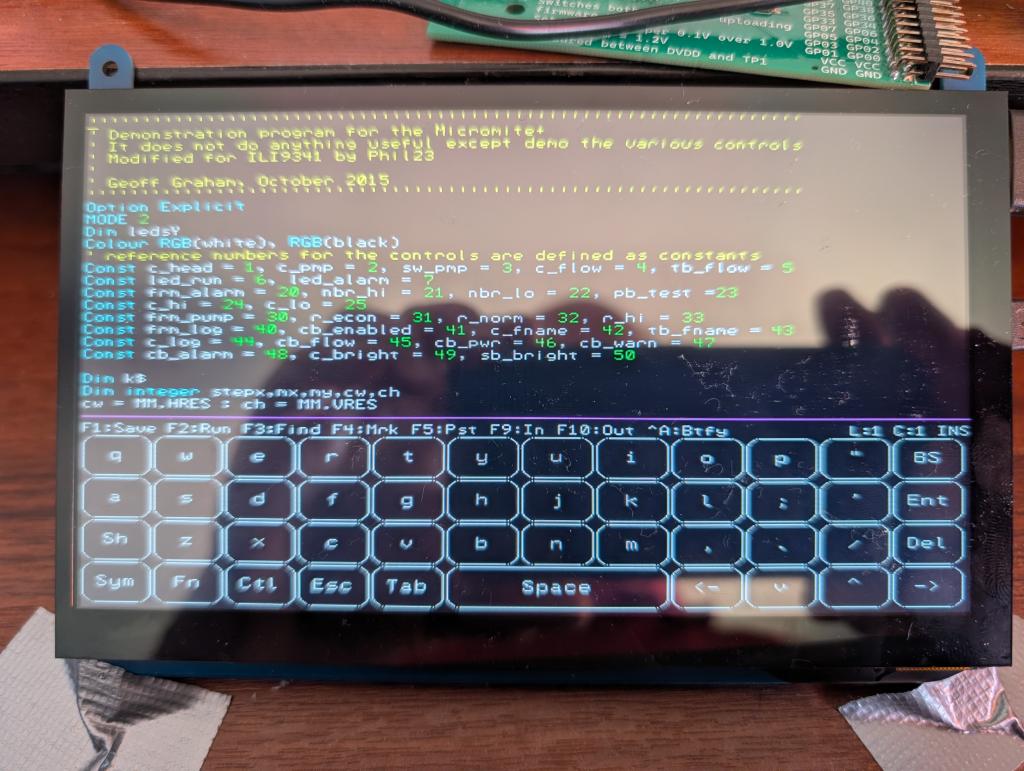
No number keys?
Function keys after pressing Fn I asume?

But it looks Nice and compact. Could replace your picocalc design when touch works well enough.
If you need not redraw the keys often you could even put real artwork. Maybe you can find hires scans of Casio FX720 or similar.

Volhout
Edited 2026-05-29 03:00 by Volhout
PicomiteVGA PETSCII ROBOTS
 
matherp
Guru

Joined: 11/12/2012
Location: United Kingdom
Posts: 11384
Posted: 05:02pm 28 May 2026
Copy link to clipboard 
Print this post

  Quote  If you need not redraw the keys often you could even put real artwork.

Problem is the keypad scales to the resolution so it will even work in 320x240, numbers are on the sym(bol) toggle. I'm just deciding whether these should toggle shift, sym and ctrl should toggle like a lot of on-screen keyboards or use multi-touch.

PS. The final S/W will be a bluetooth host/usb/hdmi build so you can select between the onscreen keyboard, physically connected usb keyboard or a bluetooth keyboard. S/W for this will be released next week. I'm assuming any of the cheap HDMI 1024x600 screens 7" or 10" will work as long as they have the USB touch capability. The frequency will be fixed (252MHz) which should allow me to run 1024x600, 512x300, 640x480, 320x240 all as modes available without reboot
Edited 2026-05-29 03:09 by matherp
 
matherp
Guru

Joined: 11/12/2012
Location: United Kingdom
Posts: 11384
Posted: 09:22am 29 May 2026
Copy link to clipboard 
Print this post

Videos:
https://youtu.be/lrpX17DAZkQ
https://youtu.be/8BSQiHhAZMc
Demo running 1024x600 with font 3. Switching to mode 3 for the gui demo (512x300).
Apologies for the dithering and video quality
Edited 2026-05-29 19:34 by matherp
 
Amnesie
Guru

Joined: 30/06/2020
Location: Germany
Posts: 754
Posted: 04:04pm 29 May 2026
Copy link to clipboard 
Print this post

Peter,

this is so cool! Now it is even more "stand-alone" and self stustained! Not even a real keyboard needed! Wow!

Greetings
Daniel
 
Peter63
Senior Member

Joined: 28/07/2017
Location: Sweden
Posts: 184
Posted: 04:15pm 29 May 2026
Copy link to clipboard 
Print this post

Jepp,  
 
Print this page


To reply to this topic, you need to log in.

The Back Shed's forum code is written, and hosted, in Australia.
© JAQ Software 2026