Notice. New forum software under development. It's going to miss a few functions and look a bit ugly for a while, but I'm working on it full time now as the old forum was too unstable. Couple days, all good. If you notice any issues, please contact me.
twofingers Guru Joined: 02/06/2014 Location: GermanyPosts: 1782
Posted: 03:10pm 24 Jun 2026
Copy link to clipboard
Print this post
Just a quick question: Is there a way to determine the tile colors (FG/BG) in Mode 1 on the Picomite HDMI?
Regards MIchael Edited 2026-06-27 13:25 by Grogster
mozzie Guru Joined: 15/06/2020 Location: AustraliaPosts: 469
Posted: 11:36am 25 Jun 2026
Copy link to clipboard
Print this post
G'day, This is possible but not directly with a command AFAIK. At some point I had a need to read from the framebuffer to drive a display not supported by the firmware, you can read the colours of the FG/BG (Mode 1) out of the framebuffer in HDMI:
Using 1024 x 600 resolution:
? Hex$(mm.info(writebuffer)) 2003BA00 ' Framebuffer Base Address
&h20050B80 is start of Background Colour Buffer, 1 Byte per Tile.
Using PEEK and these base addresses you can find the colour of any tile.
This will all change depending on mode, resolution and if framebuffers l/f exist.
Hope this helps.
Regards, Lyle. Edited 2026-06-26 00:30 by mozzie
twofingers Guru Joined: 02/06/2014 Location: GermanyPosts: 1782
Posted: 02:36pm 25 Jun 2026
Copy link to clipboard
Print this post
Hi Lyle, Thanks for your reply. That’s exactly what I was looking for and hoping to find. I remembered seeing something like that before but couldn't find it in the manual. I’ve already experimented a bit, though unfortunately without success so far. At least it’s a good starting point, and the rest will fall into place. Thanks again for your effort and the detailed explanation!
Kind regards Michael
PS: I’m just wondering who changed the thread title ("A way to determine the tile colors in Mode 1?")... Russian hackers?
Volhout Guru Joined: 05/03/2018 Location: NetherlandsPosts: 6195
Posted: 07:48pm 25 Jun 2026
Copy link to clipboard
Print this post
twofingers,
Depending on what you need the info for,, there may be a better way.
If you are running an MMBasic program, and need to know tile color, the best way is to remember, since your MMBasic program did set the tile color itself.
If you have a shared memory application: the PEEK above is your best solution.
But...if you want to work on this tile data from a PC there is another way.
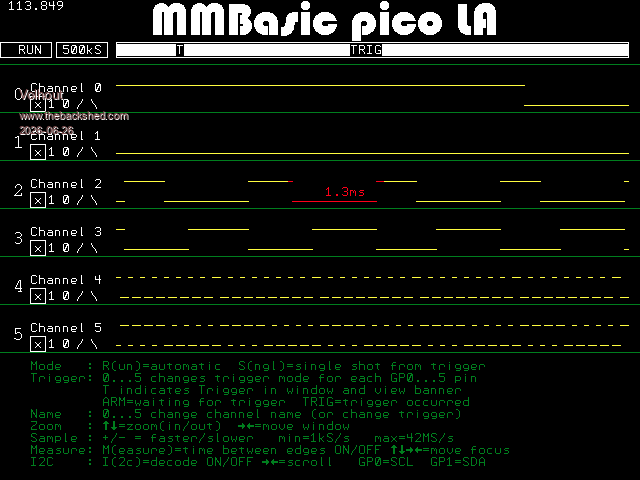
- in the program that set the colors: SAVE IMAGE (or SAVE COMPRESSED IMAGE) - transfer to the PC - open the image in PAINT, PHOTOSHOP or your favorite picture editor
The SAVE IMAGE contains all color information. See below, a picture from 640x480 logic analyzer screen that works with tiles. As opened on the PC.
But you have to save from the running program. When you stop the program, tile information is not saved.
Volhout
P.S. thanks to Peter, who added this functionality in 6.01, Tested on VGA. Edited 2026-06-26 06:20 by VolhoutPicomiteVGA PETSCII ROBOTS
phil99 Guru Joined: 11/02/2018 Location: AustraliaPosts: 3416
Posted: 09:54pm 25 Jun 2026
Copy link to clipboard
Print this post
Not tested with Tiles but perhaps reading from the screen buffer will work.
Blue = pixel(x,y) And 255 : Green = (pixel(x,y) >> 8) And 255 : Red = (pixel(x,y) >> 16)
Edit. Tested in Mode 1. The foreground and background colours of the tiles are read correctly.
> pixel 4,4,255 : tile 0,0, RGB(0,0,255), RGB(255,64,0) > x = 4 : y = 4 : ? pixel(x,y) >> 16; pixel(x,y) >> 8 And 255; pixel(x,y) And 255 0 0 255 > x = 0 : y = 0 : ? pixel(x,y) >> 16; pixel(x,y) >> 8 And 255; pixel(x,y) And 255 255 64 0 >
A little shorter.
> pixel 1,1,1 : tile 0,0, RGB(255,0,0), RGB(0,128,255) > z = pixel(1,1) : ? z >> 16; z >> 8 And 255; z And 255 255 0 0 > z = pixel(0,1) : ? z >> 16; z >> 8 And 255; z And 255 0 128 255 >
Edited 2026-06-26 11:59 by phil99
Martin H. Guru Joined: 04/06/2022 Location: GermanyPosts: 1572
Posted: 06:16am 26 Jun 2026
Copy link to clipboard
Print this post
However, this only works if the second pixel (BG) being checked is not set. So it’s more a matter of chance and isn’t reliable. The method using `Peek` seems to be more reliable. (Unfortunately, I can’t test it at the moment because my new monitors are still in the post) Cheers Martin Edited 2026-06-26 16:17 by Martin H.'no comment
Volhout Guru Joined: 05/03/2018 Location: NetherlandsPosts: 6195
Posted: 06:56am 26 Jun 2026
Copy link to clipboard
Print this post
Question is "why would you try to find the color of a pixel/tile that you just programmed yourself". ? Since MMBasic is single thread, nobody can program the tile except you yourself. And in MODE1 the tile information is lost when you exit the program to a different one.
twofingers Guru Joined: 02/06/2014 Location: GermanyPosts: 1782
Posted: 08:34am 26 Jun 2026
Copy link to clipboard
Print this post
Hi Harm, thanks for the suggestion. That is exactly how I handle it in the FM: I store the relevant data in a 2-byte array. However, for the specific purpose at hand, I do not want to allocate a new array. That consumes too much precious memory, and I only need to save and restore a small segment. Keep it simple.
I assumed that for the mentioned Mode 1 with 640x480/8 bytes, the pixel memory (mono) starts at the address pointed to by MM.info(writebuff), followed by 80x40 bytes for the foreground and background colors of the 'tiles', with 4 bits for the foreground and 4 bits for the background (compactly stored in a single byte).
That assumption was likely incorrect. I now believe that the color information for tiles is inaccessible (unless it is being "logged").
Thanks also to Phil and Martin.
Michael
Volhout Guru Joined: 05/03/2018 Location: NetherlandsPosts: 6195
Posted: 08:56am 26 Jun 2026
Copy link to clipboard
Print this post
Michael,
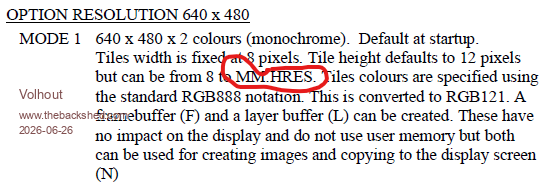
The tiles not necessarily are arranged as 80x40, since that implies tiles are 8x12. And they can be anything from 8x8 to 8x480.
That reminds me that there is an error in the manual (multiple locations, copy-paste).
This seems to be consistent with a couple of modes, 1024x600 is different.
There is a program here somewhere that interrogates the memory to figure out where things are hiding, sets a FG/BG colour and then goes looking for starts and ends.
Also not sure what happened to the thread title, but its not the first time its been mentioned that this can happen.
Regards, Lyle.
Edit: Defective math Edited 2026-06-26 22:20 by mozzie
Grogster Admin Group Joined: 31/12/2012 Location: New ZealandPosts: 10073
Posted: 03:24am 27 Jun 2026
Copy link to clipboard
Print this post
Sometimes the forum software does odd things like this. Gizmo could possibly say why that should have happened in your case, but for now, I just edited your thread to put the full title back in.
I DID wonder myself about the odd thread title when I saw it..... Smoke makes things work. When the smoke gets out, it stops!

 Notice. New forum software under development. It's going to miss a few functions and look a bit ugly for a while, but I'm working on it full time now as the old forum was too unstable. Couple days, all good. If you notice any issues, please contact me.


 Print this post