Notice. New forum software under development. It's going to miss a few functions and look a bit ugly for a while, but I'm working on it full time now as the old forum was too unstable. Couple days, all good. If you notice any issues, please contact me.
Octatron Newbie Joined: 01/04/2015 Location: United KingdomPosts: 29
Posted: 03:37pm 05 Aug 2026
Copy link to clipboard
Print this post
I have been programming Micromites and Picomites on my Win10 laptop for years and was doing so last week with no problems. This week it won't connect. For instance using Tera Term I can't select the serial ports and no Coms ports show up! I suspect Microsoft has snook in an update. I might add that the USB ports do work if I plug in a keyboard for instance. I'm a bit puzzled, any ideas? I also have a Linux laptop and looked into running MMedit on it but it looks complicated and at my limits with Linux.
PhenixRising Guru Joined: 07/11/2023 Location: United KingdomPosts: 2100
Posted: 04:09pm 05 Aug 2026
Copy link to clipboard
Print this post
This happened to me (ages ago) with only the PicoMite. Tried lots of stuff to no avail except for the easiest thing (typical of me ) which was to connect to a different USB hub port. Everything came to life and I could even revert back to the original port.
Octatron Newbie Joined: 01/04/2015 Location: United KingdomPosts: 29
Posted: 05:46pm 05 Aug 2026
Copy link to clipboard
Print this post
I tried different USB Ports but to no avail.
EDNEDN Guru Joined: 18/02/2023 Location: United StatesPosts: 308
Posted: 06:48pm 05 Aug 2026
Copy link to clipboard
Print this post
Sometimes the USB ports get confused on Windows machines and get turned off.
A hard power cycle is worth trying if you haven't done that yet.
Volhout Guru Joined: 05/03/2018 Location: NetherlandsPosts: 6195
Posted: 07:36pm 05 Aug 2026
Copy link to clipboard
Print this post
Try powering off the PC (and its built in root hub). It happened to me after too many re-connects of the same device. Bug in the usb hub firmware.
Martin H. Guru Joined: 04/06/2022 Location: GermanyPosts: 1572
Posted: 11:01pm 05 Aug 2026
Copy link to clipboard
Print this post
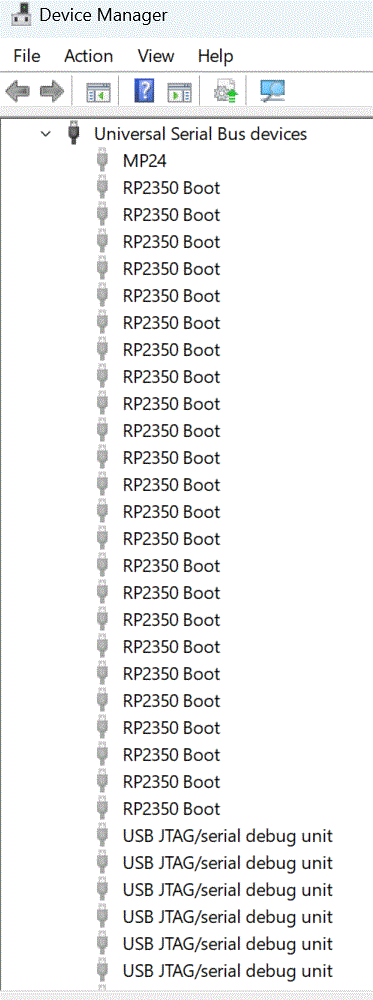
Hi Octatron Yes, that sounds like a typical Windows problem. It often helps to make Windows forget the previous settings: ________________________________________ Disconnect the Picomite USB Cable then open Windows Device Manager as administrator (devmgmt.msc) Activate "Show hidden devices" Delete all unused USB Devices then Plugin the PicoMite. ________________________________________ Good luck! Cheers Martin Edited 2026-08-06 09:13 by Martin H.'no comment
lizby Guru Joined: 17/05/2016 Location: United StatesPosts: 3885
Martin H. Guru Joined: 04/06/2022 Location: GermanyPosts: 1572
Posted: 12:48pm 06 Aug 2026
Copy link to clipboard
Print this post
Hi Lance,
if they only appear when you display ‘hidden devices’, you can usually delete these devices. The devices labelled ‘BOOT’ indicate the state when the ‘Boot’ button is pressed, i.e. as a USB drive. The JTAG devices are used for the serial USB connection.
Your list looks as though your Windows has registered every Pico on every possible USB port. It’s not a Pico problem, but a Windows problem. This method also works if Windows has got itself in a bit of a mess with the USB drivers for other devices, such as mice or USB sticks.(The fact that they simply go unrecognised)
Don’t worry – when you plug the Pico back in afterwards, the driver will be reinstalled, hopefully with the correct settings. Good old Microsofts Plug and Pray Edited 2026-08-06 22:54 by Martin H.'no comment
lizby Guru Joined: 17/05/2016 Location: United StatesPosts: 3885

 Notice. New forum software under development. It's going to miss a few functions and look a bit ugly for a while, but I'm working on it full time now as the old forum was too unstable. Couple days, all good. If you notice any issues, please contact me.

 Print this post
 ) which was to connect to a different USB hub port. Everything came to life and I could even revert back to the original port.