| Author |
Message |
Bryan1

Guru

Joined: 22/02/2006
Location: AustraliaPosts: 2297 |
| Posted: 07:33am 11 Aug 2026 |
 Copy link to clipboard Copy link to clipboard |
 Print this post |
|
Well guy's since my club.py is done it was time to have a go at making my own 3D Model Editor and went leap and bounds today where after a drawing is made one can save a stl file to pass to Cura etc
No as I don't have a 3D printer yet could a member try this out and see after a drawing is made does the stl file slice properly.
3D Model Editor
Regards Bryan |
| |
Bryan1
Guru
Joined: 22/02/2006
Location: AustraliaPosts: 2297 |
| Posted: 08:17am 12 Aug 2026 |
Copy link to clipboard |
Print this post |
|
Well got a bit more done today and talked with claude about Flash Forge so it brought up a page in the right window, was a Adventurer 4 pro 3D printer new for $228 and silly me didn't click on it to buy.
Anyway downloaded the Flash Forge program so I could see the output stl file made in 3D Model Editor. now as the holes are mm or 2 off on the claude version of the pico 3 box it was time to draw up a new one while adding new code.
So now got
1. line :--- input the co-ordinates or snap to grid
2. Multi line :-- choose how many points to make a polygon
3. box :-- input or snap to grid
4. circle :-- input or snap to grid
5 radius :-- select 2 edges or 2 edges of a box then input number
6. Extrude :-- select object and choose height
7. select :-- select a part
8. edit :-- edit the selected part where input can change numbers
9. delete:-- select an object and delete it
10. open :-- open a file on /sd/model
11. New :-- open a blank canvas at 0,0,0
12. Grid :-- grid on/grid off
Now with the grid we can set the area and size for any axis Layers can be shown and hidden. Now everything is save in triangles and saved as a .model file Now in the save as box we have save, delete, export STL file and send to board so other pico3's get updated with the file.
I do update my gihub at the end of everyday so all the code and files are there but best off I'm having fun.
Regards Bryan |
| |
Andrew_G
Guru
Joined: 18/10/2016
Location: AustraliaPosts: 906 |
| Posted: 07:01pm 13 Aug 2026 |
Copy link to clipboard |
Print this post |
|
Hi Bryan,
If you can post the .stl file here I can see if it slices etc.
Andrew |
| |
Bryan1
Guru
Joined: 22/02/2006
Location: AustraliaPosts: 2297 |
| Posted: 10:06pm 13 Aug 2026 |
Copy link to clipboard |
Print this post |
|
Andrew I will update my github with the changes I did yesterday and today this afternoon 
Now got a measurement function where one clicks on 2 points and the dimension is shown for X Y Z also setup where 2 grids can be setup on different planes so snap to grid will work in 3D.
Now 3D Model Editor is in club.py and we also made a stand alone version and while I'm working on it the club.py version is being worked on. What I do need is for a member to use it and give feedback and as this is open source if the member does have Claude use the code not home version and is free to modify the code to improve it.
The help file gets updated with every new command so when a member uses it for the first time have a look at the help file so one can learn how to get around and get started.
At the moment Claude can't get the mouse wheel working so one can pan in and out and got told with the colour command trying to colour a part will crash the code. I'm sure it's just my terminology talking with Claude is the problem.
Now with all the changes we did yesterday this morning I will give the code a good road test to make sure I find all the bugs etc. I do have that pico 3 box Sam 3D printed for me to use for the measurements so with some luck I will have the box done today.
I did have a look at the 3D printer software and with a huge learning curve I thought bugger it make my own so I can learn as I go and for example:- the radius function pick 2 edges of a part specify the radius and thickness and it's drawn in 3D on the screen.
Once a part is made clicking on select then the part and clicking edit one can
adjust the axis on all 3 planes.
Now I am looking for a 3D printer now being on a budget the Flash Forge Adventurer 5 Pro looks like a good one and for $379(yesterdays price) it is in my budget range so what do members think of that printer.
Regards Bryan
Edit: well won't have a full day working on 3D Model Editor as just checked my email and those GPS chips have arrived so today GPS will be added to club.py
Edited 2026-08-14 08:15 by Bryan1 |
| |
Andrew_G
Guru
Joined: 18/10/2016
Location: AustraliaPosts: 906 |
| Posted: 10:44pm 13 Aug 2026 |
Copy link to clipboard |
Print this post |
|
Hi Bryan,
I'm not into github so I will need the .stl file.
Cheers,
Andrew |
| |
Bryan1
Guru
Joined: 22/02/2006
Location: AustraliaPosts: 2297 |
| Posted: 10:51pm 13 Aug 2026 |
Copy link to clipboard |
Print this post |
|
Ok Andrew do you have a pico3 board to run the code if not I do need to edit the box as I made it 5mm wide now looking in Flash Forge software it does look the goods but I can't splice as no board is present.
I will get on and modify the STL file and post it here so you can have a look sometime today as after this last caffine intake it's time to go get those GPS chips so more fun today in club.py. |
| |
Andrew_G
Guru
Joined: 18/10/2016
Location: AustraliaPosts: 906 |
| Posted: 11:21pm 13 Aug 2026 |
Copy link to clipboard |
Print this post |
|
Hi Bryan,
I don't have a Pico3 board but I do have a 3D printer and software to input a .stl file etc.
I'll await your .stl file.
Andrew |
| |
Bryan1
Guru
Joined: 22/02/2006
Location: AustraliaPosts: 2297 |
| Posted: 12:21am 14 Aug 2026 |
Copy link to clipboard |
Print this post |
|
Hi Andrew I got on this morning and edited pico3box.model where I changed the wall thickness from 5 to 2. I did find I had to turn off snap which will get fixed and all I had to do was Select click on part Edit one dimension then Save, did all parts so the box is now 2mm thickness and all though I haven't run it in Flash Forge Claude did check out the STL and found no errors.
pico3box.zip
So mate have a go slicing it and let me know how it went.
Regards Bryan |
| |
Andrew_G
Guru
Joined: 18/10/2016
Location: AustraliaPosts: 906 |
| Posted: 02:56am 14 Aug 2026 |
Copy link to clipboard |
Print this post |
|
Hi Bryan,
My printer uses 'eufyMake Studio' which is based on 'PrusaSlicer'.
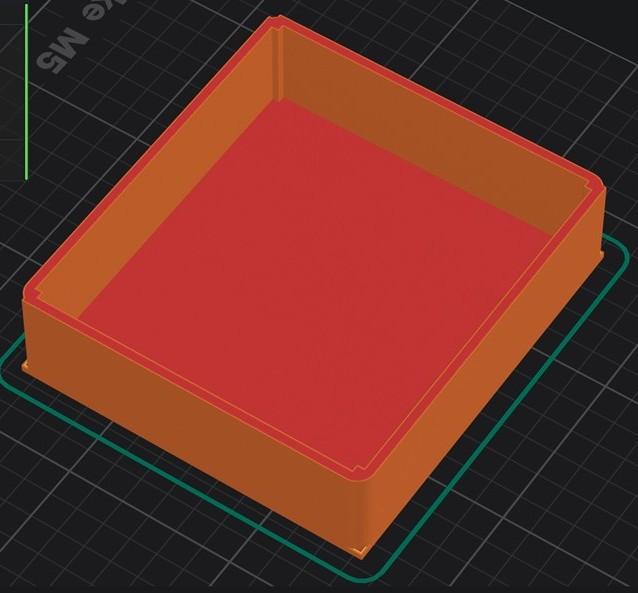
It imported your .stl with no problems. The attached image is what my machine would have printed. Notice the 'effect' on the corners:
- The base is still square but above it is rounded.
- There are also square intrusions into the interior.
Cheers,
Andrew
 |
| |
Bryan1
Guru
Joined: 22/02/2006
Location: AustraliaPosts: 2297 |
| Posted: 03:03am 14 Aug 2026 |
Copy link to clipboard |
Print this post |
|
Hi Andrew thanks for doing that now I did get on and put all the holes in where I measured off the pico 3 box with my trusty 6" ruler and manually entered the data in. Now there was a problem with extrude on the XZ plane so got that fixed and I will have a look on my Flash Forge software to see how it looks. Just got the top to finish for the lid closure then it will time to start drawing up the lid.
After the next update I can put that STL up so you can have a look
Anyway on the GPS front I have board 2 sitting near the front of my shed and the ticker is running with gps and weather reports  so getting them work took less than a hour so getting them work took less than a hour |
| |
Bryan1
Guru
Joined: 22/02/2006
Location: AustraliaPosts: 2297 |
| Posted: 04:29am 14 Aug 2026 |
Copy link to clipboard |
Print this post |
|
ok got the box finished and yes those 2mm radius's are still there on the base as I kept forgetting to update the base. Now to get on and draw up the lid then the PICO 3 Case can be updated
pico3box.zip
Regards Bryan
Edit: I had a look on flash forge and found a major error where the holes were imposed on the inner so got the bug fixed and looking now on flash forge it does look the goods. so updated the zip file.
Edited 2026-08-14 17:02 by Bryan1 |
| |
Andrew_G
Guru
Joined: 18/10/2016
Location: AustraliaPosts: 906 |
| Posted: 11:08pm 14 Aug 2026 |
Copy link to clipboard |
Print this post |
|
Hi Bryan,
The effects are still in the corners,
Andrew
.jpg) |
| |
Bryan1
Guru
Joined: 22/02/2006
Location: AustraliaPosts: 2297 |
| Posted: 01:51am 15 Aug 2026 |
Copy link to clipboard |
Print this post |
|
Hi Andrew yes it seems Claude had stuffed up the 'radius' function and it is quite clear as only 1 corner has the right radius also that standoff function has to go to stop those inlays in the inside corners.
Now also looking at the picture I'm going back in the .model file and put the right figures in as I got the direction of the holes backwards on both sides or more than likely it was Claude when he fixed the issue with thru holes
Anyway today's job is to setup 2 more boards with club.py as got the meeting next Tuesday night and check each one with the GPS where I do need to get on and design the box to hold the GPS.
Regards Bryan |
| |
Bryan1
Guru
Joined: 22/02/2006
Location: AustraliaPosts: 2297 |
| Posted: 08:11am 17 Aug 2026 |
Copy link to clipboard |
Print this post |
|
G'Day Guy's, Well got the radius function all sorted out today now as club.py is all done I thought about the GPS so asked saying I do have some 2040W's so hookup the GPS to that then it can just broadcast the GPS to all the boards running club.py.
So a box holding the picoW and the GPS along with custom designed 3 cell AAA holder builtin with snap closed lid. Along with a hook and magnet so the GPS can get the best eye to the sky.
Well within 5 minutes I had the basic design sitting in 3D Model Editor with out moving the mouse or any keyboard input
So now Claude can do all the design work and every once in a while check the STL file in Flash Forge to see how it looks.
Once this GPS project is done it will all go on my GitHub .
Regards Bryan
Edited 2026-08-17 18:47 by Bryan1 |
| |

 Notice. New forum software under development. It's going to miss a few functions and look a bit ugly for a while, but I'm working on it full time now as the old forum was too unstable. Couple days, all good. If you notice any issues, please contact me.