matherp
Guru

Joined: 11/12/2012
Location: United KingdomPosts: 12129 |
| Posted: 10:30am 06 Nov 2026 |
 Copy link to clipboard |
 Print this post |
|
A ZX Spectrum on the Colour Maximite 2
A new program in the RC2 zip, for both the G1 and the G2. It needs firmware 7.00.00RC2 or later, and no firmware update.
https://github.com/UKTailwind/CMM2V1.5/releases/tag/v7.00.00RC2
Getting started
Download CMM2_Programs_7.00.00RC2.zip again, as the spectrum folder was added on 6 November. Copy that folder to A:/spectrum, then:
CHDIR "A:/spectrum"
RUN "spectrum.app"
You get a 48K Spectrum in a few seconds. The ROMs are built into the program, so there is nothing else to install.
What it does
It is pico-spec, DnCraptor's port of the ESPectrum emulator by Víctor Iborra and David Crespo, with a new front end for the CMM2.
• It runs at the Spectrum's own 50 frames a second on both generations, with about half the time to spare on a G1 and more on a G2.
• The picture is the Spectrum's 256 x 192 with its border, in MODE 7,8, so border effects show.
• The sound is the beeper and the AY chip, through the CMM2's audio output.
• The Z80 emulation passes z80test's full test: all 160 tests, which is everything but the 4 the test itself leaves out for NEC and ST chips.
• The F1 menu chooses the machine: Spectrum 48K, Spectrum 128K, Pentagon 128K, 512K and 1024K, Byte and Murmuzavr mode. The 128K also has the +2, the Spanish ROMs and ZX81+.
• It reads tapes (.tap, .tzx, .pzx, and recordings as .wav or .mp3), snapshots (.sna, .z80) and TR-DOS disks (.trd, .scl).
Loading a program
Put any tape or snapshot you have the right to use in A:/spectrum. The emulator shows that folder as SD:/.
Press F5, choose the file with the arrow keys and press Enter. A tape loads and runs by itself, in a few seconds. It stays in the drive after a reset, so you can also load it the Spectrum's way with LOAD "".
Typing on it
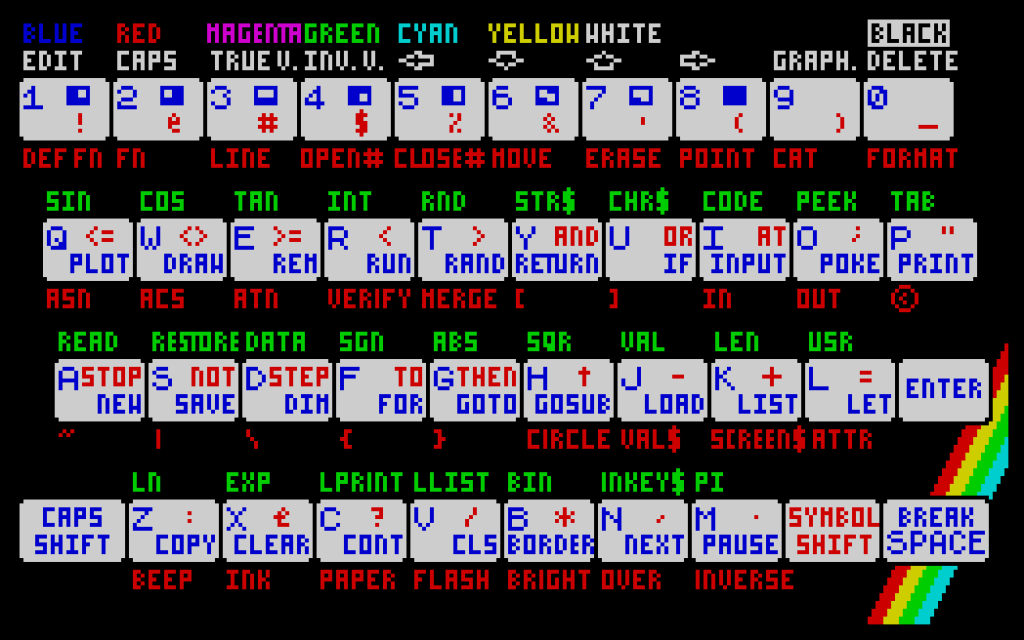
Shift is Caps Shift and Ctrl is Symbol Shift.
• In 48K BASIC, each key gives a keyword, as on the real machine. LOAD "" is J, Ctrl+P, Ctrl+P, then Enter.
• ZX Keyboard in the F1 menu shows the whole Spectrum keyboard, with every keyword on it.
• On the 128K, choose 128 BASIC from its menu and type the keywords out in full.
The keys
F1 the menu
F3, F4 load and save a snapshot, in numbered slots
F5 open a file
F6 start or stop the tape
F9, F10 volume down and up
F11 reset the Spectrum
F12 restart the emulator
Ctrl+Alt+End back to MMBasic
• Ctrl-C does not end the program, as Ctrl is Symbol Shift here. Use Ctrl+Alt+End.
• F12 asks first, with No chosen. Press the left arrow, then Enter.
• Help in the F1 menu lists the rest of the keys.
• USB gamepads step through the menus and are the joystick, Kempston unless you change it in the menu.
• Settings and snapshots are kept in the folder you started it from.
What has and has not been tried
Tried: the 48K and 128K machines, .tap and .tzx tapes, snapshots saved and loaded in its slots, F11 and F12, the sound, the USB keyboard, and a USB gamepad in the menus.
Not tried yet: a gamepad as a joystick in a game, tapes played in real time, .pzx, .wav and .mp3 tapes, .sna and .z80 files, TR-DOS disks, the other machines, and the F6, F9 and F10 keys. Please report what you find.
Licences
The emulator is under the GNU GPL version 3. Its source is github.com/DnCraptor/pico-spec, with the CMM2's changes in apps/spectrum of the firmware's repository.
The ROMs are not under the GPL. For the Sinclair and Amstrad ROMs: Amstrad have kindly given their permission for the redistribution of their copyrighted material but retain that copyright. The other ROMs belong to their authors. The README in the zip gives the details. |

 Notice. New forum software under development. It's going to miss a few functions and look a bit ugly for a while, but I'm working on it full time now as the old forum was too unstable. Couple days, all good. If you notice any issues, please contact me.