matherp
Guru

Joined: 11/12/2012
Location: United KingdomPosts: 12129 |
| Posted: 03:39pm 06 Nov 2026 |
 Copy link to clipboard |
 Print this post |
|
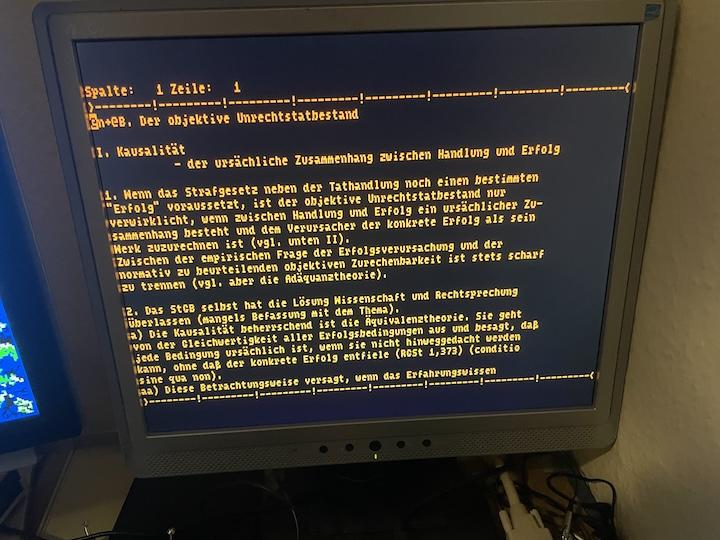
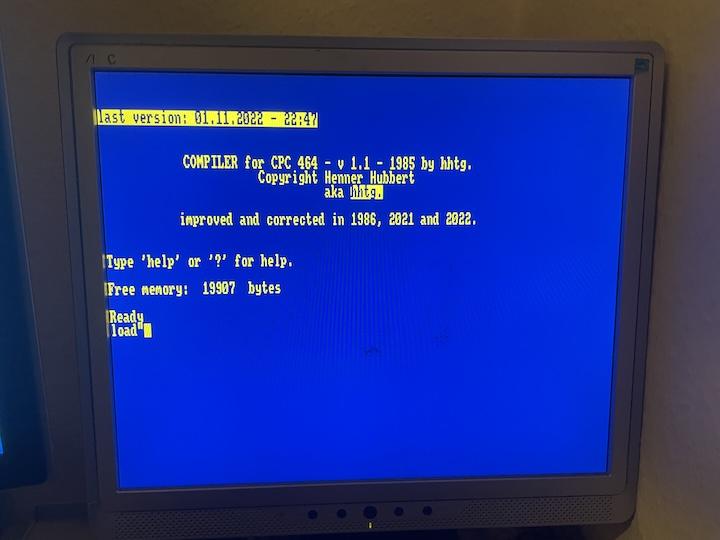
An Amstrad CPC on the Colour Maximite 2
A new program in the RC2 zip, for both the G1 and the G2. It needs firmware 7.00.00RC2 or later, and no firmware update.
https://github.com/UKTailwind/CMM2V1.5/releases/tag/v7.00.00RC2
Getting started
Download CMM2_Programs_7.00.00RC2.zip again, as the cpc folder was added on 6 November. Copy that folder to A:/cpc, then:
CHDIR "A:/cpc"
RUN "cpc.app"
Press a key to clear the welcome screen, and you have a CPC 6128 at its Ready prompt. The ROMs are in the rom folder, so there is nothing else to install.
What it does
It is frank-cpc, rh1tech's port of the Caprice32 emulator to the RP2350, with a new front end for the CMM2.
• It runs at the CPC's own 50 frames a second on both generations.
• The picture is in MODE 8,8, with each line shown twice. frank-cpc normally loses half of Mode 2's pixels. Here all 640 are drawn, so 80 column text reads cleanly.
• All 27 CPC colours are there, and there is a green screen monitor in the settings.
• The sound is the AY chip, in mono or stereo, through the CMM2's audio output.
• The F12 menu chooses the machine, CPC 464, 664 or 6128, with 64K, 128K or 576K of memory.
• It reads disks (.dsk), tapes (.cdt, .cas) and cartridges (.cpr).
• The F12 menu also saves and loads snapshots and takes screenshots.
Loading a program
Put any disk, tape or cartridge you have the right to use in A:/cpc/disk. The emulator shows the folder you started it from as /cpc.
Press F11, choose the drive, tape or cartridge with the arrow keys, then choose the file and press Enter.
For a disk, the CPC's own commands then work as usual: CAT lists it and RUN"NAME runs a program. If there is exactly one disk in the folder it is put in drive A when you start, ready for you to use.
For a tape on the 664 or 6128, type |TAPE first. Then type RUN" and press Enter. A tape loads at the real machine's speed, so be patient: about 4 minutes for 28K on a G1.
Typing on it
What is printed on the key is what you get. The emulator follows your OPTION USBKEYBOARD setting, so a symbol is where your own keyboard has it and not where the CPC had it. The Keyboard line in the F12 menu makes no difference here.
Backspace DEL
Delete CLR
Ctrl CONTROL
Alt COPY
Caps Lock CAPS LOCK
Arrow keys the cursor keys
Keypad Enter the small ENTER
The CPC has no ~ character, so that key does nothing useful.
The keys
F11 disks, tapes and cartridges
F12 the settings
Ctrl+Alt+Del reset the CPC
Ctrl+Alt+End back to MMBasic
• Ctrl-C does not end the program, as Ctrl is the CPC's CONTROL here. Use Ctrl+Alt+End.
• After changing the machine or memory, choose Save changes and restart in the F12 menu.
• Settings are kept in cpc.ini in the folder you started it from.
• USB gamepads are the CPC's joystick.
Known problems
• SAVE to a disk works until you eject the disk or leave the emulator, and is then lost, as frank-cpc does not write back to the .dsk file. Use a snapshot to keep your place.
• Leave Fast Tape set to Off. With it on, the tape runs to its end without loading.
• Create Blank Disk writes to a folder that does not exist, so do not expect it to work.
• A tape played in real time runs at about 41 frames a second on a G1, so it takes about a fifth longer.
• The left and right borders are not shown.
• IPF disk images and the Multiface II are not included.
What has and has not been tried
Tried: all three machines and changing between them, disks, a .cdt tape in real time, 576K of memory, snapshots, the sound, the USB keyboard, the green monitor and a test cartridge I wrote. Most of this was on a G1. On a G2: starting it, the speed, the sound, the USB keyboard and reading a disk.
Not tried yet: a USB gamepad as a joystick, .cas tapes, tape recording, real Plus cartridges and the Speed settings. Please report what you find.
Licences
The emulator is under the GNU GPL version 3. Its source is github.com/rh1tech/frank-cpc, with the CMM2's changes in apps/cpc of the firmware's repository.
The ROMs are not under the GPL. Amstrad have kindly given their permission for the redistribution of their copyrighted material but retain that copyright. The same note says that some of the CPC's code is also copyright Locomotive Software, whose permission should be sought too. That permission has not been obtained. The README in the zip gives the details. |

 Notice. New forum software under development. It's going to miss a few functions and look a bit ugly for a while, but I'm working on it full time now as the old forum was too unstable. Couple days, all good. If you notice any issues, please contact me.