Notice. New forum software under development. It's going to miss a few functions and look a bit ugly for a while, but I'm working on it full time now as the old forum was too unstable. Couple days, all good. If you notice any issues, please contact me.
Geoffg Guru Joined: 06/06/2011 Location: AustraliaPosts: 3369
Posted: 08:50am 17 Dec 2025
Copy link to clipboard
Print this post
I decided to start this topic for any PicoMite User Manual V6.01.00 updates to avoid cluttering the main firmware topic.
If you find anything wrong with the manual, please post it here. I might not acknowledge every post but I will collect all suggestions and from time to time release a new revision in this topic.
The manual was checked and rechecked so there should be little wrong with it, but then that is probably just hopeful thinking.
twofingers Guru Joined: 02/06/2014 Location: GermanyPosts: 1782
Posted: 09:09am 17 Dec 2025
Copy link to clipboard
Print this post
Hi Geoff, thanks for your great work!
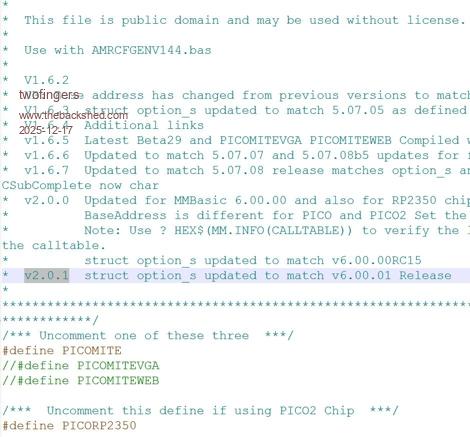
Can you confirm that the "PicoCFunctions.h" (V1.5, #define BaseAddress 1000030C) in the C Routines folder is up to date and works with this MMBasic version? I'm asking because I have version v2.0.1, which seems more "modern" to me. I think CSUBs are being neglected and have been somewhat forgotten.
If there are any further updates to the manual, I would appreciate it if the size of the buffer required/expected by the Play MP3, WAV, and FLAC commands were also specified. For example, 30 KB heap is needed.
Kind regards Michael
Geoffg Guru Joined: 06/06/2011 Location: AustraliaPosts: 3369
twofingers Guru Joined: 02/06/2014 Location: GermanyPosts: 1782
Posted: 03:32am 18 Dec 2025
Copy link to clipboard
Print this post
Hi Geoff, I'm wondering if it would be useful to include the working command "MM.INFO(CALLTABLE)", which displays the BaseAddress, in the manual. Are there any reasons not to do so?
> ? hex$(MM.INFO(CALLTABLE)) 1000023C
Kind regards Michael
Additionally, it would be helpful, in my opinion, to mention the respective compiler command line for the different hardware (RP2040, 2350), e.g. for Pico2,
or something similar. This could also be done in a separate CSub-PDF. My goal is to lower the barriers to writing CSubs. As we have seen here, this can lead to amazing results.
I'm sorry if I'm causing any more work ...
Breakdown of the Compiler Flags:
arm-none-eabi-gcc: The compiler driver. it coordinates the preprocessor, the actual compiler, and the assembler. -c: Compile only. This generates an object file without performing the linking stage. -mcpu=cortex-m33: Defines the target architecture. The Cortex-M33 is the core of the RP2350 (Pico 2). -mfloat-abi=hard: Enables the hardware floating-point unit (FPU) of the chip for calculations. -mthumb: Generates code using the compact Thumb instruction set. -O3: Optimization Level 3. The compiler attempts to make the code as fast as possible. -fPIC: Position Independent Code. This is essential for CSubs because they are loaded into MMBasic RAM at varying memory addresses. -I.: Adds the current directory (.) to the search path for header files like your PicoCFunctions.h.
Why this is important:
For MMBasic users, this command is often contained within a Batch file (.bat on Windows). The variable %1 acts as a placeholder for your C program's filename.
Note: If you were compiling for the older RP2040 (Pico 1), the flags would be -mcpu=cortex-m0plus and -mfloat-abi=soft (as the M0+ lacks a hardware FPU). (Source: GEMINI-KI)
Edited 2025-12-18 13:57 by twofingers
toml_12953 Guru Joined: 13/02/2015 Location: United StatesPosts: 736
Posted: 04:41am 18 Dec 2025
Copy link to clipboard
Print this post
The TAB function doesn't work the way the manual states. TAB(n) seems to output n spaces no matter what column the print starts in. The manual (page 200) says it will only output spaces until column n is reached. TAB as described in the manual would make it much easier to get tabulated output neatly aligned.
Geoffg Guru Joined: 06/06/2011 Location: AustraliaPosts: 3369
Posted: 04:43am 18 Dec 2025
Copy link to clipboard
Print this post
Thanks, somehow it went missing. I will add it in.
I'm not sure about the rest of your suggestion. Writing CSubs is a complex subject and not of interest to the typical user. So, it needs a separate and comprehensive manual/tutorial. This is a big subject which will require someone with a deep knowledge of the subject to write (any volunteers?).
Turbo46 Guru Joined: 24/12/2017 Location: AustraliaPosts: 1694
Posted: 05:36am 18 Dec 2025
Copy link to clipboard
Print this post
CSUBs
To quote Sgt. Shultz "I know nothing". But after having success with Claude writing the code for a Micromite CFunction I thought I would ask Claude if it could write a document about writing CSUBs for MMBasic on the Picomite.
And here it is. Maybe it will be useful for someone in the know as a starting point at least.
BillKeep safe. Live long and prosper.
BarryH Regular Member Joined: 05/01/2025 Location: AustraliaPosts: 53
Posted: 05:44am 18 Dec 2025
Copy link to clipboard
Print this post
page 174 - SUB ... END SUB
2 paragraphs are duplicated
"Arguments in the callers list..." "Arrays are passed by..."BarryH
twofingers Guru Joined: 02/06/2014 Location: GermanyPosts: 1782
Posted: 11:32am 18 Dec 2025
Copy link to clipboard
Print this post
@Bill, I really like the CSub manual - it's exactly what I had in mind, thanks! But it should be proofread critically again, perhaps by Peter? I would also add a few simple examples. I could also do the layout, if desired.
@Geoff
I completely agree with you, but times are changing - ¡Los tiempos cambian! With AI, anyone can now write (or have written) C programs in natural language. AI even makes cryptic compiler error messages understandable and gives tips on how to fix the errors.
(BTW, I'm not an uncritical fan of AI; I see the downsides. )
Kind regards Michael Edited 2025-12-18 21:38 by twofingers
matherp Guru Joined: 11/12/2012 Location: United KingdomPosts: 12058
Posted: 11:55am 18 Dec 2025
Copy link to clipboard
Print this post
The script referenced in the document is missing significant capabilities for other than a single function csub. The basic program to do it comprehensively is on github . I've raised an issue on the script authors github as it would be a great tool if he could expand it. " Writing CSubs is a complex subject" I agree and other than for a simple function I think it is unlikely an AI could write one at the moment. The other big issue with CSUBs is that testing is very difficult. Other than compilation errors it is pretty much go/no-go testing with many bugs just causing a crash with no diagnostic.
twofingers Guru Joined: 02/06/2014 Location: GermanyPosts: 1782
Posted: 12:23pm 18 Dec 2025
Copy link to clipboard
Print this post
Would you bet on that? Regards Michael
phil99 Guru Joined: 11/02/2018 Location: AustraliaPosts: 3416
Posted: 09:31pm 18 Dec 2025
Copy link to clipboard
Print this post
Ville56 has found (in the Pico Radar thread) that when OPTION GUI CONTROLS is set it appears a touch ISR can't be enabled for ordinary touch functions.
Not entirely certain if this requires a mention in the manual or an adjustment to the firmware.
Edited 2025-12-19 07:58 by phil99
Volhout Guru Joined: 05/03/2018 Location: NetherlandsPosts: 6196
Posted: 12:38pm 19 Dec 2025
Copy link to clipboard
Print this post
Geoff,
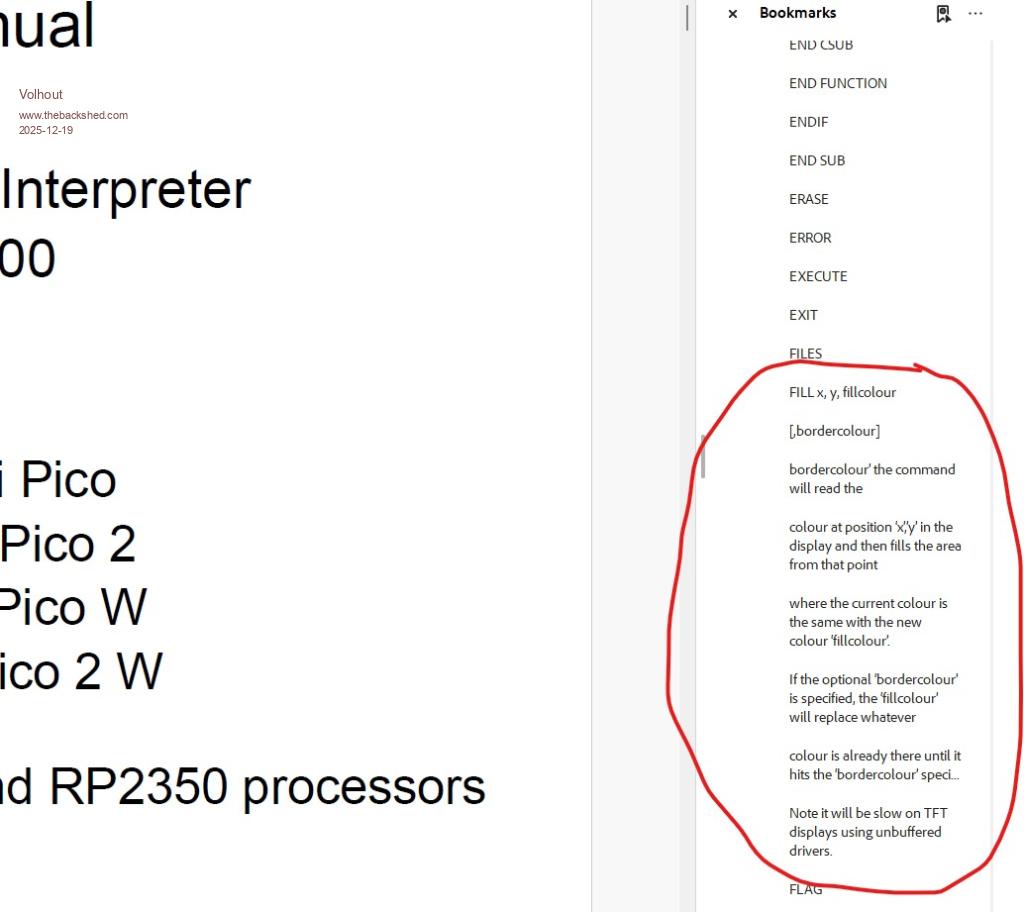
It may be just me, but I find the command list (in several places) is corrupted. Maybe you could confirm this is also shown at your original ? See below picture. This is the user manual that I just downloaded (19/12/25 13:00 CET).

 Notice. New forum software under development. It's going to miss a few functions and look a bit ugly for a while, but I'm working on it full time now as the old forum was too unstable. Couple days, all good. If you notice any issues, please contact me.


 Print this post



 )
)