Notice. New forum software under development. It's going to miss a few functions and look a bit ugly for a while, but I'm working on it full time now as the old forum was too unstable. Couple days, all good. If you notice any issues, please contact me.
DigitalDreams Regular Member Joined: 03/05/2025 Location: United KingdomPosts: 65
Posted: 12:59pm 24 Jan 2026
Copy link to clipboard
Print this post
I often find myself wanting to copy or move sections of code from one program to another while using the built in editor. Is there a way of doing this as exiting clears the paste buffer ?. Maybe a way of inserting another .bas file at the cursor position ?
Would save me having to use a PC via the sd card saves, not feasible when travelling.
Thanks in advance...
matherp Guru Joined: 11/12/2012 Location: United KingdomPosts: 12058
Posted: 01:59pm 24 Jan 2026
Copy link to clipboard
Print this post
Working from a PC, I use autosave append for this
twofingers Guru Joined: 02/06/2014 Location: GermanyPosts: 1782
Posted: 02:43pm 24 Jan 2026
Copy link to clipboard
Print this post
I use the HDMI version of the FileManager for this (old F8=Cut, old F9=Merge). Regards Michael
Martin H. Guru Joined: 04/06/2022 Location: GermanyPosts: 1573
Posted: 04:35pm 24 Jan 2026
Copy link to clipboard
Print this post
This is how I do it. Transfer the source files to the PC via xmodem, then edit them in Notepad++ and copy them back to the Pico via xmodem. You can then store frequently used routines (subs/fonts/functions) on the PC and simply add them to the source code. For minor changes, testing and error corrections, I use the built-in editor. Cheers Martin Edited 2026-01-25 02:39 by Martin H.'no comment
DigitalDreams Regular Member Joined: 03/05/2025 Location: United KingdomPosts: 65
Posted: 04:58pm 24 Jan 2026
Copy link to clipboard
Print this post
Think I'll have to say again NO PC, only using the inbuilt file manager and editor... there must be a way. LCD Picomite 6.01 on a Pico2 btw...
A command such as 'INSERT' would be great for this, or preserving the copy buffer on exiting the editor so the section could be pasted into another .bas
twofingers Guru Joined: 02/06/2014 Location: GermanyPosts: 1782
Posted: 05:36pm 24 Jan 2026
Copy link to clipboard
Print this post
Where did you say it for the first time?
DigitalDreams Regular Member Joined: 03/05/2025 Location: United KingdomPosts: 65
Posted: 05:49pm 24 Jan 2026
Copy link to clipboard
Print this post
"while using the built in editor", "would save me having to use a PC"
stanleyella Guru Joined: 25/06/2022 Location: United KingdomPosts: 2807
Posted: 05:52pm 24 Jan 2026
Copy link to clipboard
Print this post
I'm not an inbuilt editor user but can't the lcd sdcard reader be used?
phil99 Guru Joined: 11/02/2018 Location: AustraliaPosts: 3416
Posted: 08:46pm 24 Jan 2026
Copy link to clipboard
Print this post
Until someone comes up with a better way, here is a convoluted method that may (eventually) do what you want.
1) Save your current program (the one you want to add a block of code to) to A: or B:
2) Load and edit the program that has the routine you want from A: or B:
3) Delete everything except the routine you want and save it with a new name to A: or B:
4) Write a short program to open that file and append each of its lines to the target program.
4) Edit that program (the one in step 1, if I have confused you) and move that new block of code from the end to where it is needed.
That should keep you out of mischief for a while. ;)
Option 2 (the one you don't want) Always take a laptop/notebook computer when travelling.
Mixtel90 Guru Joined: 05/10/2019 Location: United KingdomPosts: 9238
Posted: 09:27pm 24 Jan 2026
Copy link to clipboard
Print this post
The Picomite has no OS or windows-type clipboard. You can list a second program to the console while editing one, but you can't copy from it as it's merely being listed from flash or SD card - it's not in the editor. You can only have one program there.Mick
disco4now Guru Joined: 18/12/2014 Location: AustraliaPosts: 1158
Posted: 10:56pm 24 Jan 2026
Copy link to clipboard
Print this post
An extension of Phils idea. Use the REM command to create some directives that a third program understands. e.g. --- In the target file REM SOURCE A:/file1.bas REM INSERT FILE 'insert whole file here REM INSERT AA 'insert section bounded by REM AA ... REM AA REM INSERT BB etc
--- In the source file REM AA code to insert ..... REM AA REM BB other code REM BB
1. Added the required directives and save the file. 2. Load the source file and mark the sections and save if not already done. 3. Run your third program , a utility that understands the above syntax that will modify your file as specified and reload it.F4H7FotSF4xGT
Volhout Guru Joined: 05/03/2018 Location: NetherlandsPosts: 6197
DigitalDreams Regular Member Joined: 03/05/2025 Location: United KingdomPosts: 65
Posted: 08:29am 25 Jan 2026
Copy link to clipboard
Print this post
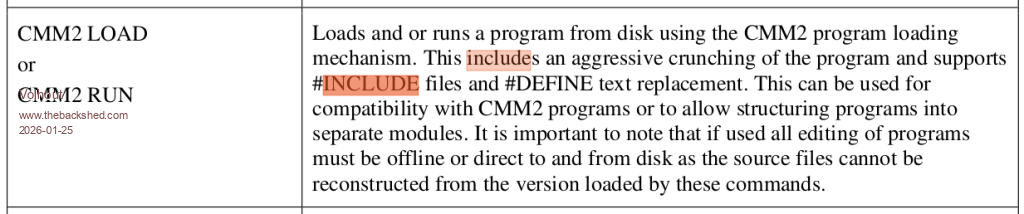
Include ??
Mixtel90 Guru Joined: 05/10/2019 Location: United KingdomPosts: 9238
Posted: 09:01am 25 Jan 2026
Copy link to clipboard
Print this post
No idea. Does the Picomite support INCLUDE now? I don't think so. That's only on the CMM2, I think, as that runs a pre-processor.
There is no way to insert text midway through a file unless it is records in a random access file.
Phil's idea will work fine, but as he points out you have to append the text then move it into position.
I like the idea of creating directives but I think it might rapidly get clunky for a program of any size, with a read_line-test_line-write_line for every line in the program. Maybe Volhout was suggesting using the word INCLUDE rather than INSERT? That would make sense.Mick
IanT Senior Member Joined: 29/11/2016 Location: United KingdomPosts: 137
Posted: 09:24am 25 Jan 2026
Copy link to clipboard
Print this post
No, all too complicated for me. I'll stick to using a PC.
IanT
Mixtel90 Guru Joined: 05/10/2019 Location: United KingdomPosts: 9238
Posted: 09:36am 25 Jan 2026
Copy link to clipboard
Print this post
Me too. :) Unfortunately I can't think of any other way on a self-contained LCD display system.
The Picomite isn't a computer and, amazing though it is, asking it to do things like cut and paste between separate files via a clipboard is probably asking a bit much of it.Mick
lizby Guru Joined: 17/05/2016 Location: United StatesPosts: 3885
Posted: 02:27pm 25 Jan 2026
Copy link to clipboard
Print this post
I tried it, it didn't work, and I posted a question about it quoting that CMM2 LOAD text from the Picomite manual. Peter explained that it did only work with CMM2 LOAD, which (as the manual says), strips out comments and white space.PicoMite, Armmite F4, SensorKits, MMBasic Hardware, Games, etc. on FOTS
matherp Guru Joined: 11/12/2012 Location: United KingdomPosts: 12058
Posted: 02:32pm 25 Jan 2026
Copy link to clipboard
Print this post
Watch this space
Page 1 of 2
Print this page
The Back Shed's forum code is written, and hosted, in Australia.

 Notice. New forum software under development. It's going to miss a few functions and look a bit ugly for a while, but I'm working on it full time now as the old forum was too unstable. Couple days, all good. If you notice any issues, please contact me.


 Print this post