Home
JAQForum Ver 24.01
Log In or Join  
Active Topics
Local Time 11:38 25 Feb 2026 Privacy Policy
Jump to

Notice. New forum software under development. It's going to miss a few functions and look a bit ugly for a while, but I'm working on it full time now as the old forum was too unstable. Couple days, all good. If you notice any issues, please contact me.

Forum Index : Microcontroller and PC projects : MMBasic  case sensitivity

Author Message
Fredd
Newbie

Joined: 26/09/2023
Location: South Africa
Posts: 7
Posted: 09:07am 23 Feb 2026
Copy link to clipboard 
Print this post

I am using MM Basic  user manual version Ver 5.07.04 which states that the interpreter is not CASE sensitive but I found otherwise recently.  I usually use capitals for all program names subroutines values etc and lower case for the rest. I downloaded a set of routines lately that had a mixture of cases that refused to run. I found after battling the error messages that a variable must be identical letter for letter to the definition.
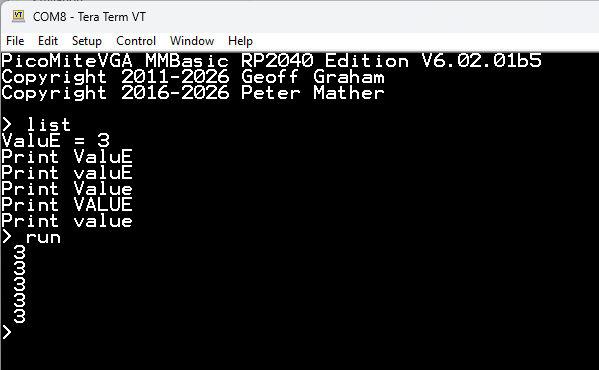
For example if your variable  name is ValuE then none of the following are recognised as equal to ValuE. e.g valuE, Value, VALUE or value.

Has this always been the CaSe?
 
matherp
Guru

Joined: 11/12/2012
Location: United Kingdom
Posts: 10984
Posted: 09:45am 23 Feb 2026
Copy link to clipboard 
Print this post

The only thing that is case sensitive is filenames on the A: drive which is a function of the LittleFS file system

Edited 2026-02-23 19:46 by matherp
 
JohnS
Guru

Joined: 18/11/2011
Location: United Kingdom
Posts: 4254
Posted: 11:30am 23 Feb 2026
Copy link to clipboard 
Print this post

Just tried mmb4l and it behaves as expected (case insensitive variables).

John
 
Fredd
Newbie

Joined: 26/09/2023
Location: South Africa
Posts: 7
Posted: 01:37pm 23 Feb 2026
Copy link to clipboard 
Print this post

Thanks for the reply matherp and JohnS. That is exactly what I expected to happen. I was battling with this all yesterday when it refused accept anything but the defined variable spelling. I tried your example and it worked then I thought perhaps the  OPTION SPECIFIC at the head  of my program made it case sensitive. I disabled that and  it worked so I replaced OPTION SPECIFIC and it continued to work!!! I give up as long as it works.
Many thanks
Vaughn
 
Mixtel90

Guru

Joined: 05/10/2019
Location: United Kingdom
Posts: 8587
Posted: 02:22pm 23 Feb 2026
Copy link to clipboard 
Print this post

OPTION SPECIFIC? I don't remember that, and it's not in my V5.07.03 manual for the PicoMite. Does it do anything?
Mick

Zilog Inside! nascom.info for Nascom & Gemini
Preliminary MMBasic docs & my PCB designs
 
phil99

Guru

Joined: 11/02/2018
Location: Australia
Posts: 3030
Posted: 08:30pm 23 Feb 2026
Copy link to clipboard 
Print this post

Not in the latest manual either.
> OPTION SPECIFIC
Error : Invalid Option
>
The non-standard PicoCalc version perhaps?
 
JohnS
Guru

Joined: 18/11/2011
Location: United Kingdom
Posts: 4254
Posted: 08:56pm 23 Feb 2026
Copy link to clipboard 
Print this post

mmb4l

> OPTION SPECIFIC
Error: Unknown option

John
 
phil99

Guru

Joined: 11/02/2018
Location: Australia
Posts: 3030
Posted: 09:22pm 23 Feb 2026
Copy link to clipboard 
Print this post

Maybe @Fredd means OPTION EXPLICIT ?
 
JohnS
Guru

Joined: 18/11/2011
Location: United Kingdom
Posts: 4254
Posted: 10:37pm 23 Feb 2026
Copy link to clipboard 
Print this post

  phil99 said  Maybe @Fredd means OPTION EXPLICIT ?

Maybe. It's a good thought.

It doesn't do what was posted... but still, let's hope for more info.

John
 
Fredd
Newbie

Joined: 26/09/2023
Location: South Africa
Posts: 7
Posted: 08:41pm 24 Feb 2026
Copy link to clipboard 
Print this post

Thanks everyone. You are right it should have been OPTION EXPLICIT. The program in which I am going to use the I2C routines is already using that. I later tried removing EXPLICIT but that made no difference.  
I have no idea what could have caused it to become case sensitive. It literally happened overnight. I was working all day the day before and closed down my computer as usual but the next morning I noticed it came on remarkably quickly. I wont say booted up because it looked like it hadn't switched off. Maybe something was updated overnight. (Windows 11) Anyway my I2C hardware is working nicely now.
Slightly off topic but interesting.
I discovered today that if you use cut and paste to move a
"DIM Some_variable as INTEGER" to another line it isn't recognised unless you add an ENTER although it appears correct in the text.

Vaughn
 
Print this page


To reply to this topic, you need to log in.

The Back Shed's forum code is written, and hosted, in Australia.
© JAQ Software 2026