|
Forum Index : Microcontroller and PC projects : Enhancing Pi Pico Voltage measurement
| Author | Message | ||||
| OA47 Guru Joined: 11/04/2012 Location: AustraliaPosts: 1048 |
I want to get a Pi Pico to accurately measure voltages on an analog input. I have been using the attached input circuit to auto range by outputting a ground from a dig out pin to alter the voltage divider hence the range for the measured voltage. ![]() R1=1M0 R2=10K R3=100K R4=1M0 (R4 is always grounded) D1=Schottky Diode Here is a snippet of code I was using for the F4 ArmMite. ' Autoranging here Vm=Pin(PA0): Pause 100 Volts=103.05*Vm 'CALIBRATION EQUATION If Volts < 20 Then Pin(PA1)=1:Pin(PA2)=0 '20V setting Vm=Pin(PA0): Pause 100 Volts=12.05*Vm 'CALIBRATION EQUATION BL=1:BEEP EndIf If Volts < 2 Then Pin(PA1)=1:Pin(PA02)=1 '2V setting ' Pin(PA3)=0 Vm=Pin(PA0): Pause 100 Volts=2.05*Vm 'CALIBRATION EQUATION BL=1:BEEP EndIf If Volts > 9.999 Then V$=Str$(Volts,2,2) Else V$=Str$(Volts,1,3) Text MM.HRes/2, MM.VRes/2 - 30,V$ , CM, 6, 2, RGB(white) ' This code to emulate decimal point not available on first fonts ' If Mid$(V$,2,1)="." Then Offset=95 ' If Mid$(V$,3,1)="." Then Offset=155 ' Circle Offset, 130, 6, 0, 1, 0, RGB(white) Text 150, 160, Date$, CM, 2, 1, RGB(Green) Text 150, 190, "UTC "+Time$, CM, 2, 1, RGB(Green) Offset=0 DrawButton 0, 0, 0, 210, 90, 30, RGB(Red), "EXIT" DrawButton 1, 0, 110, 210, 100, 30, c.ghosttext, "HOLD" DrawButton 2, 0, MM.HRes-90, 210, 90, 30, c.ghosttext, "LOG V" ' CheckButtonRelease btn If LogV=1 Then 'Log every 10 seconds If Right$(Time$,1)="0" Then Print "UTC,";Date$;",";Time$;",";V$ Pause 800 EndIf If LogV=2 Then 'Log every minute If Right$(Time$,2)="00" Then Print "UTC,";Date$;",";Time$;",";V$ Pause 500 EndIf If LogV=3 Then 'Log every hour If Right$(Time$,4)="0:00" Then Print "UTC,";Date$;",";Time$;",";V$ Pause 500 EndIf Loop WatchDog 4000 End Sub Can anyone help with suggestions to improve accuracy with the input circuit or the software? OA47 |
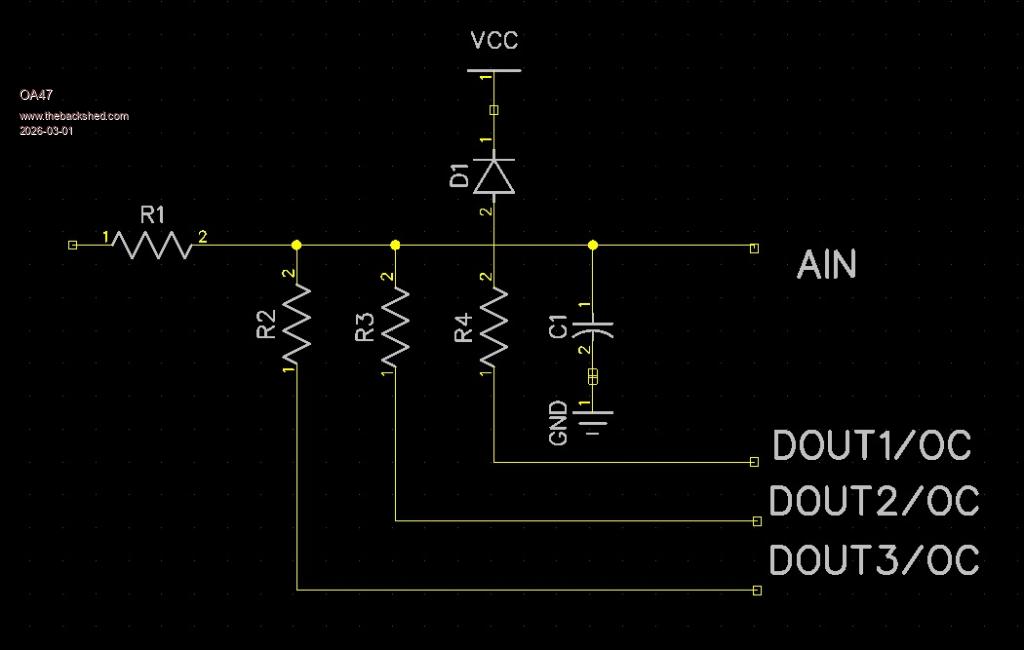
||||
TassyJim![]() Guru Joined: 07/08/2011 Location: AustraliaPosts: 6506 |
The Pico doesn't do Open collector DOUT. Jim VK7JH MMedit |
||||
| phil99 Guru Joined: 11/02/2018 Location: AustraliaPosts: 3135 |
Yes, a bit annoying that. In some situations you can simulate it with a diode, cathode to the pin (Schottky is best). In this case the non-linearity of a diode would affect accuracy so you need to do it with SetPin commands. PIN(x) = 0 : SETPIN x, DOUT 'switch to ground SETPIN x, OFF 'open collector (drain) |
||||
| Mixtel90 Guru Joined: 05/10/2019 Location: United KingdomPosts: 8760 |
You can simulate o/c DOUT without the non-linearity of diodes. SETPIN GPx, DOUT PIN(GPx)=0 SETPIN GPx, DIN When you want the pin o/c use SETPIN GPx, DIN When you want it pulled low use SETPIN GPx, DOUT It will remember that as an output it will be low. You are limited to a maximum of 3V6 on any GPIO pin though, so this is the maximum voltage you could measure. Personally I'd put mosfets in the way and invert the outputs driving them. They need a pulldown resistor on the gate but small ones don't really need a gate series resistor from a GPIO pin. The on resistance is so low that it will have no effect and the off resistance is very high. The maximum voltage you can measure then is limited by the mosfet. High value input resistors on the Pico ADC may not give good results. You may have to accept a lower potential divider value. Mick Zilog Inside! nascom.info for Nascom & Gemini Preliminary MMBasic docs & my PCB designs |
||||
| DaveC5 Newbie Joined: 24/09/2025 Location: United KingdomPosts: 34 |
Hi, To add to the points raised ... Might those resistor values be a bit high? I think the input impedance of the RP2040 (for example) is around 100k, with a parasitic capacitance a few pF at least, so using 1M for the R1 input resistor might introduce a scaling error and also a low-pass filtering effect. If this is causing a problem, a high-input-impedance buffer (J-FET input op-amp) between the output of this circuit and AIN on the Pi would help, as long as it's rail-rail I/O. Can I ask, what sample rate are you looking at, and what would be the full voltage range? |
||||
| Volhout Guru Joined: 05/03/2018 Location: NetherlandsPosts: 5851 |
Hi OA47, Not sure what the application is. In case of measuring a fixed voltage, you do not need switching attenuators. So I assume a digital voltmeter. Not that with the shown circuit you can only measure DC volatges, and positive voltages only. So not very usefull. When you use a RP2040 or a RP2350 stepping A4(the latest) you could switch between output low, and input modes of the GPIO pins. Not with the RP2350 stepping A2(the bulk of the RP2350's). The only way to get this circuit accurate, is to "adjust" offset and gain in each range while using a calibrated digital meter in parallel. Simplest is to do a 10% and 90% measurement in each range. If you want to create a digital multimeter that can measure positive, negative, and AC voltages, you need to create a negative voltage using a switchmode converter, and add a opamp between input and ADC. There are several circuits on the web that show you how to do this. With different attenuator settings, look at the analog input circuits of "Github SCOPPY". Google...is....your....best...friend Volhout Edited 2026-03-02 03:58 by Volhout PicomiteVGA PETSCII ROBOTS |
||||
| The Back Shed's forum code is written, and hosted, in Australia. | © JAQ Software 2026 |
