Notice. New forum software under development. It's going to miss a few functions and look a bit ugly for a while, but I'm working on it full time now as the old forum was too unstable. Couple days, all good. If you notice any issues, please contact me.
fred777 Senior Member Joined: 01/07/2021 Location: United KingdomPosts: 106
Posted: 06:44pm 16 Apr 2026
Copy link to clipboard
Print this post
Hi all,
Recently, I've thinking back to the "good old days" when I was using some of the more advanced Basic dialects available on MSDOS. I fondly remember the IDEs of QuickBasic and MS-PDS7, but especially that of Powerbasic. Wouldn't it be great to have a build-in Editor on the Pico that has lots more functionality? Don't get me wrong, I love MMEDIT, but wouldn't it be nice to improve the builtin Editor? Things like auto indent and a Sub/Function List when pressing F2 (was it F2?), context help, auto completion... All in text mode of course. I was thinking about writing an IDE for MMBASIC in MMBasic but I'm unsure about how that IDE could run the basic program...
Discuss... Edited 2026-04-17 05:05 by fred777
Mixtel90 Guru Joined: 05/10/2019 Location: United KingdomPosts: 9234
Posted: 09:30pm 16 Apr 2026
Copy link to clipboard
Print this post
The beauty of the current editor is that it doesn't matter which MMBasic platform you are using, it's almost the same (there have to be some changes). You can usually just walk in and use it, all the way from a 28-pin MicroMite to a CMM2. Yes, you could probably enhance the editor but you'd break that system as there's no room for anything bigger on the MicroMite - it's full!Mick
fred777 Senior Member Joined: 01/07/2021 Location: United KingdomPosts: 106
Posted: 01:26pm 17 Apr 2026
Copy link to clipboard
Print this post
That is a good point, keep the mites as similar as possible.
So,if I wanted another editor I'd need to write a Basic IDE myself (that will give me something to do for ages, great) and assign that to a flash slot. Then use OPTION FNKEY to start it from the prompt, then load in a .BAS file to edit. Then save the file and use RUN or CHAIN to run it, maybe using RAM SAVE/RAM RUN if PSRAM is available - might that be faster than saving to flash or sdcard?
And the source code from the current program can't be access from another Program runnig from a flash slot i guess. So getting the current active prog into the IDE would need something like SAVE "zzztemp":FLASH RUN 1 as the Function key.
Does that sound right? Are the any better options? Edited 2026-04-17 23:26 by fred777
Volhout Guru Joined: 05/03/2018 Location: NetherlandsPosts: 6195
Posted: 01:32pm 17 Apr 2026
Copy link to clipboard
Print this post
Hi Fred777,
That is exactly how the filemanagers work. There are also filemanagers that can invoke the built in editor.
- Load the editor in program memory - FLASH SAVE 2 'store in flash slot 2 - OPTION F9 "FLASH RUN 2"+chr$(13)
When pressing F9 you start the (always available) editor.
Regards,
Volhout
P.S. there are forum members that use AI to write MMBasic code. I assume that with perseverance you could get the editor you want (i.e. VI ? ) in MMBasic code. Especially since behaviour of know editors is well documented, and AI can use that without you specifying every single detail. Edited 2026-04-17 23:36 by VolhoutPicomiteVGA PETSCII ROBOTS
lizby Guru Joined: 17/05/2016 Location: United StatesPosts: 3885
Posted: 05:52pm 17 Apr 2026
Copy link to clipboard
Print this post
Filed under "Just As a Lark".
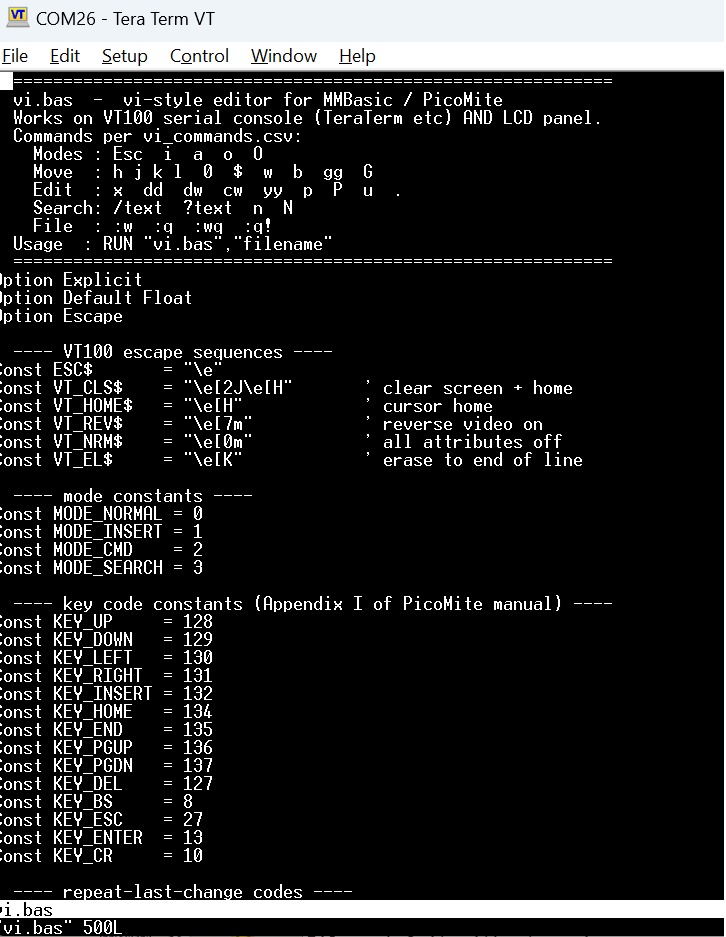
That sounded like a challenge (I don't think it was meant to be). After about 10 minutes to perplexity to give me a (perhaps simplified) vi cheat sheet in csv form, I uploaded the cheat sheet to Claude along with the Picomite manual, and gave this prompt:
I started it with run "vi.bas" "vi.bas" (to edit itself). The first pass failed because it wanted to use CALL subsomething() instead of just subsomething(); then failed because I was using TeraTerm, not a display, then failed because of a trivial mistake (VAL used on an mm.info return which was already a number). Then it displays correctly including scrolling to a new page. I haven't tested any commands (because I hate vi). 1100+ lines of code provided while I was doing other things.
EDNEDN Guru Joined: 18/02/2023 Location: United StatesPosts: 308
Posted: 07:35pm 17 Apr 2026
Copy link to clipboard
Print this post
One favorite question of mine when interviewing software engineers for systems level positions was "What is your favorite editor?"
Very few people would answer the question with "Vi." But those that did were always extremely competent.
lizby Guru Joined: 17/05/2016 Location: United StatesPosts: 3885
Posted: 08:17pm 17 Apr 2026
Copy link to clipboard
Print this post
I used vi in the past because it was the only editor available on the tiny openWrt router devices I was using to provide wifi access for sensors about my house. I doubt that anyone who had not been forced by circumstance to use it and to become proficient with it would consider it a favorite.
Mixtel90 Guru Joined: 05/10/2019 Location: United KingdomPosts: 9234
Posted: 06:51am 18 Apr 2026
Copy link to clipboard
Print this post
At least vi was quite an upgrade on edlin. :( As you say though, it's all that's available on some embedded devices. I've used it for a similar reason on a linux-based music system.
nano is a far more usable editor IMHO. Not really an upgrade on the built-in MMBasic editor though. Nothing else puts your cursor on the error line after a crash.Mick
fred777 Senior Member Joined: 01/07/2021 Location: United KingdomPosts: 106
Posted: 10:21am 18 Apr 2026
Copy link to clipboard
Print this post
Hmm now I’m thinking of something like OPTION EDITOR DEFAULT | FLASH_SLOT
The program in flash_slot is called instead of the default editor. And it’s supplied with the error code and line as parameters…
Nice, and wouldn’t mess with the other mites, they just wouldn’t have that option. Edited 2026-04-18 20:23 by fred777
matherp Guru Joined: 11/12/2012 Location: United KingdomPosts: 12051
Posted: 10:27am 18 Apr 2026
Copy link to clipboard
Print this post
I suggest you read editor.c before thinking about his route
fred777 Senior Member Joined: 01/07/2021 Location: United KingdomPosts: 106
Posted: 10:57am 18 Apr 2026
Copy link to clipboard
Print this post
Good one As I don’t know the first thing about programming in C, I should be getting on with writing an editor in basic that I’d actually would want to use before anything else…
Bleep Guru Joined: 09/01/2022 Location: United KingdomPosts: 863
Posted: 01:16pm 18 Apr 2026
Copy link to clipboard
Print this post
Hi Lizby, I have always used Vi and your version is working :-) There was a variable "Pos" which I had to change to "Posi" as it's a command. But basically it works, If you wouldn't mind giving your Ai some more work, there is one important feature that is missing. If you put a number before any "Move" Or "Edit" command, that command is repeated the number of times specified. So. 7yy will yank(copy) the next 7 lines into the buffer or 8dd will delete the next 8 lines into the buffer and yes 5p will put(copy back) the yanked buffer to the cursor 5 times, etc...
Also I almost exclusively don't use a terminal, so haveing either two versions, one screen one terminal, or a single version that can be simply, with a flag, swapped between the two modes, would be fantastic. :-) Currenntly on a HDMI or LCD screen I get the file text, but with control/escape code everywhere. :-( Regards Kevin. Edited 2026-04-18 23:54 by Bleep
EDNEDN Guru Joined: 18/02/2023 Location: United StatesPosts: 308
Posted: 03:05pm 18 Apr 2026
Copy link to clipboard
Print this post
Yes! It would be really nice to have the repeat count added. And the Scope parameter after a command. ie. dG or d0 or d$ to delete to the end of file or delete to start of line or delete to end of line.
lizby Guru Joined: 17/05/2016 Location: United StatesPosts: 3885
Posted: 06:20pm 18 Apr 2026
Copy link to clipboard
Print this post
Ok, I asked Claude to do as suggested. I haven't tested except for opening, editing lightly, and closing with and without saving. Works on HDMI screen with TeraTerm console. I don't have a stand-alone setup with keyboard, so haven't tested that. I didn't test LCD version. One program for all: LCD, VGA, HDMI, TeraTerm console.
robert.rozee Guru Joined: 31/12/2012 Location: New ZealandPosts: 2552
Posted: 04:24am 19 Apr 2026
Copy link to clipboard
Print this post
i remember Geoff saying many years ago that the editor was a tightly bound little ball of [open source] code that he found and spliced into micromite basic (MX150) with minimal examination of what exactly was contained therein. the editor's C source code is extremely compact and opaque!
in the past i have looked at the editor's source code, and was amazed that so little code could do so much and be so completely impossible to understand. i do recall fixing one small bug (to remove the need for a blank line at the end of a program), but that was only because it was located at the periphery.
i have said this before, and will say it again; if someone out there wants to improve the editor, go ahead and do it. don't ask Geoff or Peter to do this for you. just sit down yourself and write a tiny, compact editor in C code. you can write it on a PC with just stubs for loading, saving, getting keypresses and sending characters to the VDU. it is purely an exercise in compact C coding.
i am sure that if someone writes a better editor then Geoff and Peter will welcome their contribution with open arms.
cheers, rob :-) Edited 2026-04-19 22:52 by robert.rozee
phil99 Guru Joined: 11/02/2018 Location: AustraliaPosts: 3416
Posted: 04:47am 19 Apr 2026
Copy link to clipboard
Print this post
That sounds like a good challenge for Claude. Give it editor.c and get it to write a detailed report on how it works. Then get Claude to add the features you want without bloating it. Edited 2026-04-19 14:47 by phil99
thwill Guru Joined: 16/09/2019 Location: United KingdomPosts: 4405
Posted: 07:08am 19 Apr 2026
Copy link to clipboard
Print this post
I've not quite ironed out all the kinks yet, but this https://github.com/thwill1000/mmb4l/blob/develop-v0.8-6/src/common/editor.c is a readable "workalike" of the PicoMite's editor that I was developing for MMB4A. It doesn't include the latest features that Peter has added to the mainline, but it does include scrolling long lines and is heavily unit-tested. To drop it into the PicoMite would require someone to implement the display_xxx() hooks for the PicoMite.
bfwolf Senior Member Joined: 03/01/2025 Location: GermanyPosts: 258
Posted: 11:49am 20 Apr 2026
Copy link to clipboard
Print this post
That the line editor in UNIX was called "edlin" is news to me! I was more familiar with the name from MS-DOS, and that one was awful! I just checked on Google: Wikipedia says the line editor in UNIX is called "ed" — that's confusing because the "comfortable" screen editor in AmigaOS was also called "ed", while the line editor there was "edit".
I found MicroEmacs on the Amiga "passable" — but Matt Dillon's "dme" (also bundled with his popular C-compiler) was very popular; it also had great macro capabilities and was ultra-fast. You can find it open-source on GitHub, by the way.
I never really warmed to "vi"; I'd only use it in an emergency. I used to like editors based on WordStar, like the one in Turbo Pascal. The commands are easily accessible, simple, and intuitive!
I once read somewhere that "emacs" is an acronym for "Eight Megabytes Always Continuously Swapping".
--
I also took a look at the AI-generated source code for "vi" in MMBasic:
' ---- text buffer ---- Dim buf$(MAX_LINES) Length MAX_LINELEN
This is roughly what I expected from AI without detailed algorithm specifications: It's first-year programming!
On average, about 80-90% of RAM is wasted with only 300 lines of capacity and a 45kB requirement. A properly programmed editor uses RAM efficiently and, when RAM is limited, only keeps a portion of the current text in RAM and the rest in a temporary file, thus enabling it to process texts of virtually unlimited size. This already worked on the Z80 under CP/M.
Regards, bfwolf
Page 1 of 2
Print this page
The Back Shed's forum code is written, and hosted, in Australia.

 Notice. New forum software under development. It's going to miss a few functions and look a bit ugly for a while, but I'm working on it full time now as the old forum was too unstable. Couple days, all good. If you notice any issues, please contact me.


 Print this post




 I used to like editors based on WordStar, like the one in Turbo Pascal. The commands are easily accessible, simple, and intuitive!


