Notice. New forum software under development. It's going to miss a few functions and look a bit ugly for a while, but I'm working on it full time now as the old forum was too unstable. Couple days, all good. If you notice any issues, please contact me.
editor now supports Ctrl-A to launch the beautifier Tidy up of LIST command with short/no file loaded Fix the no-wrap issue.
Summary of changes from V6.02.01
All versions Performance improvements for FOR/NEXT loops and IF/THEN/ELSE/ENDIF constructs OPTION PROFILING ON/OFF 'see option-profiling-cache.pdf for details The editor now supports editing long lines without splitting them or using continuation lines DO UNTIL/LOOP now implemented Support for data sharing between two PicoMites over 4 and 8 bit parallel I/Fs see MEMORY_SHARE_User_Manual.pdf for more details Mandelbrot easter egg Adds support for escape sequences with OPTION ESCAPE ON in the INPUT statement prompt Extends OPTION GPS to allow baudrates over 65535 Reduced heap utilisation for BLIT WRITE Fixes bug in mm.info(boot count) when not in the root directory LIST COLLISIONS 'This is a diagnostic that shows any variable names that hash to the same number. LIST command can now scroll forwards and backwards through the file or program
All versions except PICOMITEMIN Beautify function in the editor (F12/Ctrl-A) In-built Filemanager (command FM) 'see FM_User_Manual.pdf FM_User_Manual.pdf
PicoMiteRP2040, All RP2350 variants except WebMiteRP2350 User configurable "Just-in-time" bytecode conversion 'see option-profiling-cache.pdf for details option-profiling-cache.pdf
USB versions FLASH UF2 fname$ 'flashes a RP2040/Rp2350 in boot mode with the uf2 file specified Fixes bug in mouse double click detection Support for USB CDC hosting for up to 4 CDC client devices, see USB_CDC_Host_User_Manual.pdf USB_CDC_Host_User_Manual.pdf
Support for USB flash drive as drive C:
RP2350 versions Enhancements to Stepper command, including supporting an A axis and GCOde as MMbasic strings' see Stepper_Reference.pdf Stepper_Reference.pdf
PICOMITEMIN New cut down build omitting Structures Draw3D command and function GUI Turtle graphics Regular expression support Help command VS1053 support SSD1963 support ILI9163 SSD1331 ST7735 but not ST7735S ILI9481IPS ILI9481 ILI9488P GC9A01 Virtual displays Editor F12 FileManager
Non VGA/HDMI versions Fixes backlight for SSD1963 displays when external PWM pin is used for control Increased SPI speed for ILI9341 displays Fixes various bugs in SSD1963 buffered drivers Edited 2026-05-05 20:16 by matherp
Volhout Guru Joined: 05/03/2018 Location: NetherlandsPosts: 6195
Posted: 10:21am 05 May 2026
Copy link to clipboard
Print this post
@Peter,
I assume 2040VGA did not get TRACECACHE because of the highly tuned memory map and performance ? But it does get FM.
matherp Guru Joined: 11/12/2012 Location: United KingdomPosts: 12051
Posted: 10:30am 05 May 2026
Copy link to clipboard
Print this post
FM just increases the size of the flash image a bit. Tracecache needs 6-8K of RAM for memory resident code which would cut the VGA heap from 100K to 92K. Add to that the ram used for the cache itself when a program is running and my view is that it doesn't make sense. Anyone can build any version with cache if they want, it is just a #define in the code needed to enable it Edited 2026-05-05 20:30 by matherp
Volhout Guru Joined: 05/03/2018 Location: NetherlandsPosts: 6195
Posted: 10:38am 05 May 2026
Copy link to clipboard
Print this post
@Peter,
60300rc0 for 2040VGA load PETSCII robots main program (the program is beautified by MMEdit). F4 (edit) ctrl-A (beautifier), let it chew for few seconds.
The indenting diverts from MMEdit beautifier in second half of the listing. The DATA statements at the end of the program are indented 30+ positions.
PhenixRising Guru Joined: 07/11/2023 Location: United KingdomPosts: 2100
Posted: 10:39am 05 May 2026
Copy link to clipboard
Print this post
I didn't get the memo:
PICOMITEMIN is RP2040 only, correct?
fred777 Senior Member Joined: 01/07/2021 Location: United KingdomPosts: 106
Posted: 11:06am 05 May 2026
Copy link to clipboard
Print this post
I really like the new Beautify function, but I think blank lines are very useful for readability. There are blank lines in many of the (demo) sources and those aren't so easy to understand without the logical grouping that simple blank lines provide. Maybe blank line removal could be optional?
Volhout Guru Joined: 05/03/2018 Location: NetherlandsPosts: 6195
Posted: 11:58am 05 May 2026
Copy link to clipboard
Print this post
@Peter,
60300rc0 2040VGA clean install option VGA design 2 FM edit (F2) any file on B drive (even a small 768 bytes basic program)
tested on robots.bas edited from FM with no issues Edited 2026-05-05 22:36 by matherp
fred777 Senior Member Joined: 01/07/2021 Location: United KingdomPosts: 106
Posted: 01:02pm 05 May 2026
Copy link to clipboard
Print this post
A strange thing is happening with the new version here:
When using the internal editor the beautifier starts every time when i press cursor left at the beginning of any line except the first. Happens with Teraterm and MMEDIT/MMC. Makes editing really difficult. Tested on PicoMiteRP2350V6.03.00RC0.uf2 with
PicoMite MMBasic RP2350A V6.03.00RC0 and PicoMite MMBasic RP2350B V6.03.00RC0 Edited 2026-05-05 23:02 by fred777
Volhout Guru Joined: 05/03/2018 Location: NetherlandsPosts: 6195
Posted: 01:49pm 05 May 2026
Copy link to clipboard
Print this post
Observations on 60300rc0 (also second version):
1/ When there is a large program (i.e. 50k) in program memory, and you do not explicitly remove it with NEW, then open FM, select a file, then press F2 to edit, you get the "not enough heap" problem.
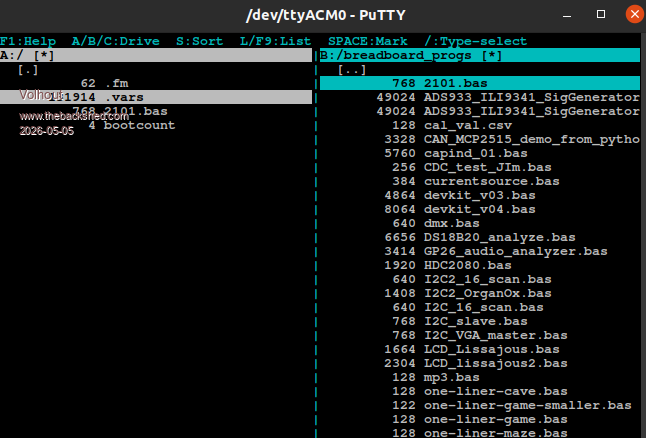
2/ When you get the "not enough heap" problem, a file called ".vars", size 131k, is left behind on the A:/ drive.
Volhout
P.S. I assume you need 132kb free on A drive to use the editor when in FM ? Maybe note that in user manual. Some may not have this luxury (Game*Mite). Edited 2026-05-05 23:53 by VolhoutPicomiteVGA PETSCII ROBOTS
matherp Guru Joined: 11/12/2012 Location: United KingdomPosts: 12051
Fixes memory issue when a large file is loaded in memory and you EDIT a file by name either at the command prompt or via FM Fixes bug in editor calling beautify with left arrow Fixes bug in beautify when NEXT is on the same line as FOR Changes beautify so that the blank line comes after a function or subroutine rather than before, This avoidss separating a comment block from the associated function Edited 2026-05-06 00:20 by matherp
Volhout Guru Joined: 05/03/2018 Location: NetherlandsPosts: 6195
JanVolk Guru Joined: 28/01/2023 Location: NetherlandsPosts: 420
Posted: 03:26pm 05 May 2026
Copy link to clipboard
Print this post
Peter,
A good solution for inserting a blank line with F12.
Jan.
homa Guru Joined: 05/11/2021 Location: GermanyPosts: 723
Posted: 03:29pm 05 May 2026
Copy link to clipboard
Print this post
Hi Peter, nice to see you’ve moved from beta to RC. The version has really come a long way!
In the meantime, I’ve picked up a PicoCalc to test.
I’m surprised to find that, unfortunately, you can’t control the screen brightness using the BACKLIGHT command, even though it works with the keyboard shortcut. It would be great to control the brightness via the program.
Also, unfortunately, the RTC on the STM32 (BIOS 1.6) isn’t being read, or can’t be written to either?!
Is this really I2C or is it I2C2? Something is responding at address 1F... Otherwise, I can't read anything on the I2C bus either; is that probably not possible because it's reserved for the system? Is this because of reading the keyboard? Could you please explain some background information on this? Thanks.
toml_12953 Guru Joined: 13/02/2015 Location: United StatesPosts: 735
Posted: 04:09pm 05 May 2026
Copy link to clipboard
Print this post
I agree. Indenting is a useful function but I like to space out my programs in a certain way and beautify ruins my logical groupings.
matherp Guru Joined: 11/12/2012 Location: United KingdomPosts: 12051
Posted: 04:20pm 05 May 2026
Copy link to clipboard
Print this post
I know nothing about the STM32 RTC on the PicoCalc or even whether it can be accessed. You can control the backlight on both the keyboard and the screen using OPTION BACKLIGHT LCD and OPTION BACKLIGHT KBD
homa Guru Joined: 05/11/2021 Location: GermanyPosts: 723
Posted: 07:01pm 05 May 2026
Copy link to clipboard
Print this post
Thanks — the 'OPTION BACKLIGHT LCD' setting works! Can I also read the current value? I'm also missing the screensaver option: 'OPTION BACKLIGHT LCD 0' –-> backlight off. I always use that to activate 'power-saving mode', where the backlight reactivates when a key is pressed or there is activity.
This also works with the keyboard! (=0) :-)
I don't know if the AI (Gemini & Claude) is just making things up, but this is what I managed to get out of it.

 Notice. New forum software under development. It's going to miss a few functions and look a bit ugly for a while, but I'm working on it full time now as the old forum was too unstable. Couple days, all good. If you notice any issues, please contact me.


 Print this post