| Author |
Message |
maxwelloau
Newbie

Joined: 31/10/2025
Location: AustraliaPosts: 3 |
| Posted: 12:18pm 22 Sep 2026 |
 Copy link to clipboard Copy link to clipboard |
 Print this post |
|
Beginner needs help or guidance. Really appreciate any help.
When using a Pico 2W and MMbasic I seem to have a problem with reliability of TCP/IP.
Perfectly willing to accept I am in the wrong, somehow!
Details: Pico 2W genuine. Loaded with MMbasic. ALL versions tried from 5 through to 6 and now into V6.04RC1. Using a simple program to ping a WAN server 8.8.8.8 or 1.1.1.1 or LAN router. Pause 10 seconds and repeat.
Program operates as expected but after a random time, mostly only an hour or a few hours, displays "No response to request for connection 1". (sometimes I have seen a different connection number).
Program ceases at that point, and falls back to the command line >.
Run "ping.bas" or * and the program runs and operates normally again.
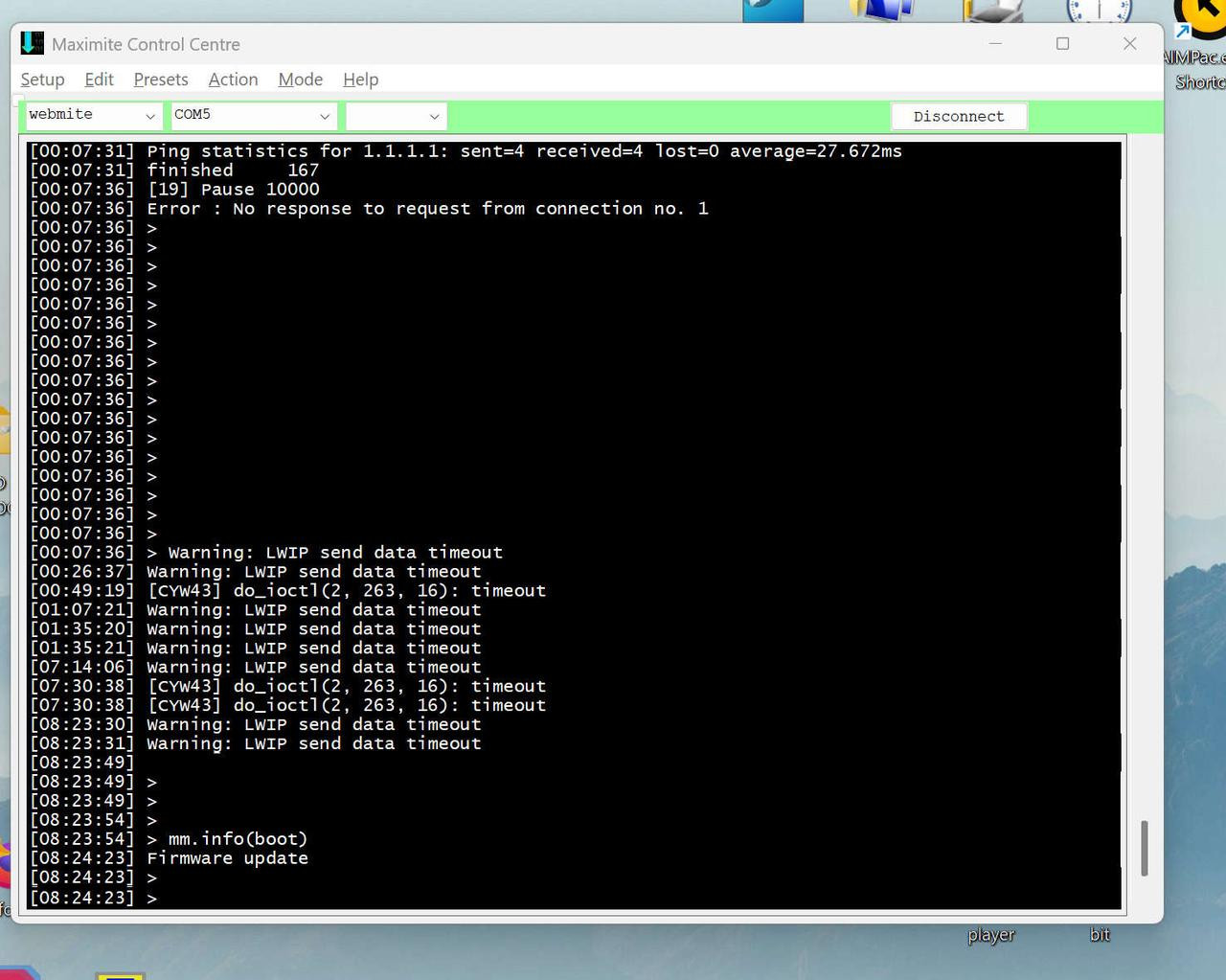
In reference to the picture below the Pico appeared to be connected by USB port but no communication was possible. No flashing device led. Had to power off/on to make it work again.
Per the picture where the ping test failed at 00:07 with "Error: No response to request from connection 1"
Then there appeared to be several keyboard returns entered, but no one was awake or at the keyboard at the time! Do I have ghosts? Then there appears to be a CYW43 error timeout. [CYW43] do_ioctl(2, 263, 16): Timeout.
Then several LWIP timeouts.
LWIP warnings I have seen before on TCPIP failures where no other information appeared. Program just fails back to not running and normal command prompt.
Tried different Pico 2W units, same result.
Tried pinging LAN IP address instead of WAN, same result.
Tried changing CPUSPEED lowest, middle and highest, same result,
I sent one of my units to a friend in another location and while the problem appears less frequent, it is still occurring.
Before Ping was added this problem was a failure of web commication and program drop back to command prompt.
From the command prompt I can issue "Web ping "1.1.1.1", 100" and so far have never seen a missed packet or error message.
Ping from a desktop to the Pico2W seems more reliable. Only failing if the OS really gives up.
This Pico 2W is approx 1 M from a wifi mesh unit connected by ethernet back to the main NBN router. Signal strength is high about -40dbm. Tried moving to 3M away, -55dbm, same result.
The LAN network is 1Gps and ALL other devices do not show any problem. That is, mobile phones, laptops, desktops, media player, DTV for streaming ABC iView and other DTV services. Three other 2.4G wifi units are attached to Solar inverters, solar battery and associated web online collection servers off a different wifi mesh unit, all are working well. LAN Ping times are 2-5mS and WAN 11-100mS generally. FTTP.
I have searched the forum etc for LWIP + CYW43 problems but other than determining its the hardware and software enabling Pico 2W WIFI operation I dont know further than that.
Is this expecting to much from the small product?
Is there any other data that can be obtained to track down the problem?
Any suggestions to improve reliability? Yes a CPU RESTART every hour might do it but this seems to point to a device that cant handle basic IP tasks, in my opinion.
Samples of most common failures.
-----------------------------------------------------------
On V6.03RC7 (I think it was)
[14:16:27] Reply from 1.1.1.1: seq=1 time=21.063ms
[14:16:28] Reply from 1.1.1.1: seq=2 time=11.696ms
[14:16:28] Reply from 1.1.1.1: seq=3 time=11.840ms
[14:16:28] Reply from 1.1.1.1: seq=4 time=11.669ms
[14:16:28] Ping statistics for 1.1.1.1: sent=4 received=4 lost=0 average=14.067ms
[14:16:28] finished 317
[14:16:29] [19] Pause 10000
[14:16:29] Error : No response to request from connection no. 1
[14:16:29] > Warning: LWIP send data timeout
-----------------------------------------------------------
On V6.04RC1
[20:30:28] Reply from 192.168.1.1: seq=19 time=7.612ms
[20:30:28] Reply from 192.168.1.1: seq=20 time=3.029ms
[20:30:28] Ping statistics for 192.168.1.1: sent=20 received=20 lost=0 average=4.208ms
[20:30:28] finished 38
[20:30:30] [20] Pause 10000
[20:30:30] Error : No response to request from connection no. 1
[20:30:30] > Warning: LWIP send data timeout
-----------------------------------------------------------
Basic program listing.
CLEAR
Option ESCAPE
Option EXPLICIT
Option Autorun On, NORESET
dim Ptime as float
dim Count1 as integer = 0
timer = 0
Do
Do While MM.Info(IP ADDRESS) = "0.0.0.0"
If int(Timer) > 6000 Then print "Timeout - Reboot" : Pause 500 : CPU RESTART
if int(Timer) < 3000 Then print "Waiting for WiFi"
Pause 1000
Loop
Do
pause 10000
ON ERROR SKIP 1
web ping "192.168.1.1", 4 ,5000,Ptime
if mm.errno > 0 then print "Timeout - Reboot" : Pause 500 : CPU RESTART
Loop until Ptime <>-1
inc Count1 'this cycles every 10secs when it's working
print "finished ",Count1
Loop
-----------------------------------------------------------
thanks maxwelloau
Edited 2026-09-22 22:19 by maxwelloau |
| |
JohnS
Guru

Joined: 18/11/2011
Location: United KingdomPosts: 4381 |
| Posted: 12:37pm 22 Sep 2026 |
Copy link to clipboard |
Print this post |
|
Might be irrelevant but what PSU are you using?
What are the connections to the Pico - USB? anything else?
John |
| |
maxwelloau
Newbie
Joined: 31/10/2025
Location: AustraliaPosts: 3 |
| Posted: 12:55pm 22 Sep 2026 |
Copy link to clipboard |
Print this post |
|
Pico is DC fed from a micro-usb cable from a desktop PC MB port. Also I have tried and had the same problems with a Lm7805 regulator connected to a variable voltage 10A supply as the source. Also when testing wifi further away, powered by several different USB plug packs 2A-4A and rotated through different cables. Voltages on the Pico including onboard regulation were checked with a Keithly 2015 bench DVM and Fluke 73 and Brymen 769 MM. All appear correct as expected.
Also checked ripple and DC stability via a Rigol DHO824 CRO.
Current draw is pretty constant from 50-70mA once booted and wifi operational.
No other external connections apart from a 10UF 5V filter on the breadboard it is currently plugged into.
Another unit is part of a slightly larger pcb with a 7805 regulator, bypass caps, connections to I2C INA226 current and voltage measurements, where problems originally noticed. All external devices were then disconnected, problem still occurred.
Ping when added helped to repeat regular testing in the most simplified form.
thanks. |
| |
matherp
Guru
Joined: 11/12/2012
Location: United KingdomPosts: 11910 |
| Posted: 01:51pm 22 Sep 2026 |
Copy link to clipboard |
Print this post |
|
You have a TCP SERVER PORT defined but you are not handling requests in your program. At the command prompt the system will automatically send out 404 if it receives a request but in a program it expects you to do it.
If you don't need the server, OPTION TCP SERVER PORT 0 and it will stop.
Or add to your program:
WEB TCP INTERRUPT WebRequest ' 'b' tell the server who answers
Sub WebRequest ' 'c' answer, then close, every request
Local Integer i
For i = 1 To MM.Info(MAX CONNECTIONS)
If MM.Info(TCP REQUEST i) Then
WEB TCP READ i, buff()
WEB TRANSMIT CODE i, 404
End If
Next i
End Sub
Edited 2026-09-23 00:16 by matherp |
| |
maxwelloau
Newbie
Joined: 31/10/2025
Location: AustraliaPosts: 3 |
| Posted: 07:07pm 22 Sep 2026 |
Copy link to clipboard |
Print this post |
|
Thankyou so much for the information and examples to resolve what I would not have solved by my traditional logic means.
Maxwelloau. |
| |

 Notice. New forum software under development. It's going to miss a few functions and look a bit ugly for a while, but I'm working on it full time now as the old forum was too unstable. Couple days, all good. If you notice any issues, please contact me.