matherp
Guru

Joined: 11/12/2012
Location: United KingdomPosts: 11974 |
| Posted: 04:42pm 09 Oct 2026 |
 Copy link to clipboard Copy link to clipboard |
 Print this post |
|
V7.00.00b8 is now available at https://github.com/UKTailwind/PicoMite/releases/tag/PicoMite-V7.0.00b8 and will become the first release candidate unless any major issues arise or I have any more crazy ideas  . .
This is a big update from b7 particularly in the two bluetooth host builds:
New in beta 8: Bluetooth Classic keyboards
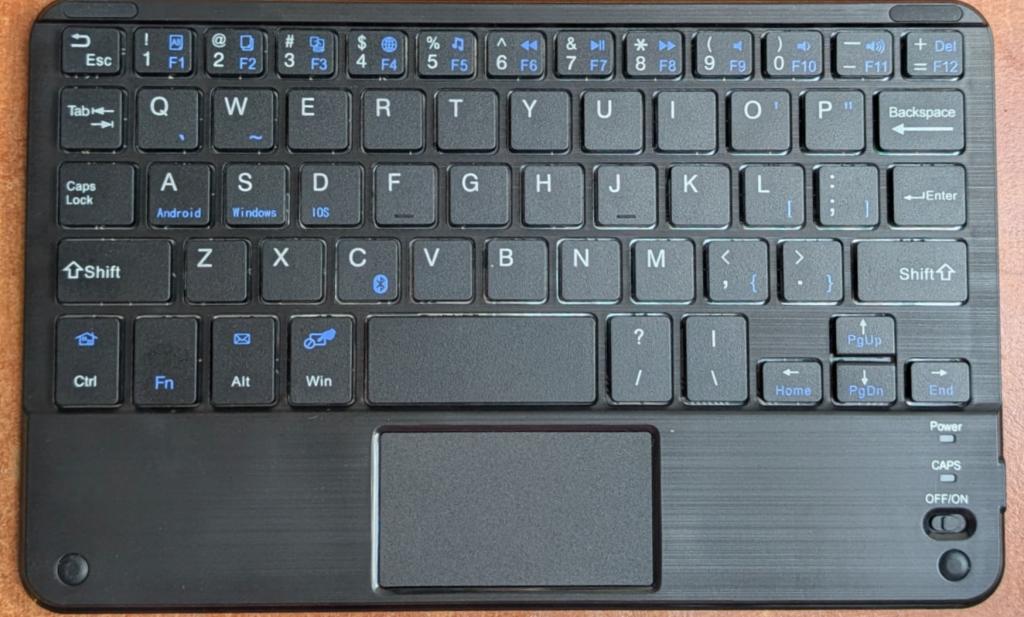
On the PicoMiteRP2350BTH and the PicoMiteHDMIBTH a Bluetooth keyboard no longer has to be a BLE one. An older Bluetooth Classic keyboard, and the touchpad or mouse built into one, now works alongside a BLE keyboard and a Bluetooth speaker, all three connected at once.
• Finding it. Put the keyboard in pairing mode and run BLUETOOTH SCAN. It is listed as a Keyboard, as speakers are listed as Audio.
• Pairing it. BLUETOOTH CONNECT "name" (the name SCAN showed, or the address) pairs it. If the keyboard asks for a code, the console shows Bluetooth keyboard pairing: type NNNNNN on the keyboard being paired, then Enter, as it does for a BLE keyboard. After that the keyboard reconnects by itself whenever it wakes up or is switched on, also after the board restarts.
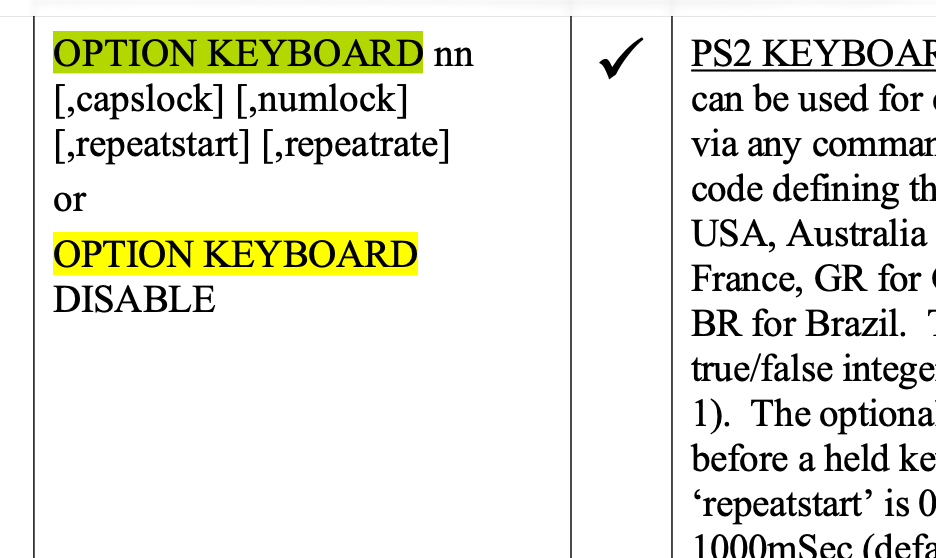
• Keys and touchpad. The keys go through OPTION KEYBOARD like a USB or BLE keyboard's: the layouts, the lock keys, auto-repeat and KEYDOWN() all work. A touchpad or mouse is DEVICE(MOUSE 2, ...), the same as a BLE mouse.
• Tablet keyboards. Many low-cost keyboards sold for tablets have an operating-system mode, chosen with an Fn key combination or a switch (see the keyboard's instructions). Use its Windows or PC mode: in its iOS mode such a keyboard sends Cmd+arrow for Home and End and iPad shortcuts instead of F1 to F12, and its touchpad changes too.
• BLUETOOTH STATUS has a Classic keyboard: line: the keyboard's address, whether it is connected, and which of its reports carry the keys, the pointer and the media keys. MM.INFO(BLUETOOTH KEYBOARD) gives its address when no BLE keyboard is connected, and BLUETOOTH FORGET forgets it.
• What it costs. A third Bluetooth link and the HID code: the flash region has moved up 16 KB (the reset described at the top), and the MMBasic heap is 4 KB smaller, 320 KB on the PicoMiteRP2350BTH and 224 KB on the PicoMiteHDMIBTH.
Tested:
New in beta 8: Bluetooth speakers that work better
A tester tried beta 7's Bluetooth audio with four devices: a generic receiver, a Milwaukee M12 site radio, a generic transmitter/receiver and a car stereo. Only the receiver worked properly. These changes, on the PicoMiteRP2350BTH and the PicoMiteHDMIBTH, are for the other three and for speakers like them.
• Speakers that pair, then refuse the sound (BLUETOOTH CONNECT stops with Bluetooth error 0x66). Some devices agree a shorter encryption key than the board insisted on. It now accepts any length the Bluetooth specification allows, 7 to 16 bytes. The tester's transmitter/receiver, which gave these errors in beta 7, now works.
• Speakers that connect but stay silent. The board could put more sound in one packet than the packet's header can count, and it offered only stereo, which a speaker that plays only mono cannot take. Packets now hold at most 15 frames, and mono is offered too (stereo is still chosen whenever the speaker can play it).
• A speaker that plays only if the sound starts as it connects. The M12 played if PLAY was already running when it connected, but stayed silent if it connected first. When a speaker closes the board's audio stream, or does not start it when asked, the board now connects to it again when PLAY next needs it. The sound waits for up to 8 seconds meanwhile, so it starts late (by 1.5 to 5.5 seconds in our tests) rather than being lost. If that does not help, the next try waits 20 seconds, then longer. We have not had an M12 to try this with. OPTION AUDIO BLUETOOTH 0, which keeps the stream running from the moment a speaker connects, is another thing to try with such a speaker.
• Short gaps every few seconds (the car stereo). The sound always went at the highest quality the speaker accepted, about 330 kbit/s. Over a link that could not carry that, the board fell behind until it had to drop a quarter of a second of sound. It now lowers the quality (the SBC bitpool) a step at a time while the link falls behind, and raises it again after ten seconds without trouble.
• BLUETOOTH STATUS tells you much more about the speaker: its packet size (MTU) and the frames in each packet, the quality in use (bitpool 41 (of 53)) and how often it was lowered, packets the radio refused, how often the stream started, paused (and how many of the pauses the speaker made), was closed by the speaker, could not be started, and was reopened. If a speaker still misbehaves, a BLUETOOTH STATUS listing taken while it plays, or straight after a dropout, shows which of these it is. Please send us one.
Other changes in beta 8:
• OPTION CYW43 PINS: modules that wire the wireless chip differently. The WiFi and Bluetooth builds expected the radio on the Pico 2 W's pins, GP23 (power on), GP24 (data), GP25 (chip select) and GP29 (clock). OPTION CYW43 PINS wl_on, wl_d, wl_cs, wl_clk sets others. Waveshare's RP2350B Pico WiFi , for example, needs OPTION CYW43 PINS GP36, GP37, GP38, GP39, and connects to WiFi with it.
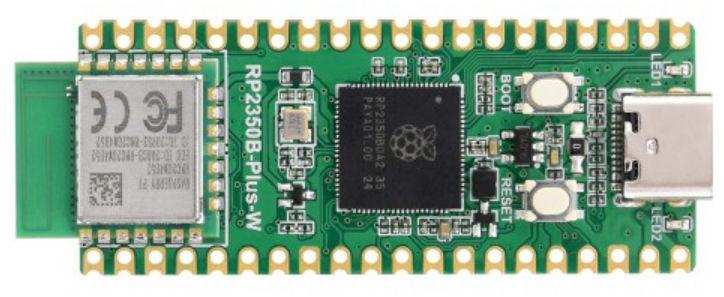
The pins given are reserved, and GP23, GP24, GP25 and GP29 become normal I/O pins. OPTION CYW43 PINS DEFAULT, or OPTION RESET, goes back to the standard pins. An I2S DAC shares a PIO block with the radio, so its pins and the radio's data and clock pins must all be within GP0 to GP31 or all within GP16 to GP47. If the radio does not answer on the pins set, the board says CYW43 radio failed to start on GP36,GP37,GP38,GP39 (OPTION CYW43 PINS) (with the pins set) as it starts and carries on without WiFi or Bluetooth; the WEB commands then report WiFi radio not running. This is in the five RP2350 wireless builds: the WebMiteRP2350, PicoMiteRP2350BT, PicoMiteRP2350BTH, PicoMiteHDMIWEB and PicoMiteHDMIBTH. The WebMiteRP2040's pins stay fixed.
• PNG images of any size, cropped, or part of one (RP2350). The PNG decoder now works a line at a time, so a PNG needs about 40 KB of memory whatever its size, where it needed room for the whole file and the whole image (2.7 MB for an 800x500 picture), and it loads faster: that picture takes 1 second on a 320x240 screen instead of 3. LOAD PNG crops an image larger than the screen, as LOAD BMP and LOAD JPG do, instead of stopping with Image too large, and takes two more optional parameters, the first column and row of the image to show: LOAD PNG fname$ [, x] [, y] [, transparent] [, alphacut] [, ximage] [, yimage]. SPRITE LOADPNG takes x_offset, y_offset, width, height after cutoff to load part of an image, as SPRITE LOADBMP does: SPRITE LOADPNG #n, filename$ [, transparent] [, cutoff] [, x_offset] [, y_offset] [, width] [, height].
• RP2350 with 16 MB of flash: the A: drive stays where it is. Every RP2350 build now lays out a 16 MB flash the same way: the firmware and its areas below 3 MB, a 1 MB MOD buffer, and a 12 MB A: drive from 4 MB to the end (see Memory and flash layout). Flashing a different build, OPTION RESET and the OPTION RESET presets keep the A: drive and its files; the options are reset as before. OPTION MODBUFF is not used on these boards (it says The MOD buffer is fixed at 1024K with 16M of flash): the 1 MB buffer is always there for PLAY MODFILE and FLASH MODBUFF LOAD, and the presets no longer ask before erasing everything. Boards with less flash are unchanged. The first boot of beta 8 reformats a 16 MB board's A: drive once (see the top).
• The flash size is measured. OPTION FLASH SIZE (MM.INFO(OPTION FLASH SIZE)) was the size the flash chip reports in its ID, which not every maker encodes the same way. That figure is now checked by reading past the end of the chip, as the PSRAM's size already was, and the size is measured at every boot.
• The A: drive's file system is littlefs 2.11.3 (it was 2.5.1), which brings three years of littlefs fixes. A write cut short by a power failure is now caught by a checksum of the flash it went into, where before it could be read back as good data. On a drive more than half full, the first two blocks, which describe the drive, were rewritten so often that they could wear out first. A power failure could leave an "orphaned" file or directory, and tidying it up could loop for ever. SEEK to near the end of a 4 KB block could read back old data, and a file open twice, written through one number and read through the other, could read corrupted data. Names still ignore case. An A: drive written by an earlier version is kept, but the first write to it converts it to littlefs's newer format, which earlier firmware cannot read: going back to beta 7 or earlier reformats the A: drive, so copy anything you need first. The new littlefs is about 1.4 KB larger, which took the PicoMiteRP2040's flash region up 16 KB, so that build resets on its first boot of beta 8 (see the top).
• PicoMiteRP2350BT: a serial console beside the Bluetooth one. This build has no USB, so a board whose Bluetooth link could not be used had no console at all. After a fresh install or any OPTION RESET the console now also runs on GP8 (TX) and GP9 (RX), UART1 at the console baud rate; on a PicoComputer 3 these pins go to the board's own USB-serial bridge. OPTION LIST shows it as OPTION SERIAL CONSOLE COM2,GP8,GP9,BOTH. A board upgraded from beta 7 keeps its options, so give it the console with OPTION SERIAL CONSOLE GP8, GP9, B. Keep the B: on this build it means Bluetooth and serial, and without it the Bluetooth console goes silent.
• I2S audio shares the radio's PIO block on the wireless builds (PIO2, or PIO1 on the WebMiteRP2040). That block is not available to your own PIO programs on these builds, and on the WebMiteRP2350, PicoMiteHDMIWEB and PicoMiteHDMIBTH PIO1 is now free for them. OPTION AUDIO I2S refuses pins the shared block cannot reach.
• USB host: TinyUSB brought up to date. The USB host builds now use TinyUSB's current development version instead of release 0.21.0. When a keyboard, mouse, game controller or flash drive behind a hub does not answer while it is being set up, TinyUSB now resets it and sets it up again. With four devices behind a PicoComputer 3's hub, all four came up after every restart, reset and power-on. Every other build uses the same TinyUSB for its USB console. Please tell us about any USB device that worked with beta 7 and does not now.
• A new companion manual, MMBasic_Performance_Guide.pdf, answers the common "how do I make it faster" questions with measurements on an RP2040 PicoMiteVGA and an RP2350 PicoMiteHDMIWEB, interpreted and compiled: statements per line, FOR against DO, constants against variables, CALL by name, long names, and when the MATH, ARRAY, SORT and MEMORY commands pay. It is in the supplementary manuals zip with the others.
• PicoMiteBT.pdf, now titled PicoMite Bluetooth Versions, covers the two Bluetooth host builds as well as the PicoMiteRP2350BT: keyboards, mice and game controllers, speakers and headphones, pairings and BLUETOOTH STATUS.
Fixed since beta 7
• Every build: sound played with PLAY (WAV, FLAC, MP3, MIDI, MOD, tones, sounds and arrays, and on the Bluetooth builds a speaker) stalled while LOAD BMP, LOAD IMAGE, LOAD JPG or LOAD PNG decoded a picture, and while SPRITE LOADBMP, BLIT LOADBMP or SPRITE LOADPNG read one. The decoders now keep the sound fed as they go. FLASH LOAD IMAGE into a flash slot still stops the sound: the flash is being written.
• RP2350: an interlaced PNG, or a damaged one, could crash LOAD PNG or SPRITE LOADPNG. They now stop with Interlaced PNG not supported or Invalid or damaged PNG file.
• RP2350: LOAD PNG did not refresh a buffered display (one with OPTION REFRESH), as LOAD BMP and LOAD JPG do.
• Every build: a DIR$() loop that KILLs or renames the files it finds on A: missed some of them (24 of 40 in a test), because DIR$() carried on reading a directory it had already closed. The directory now stays open, and up to date, until DIR$() returns an empty string.
• Every build: Ctrl-C at KILL's (Y/N) question, or an error part way through FILES, or through KILL or COPY with a wildcard, left an A: directory open, and the next of these commands, or CHDIR, could then hang the board at its next write to A:. A directory left open this way is now closed before it is used again.
• PicoMiteRP2350BT, PicoMiteRP2350BTH and PicoMiteHDMIBTH: the radio was serviced from an interrupt that could fire 30,000 to 80,000 times a second and take 40 to 100% of the processor. I2S tones warbled and played on past their length, and the PicoMiteRP2350BT's heartbeat stopped. The radio is now polled from the main loop, as on the WiFi builds.
• PicoMiteRP2350BTH and PicoMiteHDMIBTH: when another device used the board's Bluetooth LE services, BLUETOOTH STATUS could report a keyboard pairing as failed (status 0x13) that never happened, and the board could disconnect the keyboard. Only the keyboard's own link counts now. A keyboard that drops its link while pairing or reconnecting is reported as "interrupted"; a sleeping keyboard does this as it is retried, which is normal.
• PicoMiteRP2350BTH and PicoMiteHDMIBTH: a Logitech Pebble Keys 2 K380s paired and connected but never typed. Its key report is 7 bytes, not the usual 8, and was ignored; the board now reads each keyboard's report layout from the keyboard itself. And while another Bluetooth LE keyboard was paired with the board, a keyboard that starts the pairing itself (the K380s again) could not pair at all: BLUETOOTH STATUS counted it as "interrupted" about once a second. It now pairs. BLUETOOTH STATUS's Last pairing line gives the keyboard's address when a pairing fails, and the pairing prompt now says to type the number "on the keyboard being paired".
• PicoMiteRP2350BTH and PicoMiteHDMIBTH: a Bluetooth keyboard's Caps Lock LED came on for a moment and went out again, although Caps Lock stayed on: a keyboard waits for the computer to set its lock LEDs, and only USB keyboards were sent them. Bluetooth keyboards now are, for Caps, Num and Scroll Lock. On the PicoMiteHDMIBTH a Bluetooth keyboard's lock keys also sent the LED report to whichever USB device was plugged in first.
• PicoMiteRP2350BTH and PicoMiteHDMIBTH: while a speaker that had been switched off still counted as connected (the link takes up to 20 seconds to time out), the sound quality was lowered step by step for nothing, and BLUETOOTH STATUS could then report it lowered several times but its lowest value as the full one. A link that sends nothing at all is no longer taken for a slow one, and the lowest value counts since the last BLUETOOTH STATUS, like the number of times.
• PicoMiteHDMIBTH: a RESOLUTION change to another clock speed did not retune the radio's link, so at 378 MHz it ran at 63 MHz.
• Wireless builds: a clock change (CPU SPEED, or RESOLUTION on the HDMI builds) retuned every state machine on the radio's PIO block, so I2S audio on that block could then play at the wrong speed. Only the radio's state machine is retuned now.
• PicoMiteRP2350BT, PicoMiteRP2350BTH and PicoMiteHDMIBTH: I2S on GP32 or above could not work, because the radio had already fixed the PIO block's range of pins.
• Every build: a program that stopped with Not enough memory could leave the board printing the same error at the prompt for ever, until a hardware reset. It now stops once and gives the > prompt.
• Every build: after the reset button or a brown-out, MM.INFO(BOOT) said Restart if the board had last been restarted by CPU RESTART or an OPTION command, and the sign-on banner did not appear. It now gives the real cause, such as Reset Switch.
• WebMiteRP2040 (Pico W): OPTION POWER drives GP23, which on the Pico W is the radio's power-on pin, so OPTION POWER PFM switched the radio off. It now refuses with GP23 is the wireless chip's power-on pin. |
flip
Senior Member

Joined: 18/07/2016
Location: AustraliaPosts: 128 |
| Posted: 11:26am 10 Oct 2026 |
Copy link to clipboard |
Print this post |
|
Hi Peter,
I have a problem with PM2 using a USB keyboard in combination with CDC port connected to slave PM.
It could be my program too of course.
I hope there's enough details here:
Environment
'PM2 board:
PicoMiteHDMI MMBasic USB RP2350B Edition V7.0.00b8
Connected to a RP2350-Zero on COM3: (PicoMite MMBasic RP2350A V6.04.00RC0)
Fault Description
'USB keyboard interfering with COMMS port which has slave PicoMite connected
' During fault condition (with KB plugged in), there are NO RX CHARACTERS WHATSOEVER appearing on the Host (INPUT$)
' Also it seems partially sends commands to slave
'When running same program WITHOUT inbuilt hub's USB Keyboard connected it works fine - chars sending and receiving).
'BUT Whenever the USB keyboard is activated and the program runs, the program fails.
AFTER the fault happens, I can unplug keyboard but fault persists (i.e. when using USB-C port from my computer.
Seems to only come right by restarting either the Slave Pico or (naturally) the Host PicoMiteHDMI (without USB KB plugged in.
PowerON the Host PM2PicoMiteHDMI MMBasic USB RP2350B Edition V7.0.00b8
Copyright 2011-2026 Geoff Graham
Copyright 2016-2026 Peter Mather
Total of 6 Mbytes PSRAM available
> USB CDC Device Connected on channel 5 (COM3)
> US USB Keyboard Connected on channel 1
> Multi-touch Connected on channel 4 (6 contacts, 2048x2048)
> Multi-touch Disconnected
> Multi-touch Connected on channel 4 (6 contacts, 2048x2048)
> option list
PicoMiteHDMI MMBasic USB RP2350B Edition V7.0.00b8
OPTION SERIAL CONSOLE COM2,GP8,GP9
OPTION SYSTEM I2C GP20,GP21
OPTION FLASH SIZE 16777216
OPTION COLOURCODE ON
OPTION KEYBOARD US, 0, 1, 300, 50
OPTION PICO OFF
OPTION RESOLUTION 1024x600 @ 252000KHz
OPTION DISPLAY 50, 128
OPTION HDMI PINS 1, 3, 5, 7
OPTION GUI CONTROLS 10
OPTION SDCARD GP29, GP30, GP31, GP32
OPTION KEYBOARD REPEAT 300,50
OPTION AUDIO I2S GP10,GP22', ON PWM CHANNEL 11
OPTION RTC AUTO ENABLE
OPTION COUNT GP0,GP1,GP2,GP3
OPTION PLATFORM HDMIUSBI2S
OPTION PSRAM PIN GP47
OPTION HEARTBEAT PIN GP25
Program I'm running as follows:
'Setup and open Comms
FRAME CREATE
FRAME BOX 0,0,126,48,2,1
FRAME TITLE 1,"Log Info",RGB(YELLOW)
FRAME TITLE 2,"I/O to Slave uM",RGB(CYAN)
ON ERROR SKIP
OPEN "COM3:115200,1024" as #3 ',ComInt,1" as #3
IF MM.ERRNO Then
FRAME PRINT 1,TIME$+" Com3 Slave Pico Open Failure:",RGB(Magenta),WRAP
FRAME PRINT 1,CHR$(10)
FRAME PRINT 1," Err:"+STR$(MM.ERRNO)+" "+MM.ERRMSG$,RGB(RED),wrap
FRAME PRINT 1,CHR$(10)
Finished
Else
FRAME PRINT 1,TIME$+" Com3 Slave Pico Open SUCCESS:",RGB(GREEN),WRAP
FRAME PRINT 1,CHR$(10)
FRAME WRITE
EndIf
'Main Program Here
Print #3,""
Pause 1000
Print #3,"SETPIN GP16,DOUT"
Pause 1000
Print #3,"WS2812 O,GP16,1,RGB(127,0,127)"
Pause 1000
Print #3,"WS2812 O,GP16,1,RGB(0,127,127)"
Pause 1000
Print #3,"WS2812 O,GP16,1,RGB(0,0,0)"
PAUSE 100
Print #3,"SETPIN GP16,OFF"
PAUSE 100
FRAME PRINT 1,TIME$+" Set LED to Magenta, Cyan, Then OFF in turn",RGB(RUST),WRAP
FRAME PRINT 1,CHR$(10)
FRAME PRINT 1," Now communicating with Device on COM3....Press <ESC> to finish",RGB(WHITE),WRAP
FRAME PRINT 1,CHR$(10)
FRAME WRITE
'SUB ComInt
' INC ci%
'END SUB
Do
a$=INKEY$
IF LEN(a$) THEN
lk$=a$
If a$=Chr$(27) THEN EXIT DO
cs%=cs%+1
PRINT #3,a$;
ENDIF
b$=INPUT$(1, #3)
n%=len(b$)
If n% Then
if lk$=b$ Then
FRAME PRINT 2,b$,RGB(CYAN)
ELSE
FRAME PRINT 2,b$,RGB(WHITE)
ENDIF
wr%=1
cr%=cr%+1
ELSE
'When Input flow has stopped, do a FRAME WRITE of the frame display buffer
IF wr% THEN
FRAME WRITE
wr%=0
ENDIF
ENDIF
Loop
Finished
END
'End section
Sub Finished
FRAME PRINT 1,TIME$+" "+Str$(ci%)+" interrupts and "+Str$(cr%)+" chrs recd, "+Str$(cs%)+" chrs sent",RGB(WHITE),WRAP
FRAME PRINT 1,", press any key to exit",RGB(YELLOW),WRAP
FRAME PRINT 1,CHR$(10)
FRAME WRITE
DO:LOOP WHILE INKEY$=""
FRAME PRINT 1,TIME$+" Finished program.",RGB(YELLOW),WRAP
FRAME WRITE
CLOSE #3
End Sub
Let me know if I've confused with above
Regards Phil |

 Notice. New forum software under development. It's going to miss a few functions and look a bit ugly for a while, but I'm working on it full time now as the old forum was too unstable. Couple days, all good. If you notice any issues, please contact me.