Notice. New forum software under development. It's going to miss a few functions and look a bit ugly for a while, but I'm working on it full time now as the old forum was too unstable. Couple days, all good. If you notice any issues, please contact me.
matherp Guru Joined: 11/12/2012 Location: United KingdomPosts: 12066
Posted: 09:14am 24 Oct 2026
Copy link to clipboard
Print this post
V7.00.00 firmware for the CMM2 is now available on this thread Please, if you have a CMM2 get it out from the back of the cupboard and update it. This is a major update that I think rejuvenates the platform. It brings across most of the new Picomite functionality and, other than programs using PIO or web, will run most VGA or HDMI Picomite programs completely unmodified. This includes all the complex game programs I have tested including backgammon, petscii, elite, frogger and the entire set of Javavis' graphics demos. Of course, it runs them considerably faster than the Picomite and when the code is compiled very fast indeed. If you haven't got a CMM2 and want one Grogster may have some still for sale and I have made the design files available on github if you want to get some built.
Colour Maximite 2: MMBasic 7.00
The Colour Maximite 2 is a complete computer that runs BASIC. Plug in a VGA monitor and a USB keyboard, switch it on, and you are at a BASIC prompt, with your programs and files on its SD card. It has colour graphics in 18 video modes from 320 x 200 to 1920 x 1080, stereo sound, and a connector of I/O pins for sensors, displays and other hardware. Its editor and file manager are built in, so it needs no other computer.
MMBasic 7.00 is the biggest update since the Colour Maximite 2 came out. It keeps everything the computer already did, and adds the PicoMite's MMBasic 7 and a compiler.
Everything it did before The 18 video modes and their colour depths, pages, BLIT and sprites, the 3D engine, CAN, the DAC and ADC, the Wii controllers, speech and the GUI controls are all still there, and most Colour Maximite 2 programs run unchanged. The same firmware file runs on the Generation 1 and the Generation 2.
The PicoMite's MMBasic 7 The Colour Maximite 2 now has the same MMBasic as the PicoMite, so programs and know-how move between the two:
• The language: structures (TYPE ... END TYPE), REDIM, whole-array assignment, libraries, CHAIN, block comments and the PicoMite's complete MATH command. • The editor and file manager: the PicoMite's full screen editor and two-panel file manager, both with the mouse. • USB: hubs, mice, game controllers (DualShock, Xbox, Switch Pro and generic pads), USB serial adaptors, and a USB flash drive as the C: drive. • Graphics: the PicoMite's 16-colour and 1-bit colour modes, its raycaster and fonts, flood fill, and better JPG, PNG and BMP loading. • Sound: FLAC and MP3 at 16 bits, sample playback with envelopes, and BBC Micro sound. • And more: astronomy, flash and RAM program slots, and the PicoMite's forms of many commands.
OPTION PICOMITE: PicoMite programs as they are Type OPTION PICOMITE HDMI (or VGA, or the name of a particular PicoMite) and the Colour Maximite 2 behaves as that PicoMite: its MODE numbers and screen sizes, its colours and fonts, and its MM.DEVICE$. Its GP pin names work as well, each on the pin of the rear connector with the same function (COM1 on GP0 and GP1, PWM on GP2 to GP5, I2C on GP16 and GP17, and so on), and its SETPIN commands that give a port its pins are accepted, so a PicoMite program and the way it is wired carry over. Programs and games written for a PicoMite with a VGA or HDMI screen run without changes.
The compiler: OPTION COMPILE ON With OPTION COMPILE ON, programs run from a compiled form, as on the PicoMite. Nothing else changes: you edit and LIST the same program, errors and TRACE behave as before, and anything the compiler does not handle runs as it always did. Tight loops run up to ten times faster.
The solar eclipse benchmark:
• MMBasic 5.07.02: 7.4 seconds • MMBasic 7.00: 6.0 seconds • MMBasic 7.00 with OPTION COMPILE ON: 1.7 seconds Edited 2026-10-24 20:40 by matherp
Grogster Admin Group Joined: 31/12/2012 Location: New ZealandPosts: 10074
Posted: 11:02pm 24 Oct 2026
Copy link to clipboard
Print this post
I've just worked out that Peter does not USE A.I. - he IS the A.I. The dude never sleeps!
I do have four CMM2's in stock. Website says zero, but I will update it.Smoke makes things work. When the smoke gets out, it stops!
Mixtel90 Guru Joined: 05/10/2019 Location: United KingdomPosts: 9245
Posted: 07:56am 25 Oct 2026
Copy link to clipboard
Print this post
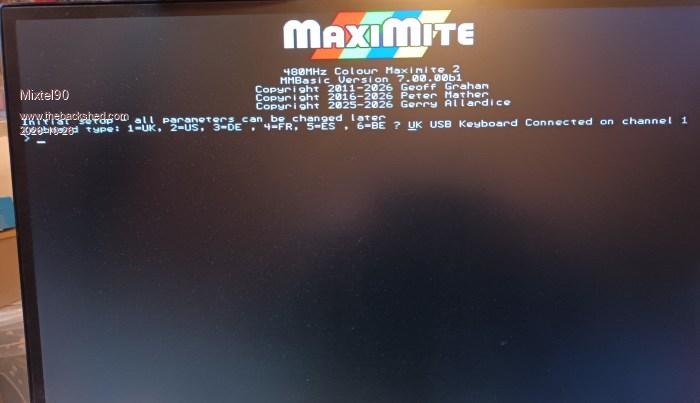
I attempted to update a Gen 1 Revision2? (the one with an SMD chip rather than the module) last night. It failed. The Busy light stays on solid. The display has no CRLF before the string of keyboard options. A prompt appears then all is dead. No keyboard response or anything. The battery was flat (I guess the 1220 always is!) so I took that out. Same result whether there is a SD card in or not. Tried powering from USB on the PC and from a USB power bank. The setup (power supplies, leads etc.) works fine when I run my original CMM2 (the one with the module) so it doesn't look like a power supply problem. I'll probably have another play later.Mick
hhtg1968 Senior Member Joined: 25/05/2023 Location: GermanyPosts: 253
Posted: 08:21am 25 Oct 2026
Copy link to clipboard
Print this post
you used the standard way from manual to update?
usb a-a cable
stm32cubeprogrammer software (1,7GB long!)
...
Mixtel90 Guru Joined: 05/10/2019 Location: United KingdomPosts: 9245
Posted: 08:52am 25 Oct 2026
Copy link to clipboard
Print this post
Yep, USB A-A cable and a newly downloaded STM Cube. The firmware unzipped ok, appeared to load ok and appeared to verify ok. The header comes up ok on the display so the system is running - or at least starting. There is no prompt for the time & date, even with no battery fitted, it doesn't get that far (or skips it).
The firmware is CMM2V7.00.00b3.bin size: 1107 KBMick
hhtg1968 Senior Member Joined: 25/05/2023 Location: GermanyPosts: 253
Posted: 09:03am 25 Oct 2026
Copy link to clipboard
Print this post
I have two cmm2s
1. gen update to v7 - no problem
2. gen v2 update to v7 seems to be installed (stm32: ok), but no signal on vga after reset (i changed the jumper from "prog" to "run"
there is perhaps a loose contact at the usb-c power. if I touch it sometimes the cmm2 resets or has no power until touching it again.
Mixtel90 Guru Joined: 05/10/2019 Location: United KingdomPosts: 9245
Posted: 09:16am 25 Oct 2026
Copy link to clipboard
Print this post
I'll try downgrading this to 5.06 and see if that still works (I know I have that version - I think it's the one on my other CMM2). At least it would test whether it can be programmed or not. I don't want to touch the other until I have this one working.Mick
ManiB Senior Member Joined: 12/10/2019 Location: GermanyPosts: 191
Posted: 10:12am 25 Oct 2026
Copy link to clipboard
Print this post
This is fantastic news, Peter!
I have always wondered why there were so many differences between the PicoMite and the Colour Maximite 2, and I am really happy to see these two MMBasic worlds coming closer together.
As some of you know, I have been working on my German MMBasic tutorial book, *"Mein erstes MMBasic Programm"*, which now contains over 800 pages and many example programs.
I am planning to update both my PicoMite and my CMM2 to the latest firmware and test all the example programs from the book on both systems.
If most of them run without modification, that would be a huge step forward, especially for beginners learning MMBasic.
I also plan to cover these developments in the next edition of my book.
Thank you, Peter, for all the work you put into MMBasic!
Mixtel90 Guru Joined: 05/10/2019 Location: United KingdomPosts: 9245
Posted: 01:51pm 25 Oct 2026
Copy link to clipboard
Print this post
Hmmm... I took it back to V5.06.00 (doing a full memory erase first) and it worked fine, prompting for keyboard, date & time exactly as expected (still no battery). Tried the CMM2V7.00.00b3 file again (full erase again) and it failed in exactly the same way. I used a wired USB keyboard for these tests just in case it was a dongle problem with the previous one, it appears not to be. Anyway, it's not fried. :) I'll try a different file.Mick
PhenixRising Guru Joined: 07/11/2023 Location: United KingdomPosts: 2104
Posted: 02:00pm 25 Oct 2026
Copy link to clipboard
Print this post
Here's hoping that V7 skips the time/date prompt. It's the only thing I never liked. A dead battery should never hold up anything.
matherp Guru Joined: 11/12/2012 Location: United KingdomPosts: 12066
Posted: 02:21pm 25 Oct 2026
Copy link to clipboard
Print this post
No chance. It is a disk based system and running it with an incorrect clock means the time stamping of files is then wrong so you can never sort by date in any meaningful way
post exactly the sequence you are trying to use and I'll see if I can replicate or diagnose Edited 2026-10-26 00:22 by matherp
Mixtel90 Guru Joined: 05/10/2019 Location: United KingdomPosts: 9245
Posted: 03:23pm 25 Oct 2026
Copy link to clipboard
Print this post
Tried V700.00.b1 and that failed in the same way.
Sequence: No battery or SD card Disconnect power lead (power switch off anyway) Change link from RUN to PROGRAM Connect to PC using USB A-A lead Run Cube Click Connect - get message that it's connected Select Download section Select file to use Select Verify Programming (Select Full chip erase -if using it) Click Start Programming - get bargraph followed by "Successful" popup Verify starts automatically - get "Successful" popup Close popups and disconnect
Disconnect A-A lead Plug keyboard into USB-A socket Change link from PROGRAM to RUN Connect power lead Switch on Run light on Busy light after a delay (solid, not blinking) (now I have a bit of a delay while the silly monitor will switch to VGA and stay there!)
Get rock solid VGA picture. The cursor is flashing but keyboard does nothing. Mick
PhenixRising Guru Joined: 07/11/2023 Location: United KingdomPosts: 2104
Posted: 03:41pm 25 Oct 2026
Copy link to clipboard
Print this post
@matherp
I figured as much so I have been looking at two lithium AAs in parallel.
If you publish the build package for the CMM2, I'll order without the 2032 holder.
PhenixRising Guru Joined: 07/11/2023 Location: United KingdomPosts: 2104
Posted: 03:44pm 25 Oct 2026
Copy link to clipboard
Print this post
Mick, have you tried with Sd-Card?
matherp Guru Joined: 11/12/2012 Location: United KingdomPosts: 12066
Posted: 03:52pm 25 Oct 2026
Copy link to clipboard
Print this post
With that on the screen you should be able to press the 1 key. You will then be prompted for the time and date. Just type numbers. It does the rest. Ensure you have a battery installed before finishing the numbers. If that doesn't work try over teraterm
I've just been through the whole process on a g2 with no issues. Do a full chip erase to start just to be sure. After you have flashed it may be worth power cycling. Then with the battery out you get the keyboard prompt followed by the keyboard connect sometime after. Press 1. The I inserted the battery and entered the time and date. After that it rebooted an all good to go.
Mixtel90 Guru Joined: 05/10/2019 Location: United KingdomPosts: 9245
Posted: 04:21pm 25 Oct 2026
Copy link to clipboard
Print this post
Yay! Thank you very much, Peter, things are working now. Have installed SD card, Phenix, and my only "rare as rocking horse pooh" platinum plated battery.
It had me fooled because there is a CRLF after the keyboard prompt question mark on 5.06 and it stops to wait for a digit to be pressed. This assumed a UK USB keyboard was connected. (it's actually a US keyboard by the way) In my dim way I assumed that if the USB keyboard had been recognised simply pressing return to accept it would lead to the date/time setting. I thought something was playing up. :)Mick
PhenixRising Guru Joined: 07/11/2023 Location: United KingdomPosts: 2104
Posted: 04:38pm 25 Oct 2026
Copy link to clipboard
Print this post
Excited as ever
So if I understand correctly, the CMM2 was nominally 270,000 lines/sec and now (potentially) >1M lines/sec?
matherp Guru Joined: 11/12/2012 Location: United KingdomPosts: 12066
Posted: 05:52pm 25 Oct 2026
Copy link to clipboard
Print this post
PhenixRising and Mixtel90 Can you let me have your views on the new hybrid servo motors (closed loop stepper) that are now appearing at sensible prices. I'm thinking of upgrading my CNC router. PS PhenixRising: I'm hoping to get the stepper capability into the CMM2 with a 100KHz maximum step rate. I've also found and fixed a number of bugs in the stepper driver causing things like slowdown in arcs.
Mixtel90 Guru Joined: 05/10/2019 Location: United KingdomPosts: 9245
Posted: 06:25pm 25 Oct 2026
Copy link to clipboard
Print this post
Apart from playing with a basic stepper on the bench (and watching my 3D printer in amazement) I'm afraid I've had nothing to do with stepper motors, I'm afraid. We didn't use them when I was designing control panels. I like the look of those closed loop ones though. I've just been watching a youtube demo. Very clever stuff.Mick

 Notice. New forum software under development. It's going to miss a few functions and look a bit ugly for a while, but I'm working on it full time now as the old forum was too unstable. Couple days, all good. If you notice any issues, please contact me.

 Print this post