Notice. New forum software under development. It's going to miss a few functions and look a bit ugly for a while, but I'm working on it full time now as the old forum was too unstable. Couple days, all good. If you notice any issues, please contact me.
PhenixRising Guru Joined: 07/11/2023 Location: United KingdomPosts: 2125
Posted: 06:56pm 29 Oct 2026
Copy link to clipboard
Print this post
Original Photo:
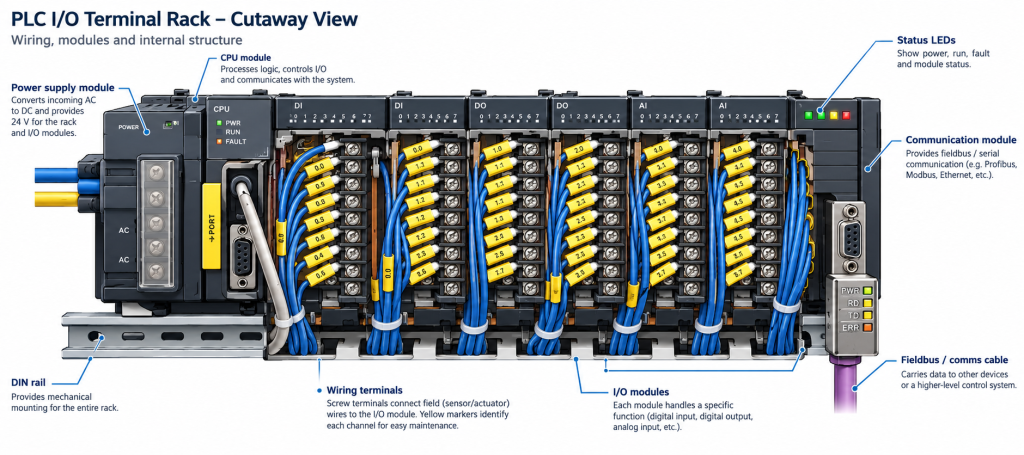
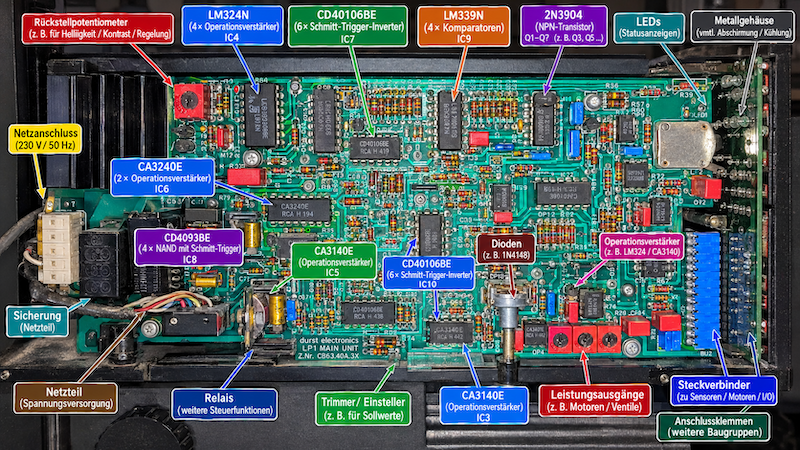
Simply uploaded to ChatGPT:
It even added the darned text and pointers I gave it no information whatsoever, just uploaded the photo
This is what I have been wanting because I upgrade old machines. Now I can include diagnostic information that includes the cr@ppy bits that I don't replace.
Absolutely blown away.
Edit: It must've recognised what it was and found something close...dunno. Edited 2026-10-30 05:03 by PhenixRising
PhenixRising Guru Joined: 07/11/2023 Location: United KingdomPosts: 2125
Posted: 07:18pm 29 Oct 2026
Copy link to clipboard
Print this post
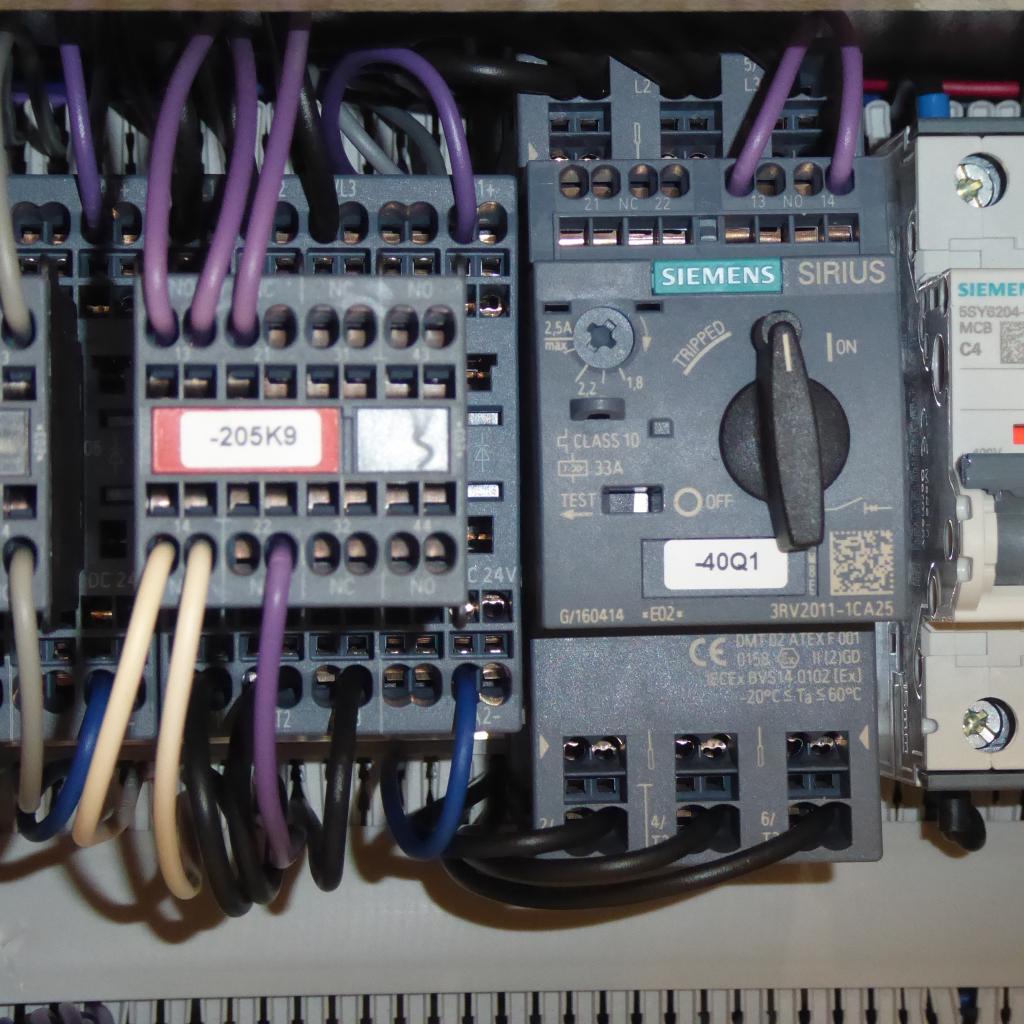
Motor contactor. I took this pic with my phone:
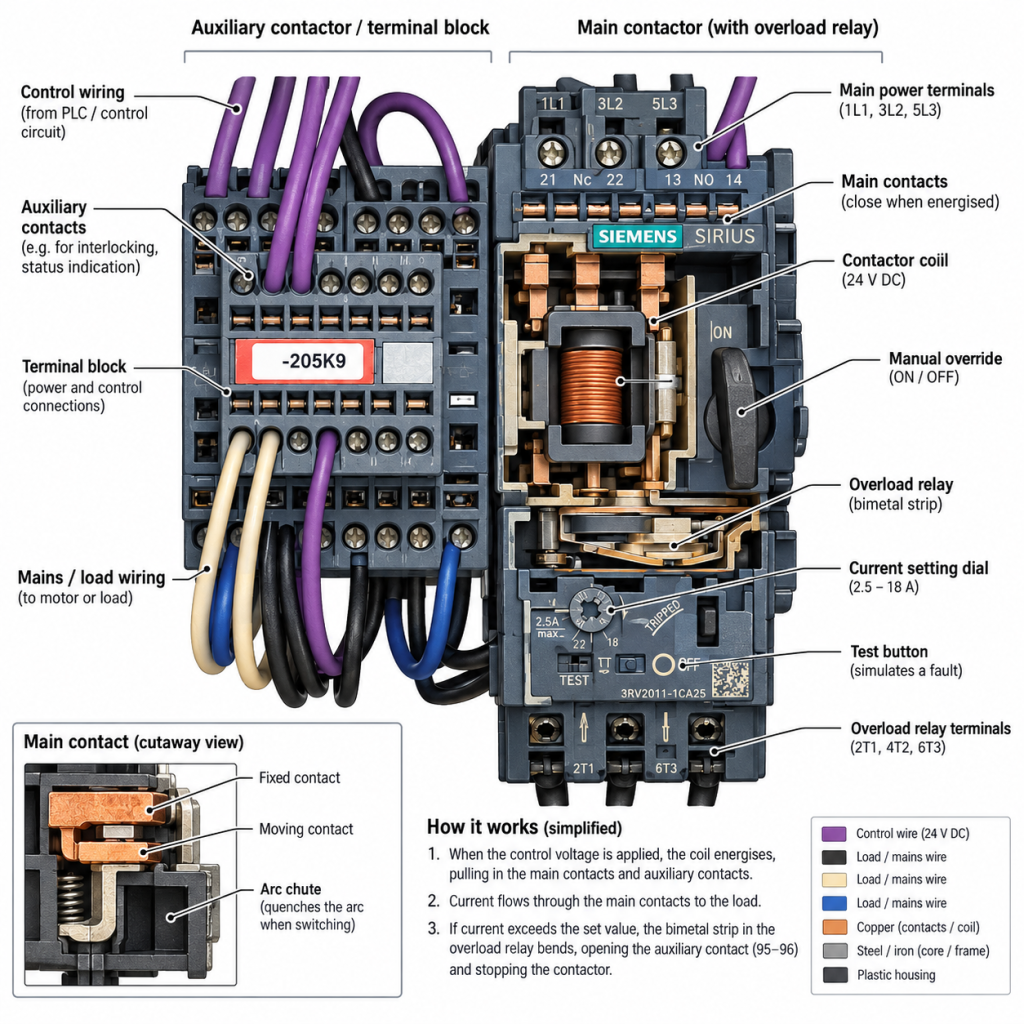
It gave me a "cutaway" view:
Bleep Guru Joined: 09/01/2022 Location: United KingdomPosts: 868
Posted: 07:23pm 29 Oct 2026
Copy link to clipboard
Print this post
Except there is quite a bit which is wrong in your original post. It's labeled the power input terminals on the Left AC they were NC it's ignored the earth symbol, the labeling is offset from the actual terminals, the mains input cable is blue and yellow, not Blue, Brown and Green/Yellow, it's invented several Blue cables in the I/O modules.... Obviously I have no idea how important such things are? Edited 2026-10-30 05:26 by Bleep
PhenixRising Guru Joined: 07/11/2023 Location: United KingdomPosts: 2125
Posted: 07:27pm 29 Oct 2026
Copy link to clipboard
Print this post
Yeah I realize that. However, there is a prompt to let it know where it messed-up, just like regular chat. Plus it appears that one can upload images from different angles for more accurate processing. I can work with this because it's the "like new" high quality images that I am excited about.
mozzie Guru Joined: 15/06/2020 Location: AustraliaPosts: 486
Posted: 01:36am 30 Oct 2026
Copy link to clipboard
Print this post
G'day, That is mighty impressive, might have to finally give AI a crack as this sort of thing is usually a pain it the backside.
I get the feeling it has identified the device in the pic and overlaid the wiring onto another pic from a brochure or manual it found on the interwebs, your motor contactor has spring terminals but the one shown has screw terminals, I think that was the previous version.
Still mighty impressive.
Regards, Lyle.
bigmik Guru Joined: 20/06/2011 Location: AustraliaPosts: 2983
Posted: 05:42am 30 Oct 2026
Copy link to clipboard
Print this post
AI does have some uses,
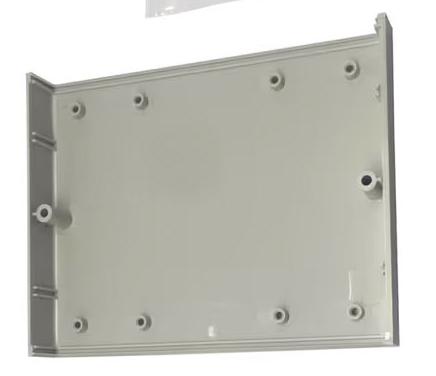
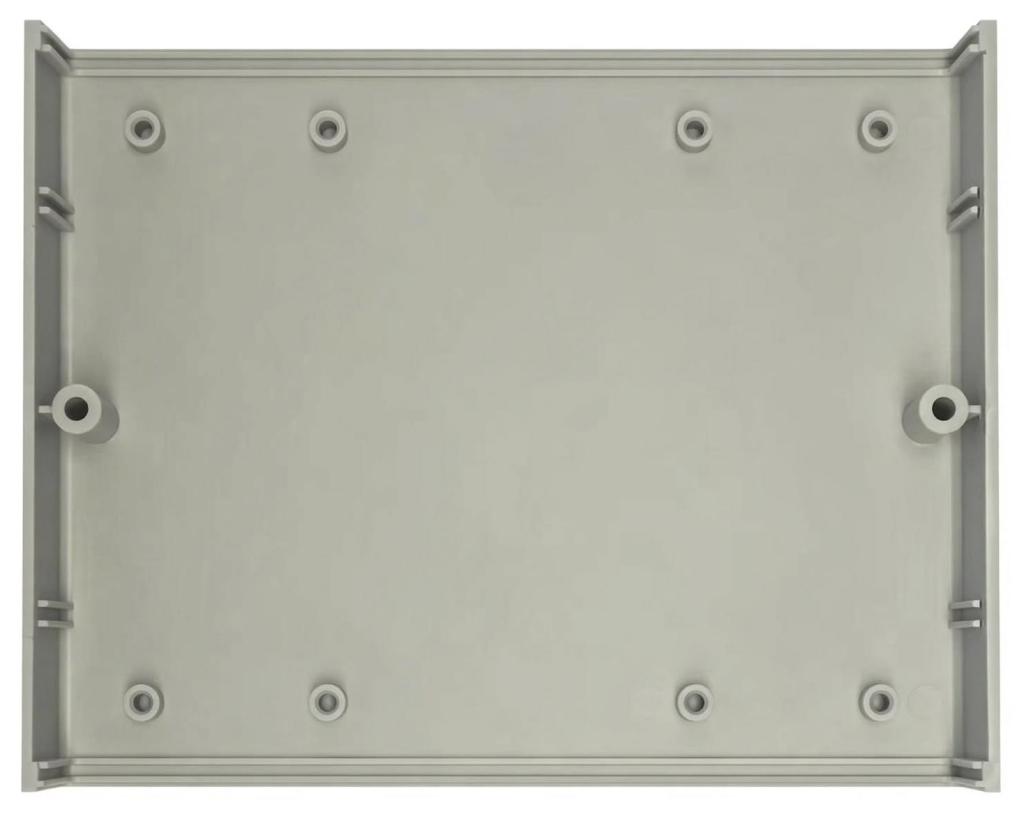
I told Meta.ai to process this image (all the actual photos were in oblique view) of a Hammond case and to view it from the top.
Original
What it came back with
It knocked my socks off, or it would have if I was wearing any.
hhtg1968 Senior Member Joined: 25/05/2023 Location: GermanyPosts: 272
Posted: 08:25am 30 Oct 2026
Copy link to clipboard
Print this post
I am impressed.
I tried at once with my old foto equipment.
here (the fotos are small, just to show):
after chatgpg:
this is a real first help.
Volhout Guru Joined: 05/03/2018 Location: NetherlandsPosts: 6210
Posted: 08:28am 30 Oct 2026
Copy link to clipboard
Print this post
Hi Phenix,
This photo in your first post, and de AI re-creation contain dangerous differences.
1/ The material differences are confusing (I, as a customer, would expect my actual PLC uses a totally different CPU compared to the AI generated picture.
2/ The only distinguisable wiring (the mains wiring) is dangerously wrong, as is the NC markin that says AC.
3/ The 16 channel IO modules, appear as 8 channel modules in AI (8 status LED's per module).
4/ The thing marked DIN rail, is not a DIN rail, and it is not used for mounting the equpment. It is a cable gutter (mistplaced as well).
5/ Real life has 5 "input" modules, and 1 "output" module. AI made that 6 "input" modules and a half "output" module.
6/ The COMM module has 4 status LED's according AI. and 7 in real life.
That is the risk with AI, it is dangerously close, and therefore confusing. A human at first glance would be impressed. But it is not accurate at all, and is therefore unusable for any form of documentation. Edited 2026-10-30 18:31 by VolhoutPicomiteVGA PETSCII ROBOTS
Volhout Guru Joined: 05/03/2018 Location: NetherlandsPosts: 6210
Posted: 08:38am 30 Oct 2026
Copy link to clipboard
Print this post
Hahahaha !!!
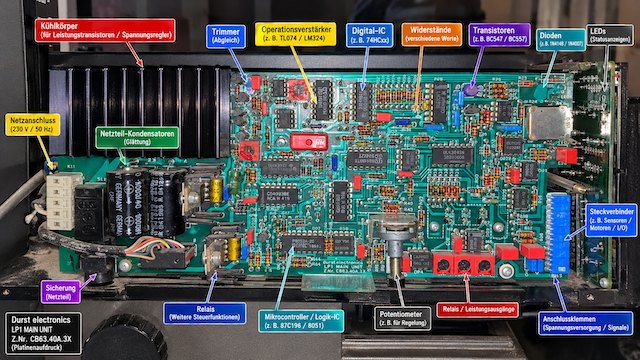
It confused you as well... I love this. - In the real photo there is no trimmer at all (abgleich). AI simply added a part. - A mounting screw is called "transistors BC547/BC557" - A voltage regulator on a heatsink is called "relay". - There is no Microcontroller on this board - It is hard to tell from the original photo, but I think there is no digital IC on this board. This looks like a full analog design. - The red things called "relay" are most likely adjustment trimmers, or switches.
Mixtel90 Guru Joined: 05/10/2019 Location: United KingdomPosts: 9280
Posted: 08:42am 30 Oct 2026
Copy link to clipboard
Print this post
It's very clever but it tells lies...
I wouldn't normally put a load through the auxiliary contact block. Especially when there's nothing to feed it. The motor switch/contactor/overload is a completely different model with the same part number. The contacts and coil are mis-labelled.
You always need to give AI results a really good checking over.Mick
hhtg1968 Senior Member Joined: 25/05/2023 Location: GermanyPosts: 272
Posted: 11:49am 30 Oct 2026
Copy link to clipboard
Print this post
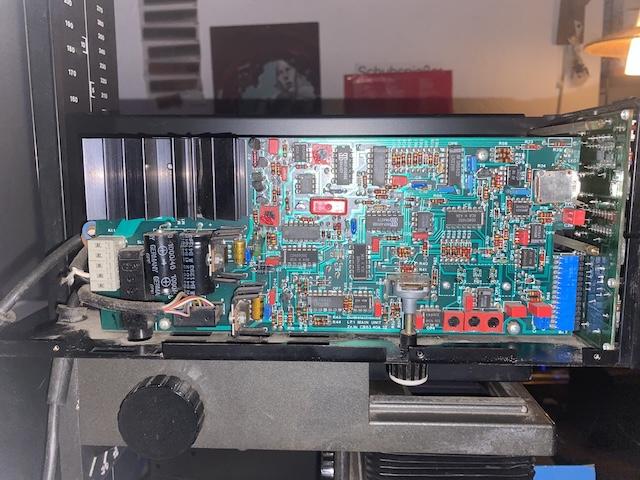
I tried other AIs with different "solutions".
bit if you insist the AI, its getting better...
hhtg1968 Senior Member Joined: 25/05/2023 Location: GermanyPosts: 272
Posted: 12:01pm 30 Oct 2026
Copy link to clipboard
Print this post
after chatting with the AI its getting better.
But it's not quite as perfect as it seems.
Volhout Guru Joined: 05/03/2018 Location: NetherlandsPosts: 6210
Posted: 12:31pm 30 Oct 2026
Copy link to clipboard
Print this post
Sorry
Disagree, this is even worse. It even removed part of the PCB. And this time it only has 1 comment right : Steckverbindung. And the item "LM324" is correct in it's comment, but AI invented the part completely. It even stretched that package from 3e to 4e width. Stop wasting your time. This is never going to be correct, or even close to correct.
Mixtel90 Guru Joined: 05/10/2019 Location: United KingdomPosts: 9280
Posted: 12:49pm 30 Oct 2026
Copy link to clipboard
Print this post
It's probably easier (and much more correct) to get a good photo in the first place (camera on a tripod please, with sensible lighting - not a handheld phone!) then mark it up in a photo editing package such as PhotoFiltre 7.Mick
EDNEDN Guru Joined: 18/02/2023 Location: United StatesPosts: 309
Posted: 12:50pm 30 Oct 2026
Copy link to clipboard
Print this post
"but AI invented the part completely. It even stretched that package from 3e to 4e width. Stop wasting your time. This is never going to be correct, or even close to correct."
It is very important to use a competent AI. I suspect Claude's Opus 5.5 would do a better job at this.
Mixtel90 Guru Joined: 05/10/2019 Location: United KingdomPosts: 9280
Posted: 01:20pm 30 Oct 2026
Copy link to clipboard
Print this post
It's even more important to check it's output. It might hide its mistakes better. :)
PhenixRising Guru Joined: 07/11/2023 Location: United KingdomPosts: 2125
Posted: 09:56am 31 Oct 2026
Copy link to clipboard
Print this post
Hi Harm,
A bit of context: An email invited me to "Test It" and so I did. It prompted for a bitmap image and so I simply grabbed that poor quality photo.
I'm not working with PLCs (don't like 'em ). I had no idea that it would go and look for an original PLC image or I would've provided the make/model because on the picture it's not legible. I also selected the "cutaway" option and I think it tried to provide a cutaway. No, I am more impressed with the image quality. I tried Mick's photo-suggestion, in the past and it's always a mess. I didn't have time to input any rules or to point-out the errors because I had to be somewhere else and so I literally just grabbed two random bitmaps. When I have time, I will see just what is possible.
The goal: I display all machine schematics; for example, when I have a condition:
The maintenance person can select "Help" and the appropriate schematic pops-up. The problem then is to locate the relevant components and terminals in the control panel.
I also intend to included instructions for machine setup but the mechanical components typically are not clean and the paintwork chipped. I am hoping that AI can provide images that eliminate this and make them look as-new.
All part of my mission to minimize downtime Edited 2026-10-31 19:57 by PhenixRising
PhenixRising Guru Joined: 07/11/2023 Location: United KingdomPosts: 2125
Posted: 10:13am 31 Oct 2026
Copy link to clipboard
Print this post
That came from an almost-new curtain-rail making machine, out of Switzerland. I was disappointed, to say the least, with the quality of the panel wiring.
Page 1 of 2
Print this page
The Back Shed's forum code is written, and hosted, in Australia.

 Notice. New forum software under development. It's going to miss a few functions and look a bit ugly for a while, but I'm working on it full time now as the old forum was too unstable. Couple days, all good. If you notice any issues, please contact me.


 Print this post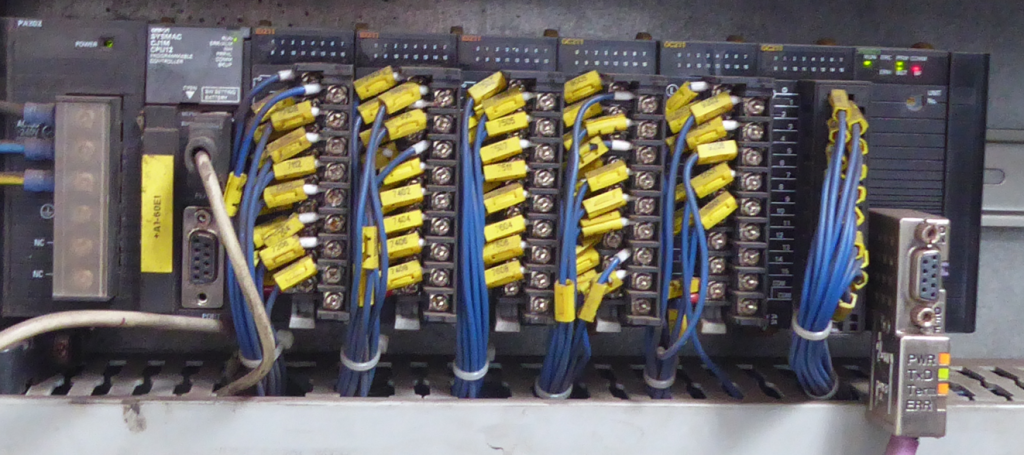
 I gave it no information whatsoever, just uploaded the photo





 ). I had no idea that it would go and look for an original PLC image or I would've provided the make/model because on the picture it's not legible. I also selected the "cutaway" option and I think it tried to provide a cutaway.
