Notice. New forum software under development. It's going to miss a few functions and look a bit ugly for a while, but I'm working on it full time now as the old forum was too unstable. Couple days, all good. If you notice any issues, please contact me.
larny Guru Joined: 31/10/2011 Location: AustraliaPosts: 349
Posted: 03:11pm 24 Sep 2015
Copy link to clipboard
Print this post
I searched the Benq site for a User Manual with no luck.
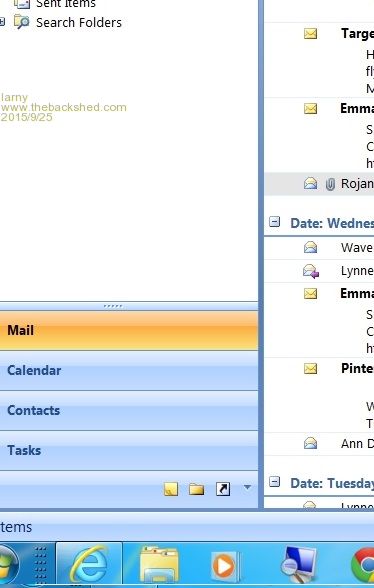
As you can see in the image below (I copied the left hand lower portion of the screen - the sample is about half the screen in height) the left hand edge of the screen is missing.
Also note that the text is small.
I experimented with the buttons on the Monitor and found that I could change the Horizontal position, but not the scanning width.
I attempted to change the text size in Windows 7/Control Panel/Display & in Microsoft Outlook without success.
Does anyone know how to fix these issues?
Does any one have a User Manual for the Benq mentioned above or one for a similar Monitor?
Any assistance will be appreciated.
Edited by larny 2015-09-26
paceman Guru Joined: 07/10/2011 Location: AustraliaPosts: 1329
Posted: 04:36pm 24 Sep 2015
Copy link to clipboard
Print this post
Hi Larny,
I think you're on the wrong forum for info on this sort of request.
Greg
Gizmo Admin Group Joined: 05/06/2004 Location: AustraliaPosts: 5197
Posted: 04:53pm 24 Sep 2015
Copy link to clipboard
Print this post
It could be the Windows Magnifier?
Right click on your desktop, click "Personalize", click "Ease of Access Center", see if the "Start Magnifier" is active.
GlennThe best time to plant a tree was twenty years ago, the second best time is right now. JAQ
twofingers Guru Joined: 02/06/2014 Location: GermanyPosts: 1773
Posted: 09:23pm 24 Sep 2015
Copy link to clipboard
Print this post
Hi,
I would try to change the screen resolution (Win). Maybe the monitor signals are misinterpreted?
Michael‚My name is Ozymandias, king of kings Look on my works, ye Mighty, and despair!‘ Nothing beside remains. Round the decay Of that colossal wreck, boundless and bare The lone and ...
robert.rozee Guru Joined: 31/12/2012 Location: New ZealandPosts: 2552
Posted: 01:58am 25 Sep 2015
Copy link to clipboard
Print this post
i believe there is an "auto" button, the leftmost in the row. press and hold this auto button for several seconds. your problem will be fixed.
for others wondering: this appears to be an analog interface only monitor.
cheers,
rob :-)
VK2MCT Senior Member Joined: 30/03/2012 Location: AustraliaPosts: 120
Posted: 02:12am 25 Sep 2015
Copy link to clipboard
Print this post
I think the magnifying glass in the TaskBar is a clue.
Try right click on magnifier. then left click on 'close window' that is on menu now visible.
John B.
larny Guru Joined: 31/10/2011 Location: AustraliaPosts: 349
Posted: 12:02pm 25 Sep 2015
Copy link to clipboard
Print this post
Thanks Robert, that did the trick.
However, this monitor has a VGA & a HDMI input.
Thanks to everyone who replied. Much appreciated.
Someone on another from another forum posted this link to a User Manual for it.

 Notice. New forum software under development. It's going to miss a few functions and look a bit ugly for a while, but I'm working on it full time now as the old forum was too unstable. Couple days, all good. If you notice any issues, please contact me.

 Print this post