Notice. New forum software under development. It's going to miss a few functions and look a bit ugly for a while, but I'm working on it full time now as the old forum was too unstable. Couple days, all good. If you notice any issues, please contact me.
Geoffg Guru Joined: 06/06/2011 Location: AustraliaPosts: 3369
Posted: 05:12am 25 Jan 2026
Copy link to clipboard
Print this post
Peter has delivered the latest release version of the PicoMite firmware V6.02.00.
This can be downloaded from https://geoffg.net/picomite.html (scroll to the bottom of the page). It includes the updated user manual and additional specialised manuals (see the Extra Documentation folder in the firmware zip).
In addition to fixing all reported bugs this version includes many new commands/functions and enhancements including ASTRO for calculating the position of celestial objects, an extended BITSTREAM command for generating precise bitstreams, a driver for HD44780-compatible character LCD displays, a comprehensive system for controlling stepper motors and the command STRUCT which allows for the manipulation of structures.
Grogster Admin Group Joined: 31/12/2012 Location: New ZealandPosts: 10073
Posted: 06:10am 25 Jan 2026
Copy link to clipboard
Print this post
Damn, does that man ever sleep?! Smoke makes things work. When the smoke gets out, it stops!
matherp Guru Joined: 11/12/2012 Location: United KingdomPosts: 12058
Posted: 08:58am 25 Jan 2026
Copy link to clipboard
Print this post
Release notes: This release is fundamentally about the implementation of structured types in MMbasic and their use in many commands and functions
New commands: TYPE END TYPE STRUCT BITSTREAM command with dual pin capability I2CLCD
New Functions: STRUCT(
Other changes: Memory footprint of MODFILE playback reduced Improved handling of errors during tokenising the code Removed constraint on number of case statements in SELECT CASE block Enhancements to SPRITE command and function COLOUR MAP now available for framebuffers on PicoMite versions COPY command now allows copying a single file to a directory without specifying the destination filename Includes the SUN in ASTRO and STAR commands Major rework of the interaction between foreground and background I2C tasks on the SYSTEM I2C to avoid conflicts Reduced memory overhead of various systems if not used: Turtle graphics, PLAY MP3, Sprites, Virtual Displays MM.INFO(LCDPANEL) now returns the current mode for VGA and HDMI versions XMODEM now always pads with NULL characters and terminates lines with CR/LF
Bug fixes: Fixed bug where audio could play at the wrong speed after playing a MODFILE Fied bugs in use of virtual screen drivers Fixes bugs in editor when default mode is not 1 Fixes lockup when trying to FLASH CHAIN or FLASH RUN an empty flash slot Fixes bug when copying a file to itself Fixes bug where GPS data with incorrect checksum was not invalidated Fixes bug where program could attempt to free unallocated heap memory Fixes bug in OPTION LIST for some LCD displays
bfwolf Senior Member Joined: 03/01/2025 Location: GermanyPosts: 258
Posted: 09:49am 25 Jan 2026
Copy link to clipboard
Print this post
I was wondering why Peter was so quiet on the release candidate thread: I thought, "Either he's still hatching an improvement or new feature, or he's waiting a few days for bugs to be found before he can fire off version 6.02.00?"
Congratulations and many thanks for the work, Peter!
Thanks to you too, Geoff!
Volhout Guru Joined: 05/03/2018 Location: NetherlandsPosts: 6197
Posted: 10:59am 25 Jan 2026
Copy link to clipboard
Print this post
I missed that one in testing. Is it RP2350 only ? "2350 only" was not listed in the user manual. On 2040 I get "unknown command"
cosmic frog Guru Joined: 09/02/2012 Location: United KingdomPosts: 311
Posted: 11:47am 25 Jan 2026
Copy link to clipboard
Print this post
Thankyou to Peter, Geoff and everyone involved.
lizby Guru Joined: 17/05/2016 Location: United StatesPosts: 3885
Posted: 02:36pm 25 Jan 2026
Copy link to clipboard
Print this post
Super upgrade, Peter. I've been using structures a lot for the indices in my PicoDB database (files which are arrays of structures), and they're very helpful--especially for sorting.
matherp Guru Joined: 11/12/2012 Location: United KingdomPosts: 12058
Posted: 02:44pm 25 Jan 2026
Copy link to clipboard
Print this post
Yes, for new releases I force a complete flash clear - we have ways...
karlelch Guru Joined: 30/10/2014 Location: GermanyPosts: 361
Posted: 05:46pm 25 Jan 2026
Copy link to clipboard
Print this post
Thank you for the new release, Peter!
homa Guru Joined: 05/11/2021 Location: GermanyPosts: 724
Posted: 07:16pm 25 Jan 2026
Copy link to clipboard
Print this post
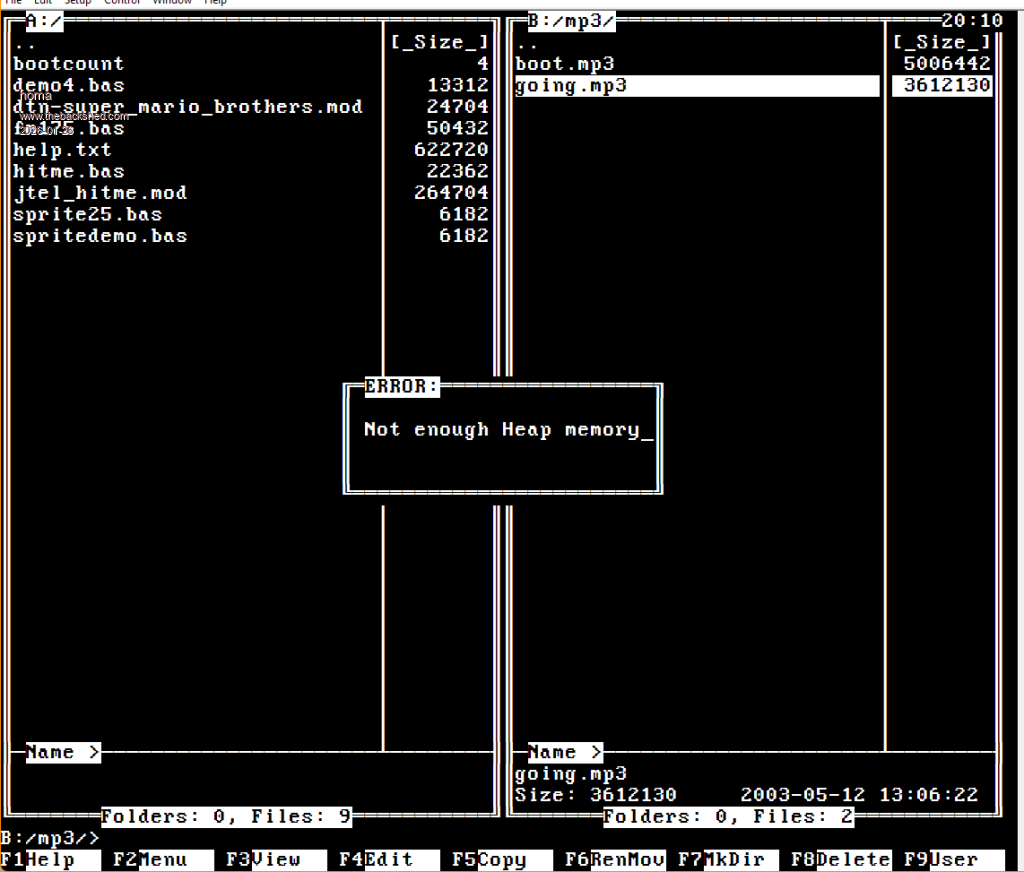
Does anyone else have this problem with MP3 playback from the FM175? It used to work without any problems. It also works when I start playback from the prompt.
> option list PicoMiteHDMI MMBasic USB RP2350A Edition V6.02.00 OPTION SERIAL CONSOLE COM2,GP8,GP9 OPTION SYSTEM I2C GP20,GP21 OPTION FLASH SIZE 4194304 OPTION COLOURCODE ON OPTION KEYBOARD GR OPTION RESOLUTION 640x480 @ 315000KHz OPTION SDCARD GP22, GP26, GP27, GP28 OPTION AUDIO GP10,GP11', ON PWM CHANNEL 5 OPTION RTC AUTO ENABLE OPTION MODBUFF ENABLE 192 OPTION PLATFORM HDMIUSB >
Matthias
phil99 Guru Joined: 11/02/2018 Location: AustraliaPosts: 3416
Posted: 08:54pm 25 Jan 2026
Copy link to clipboard
Print this post
That does appear to be the case. On the RP2040 there is the new 2 pin Bitstream command that could run a stepper motor in bursts. The amount of memory for the arrays would limit continuous running. If more than one motor I think it would only do one at a time.
Volhout Guru Joined: 05/03/2018 Location: NetherlandsPosts: 6197
Posted: 06:05am 26 Jan 2026
Copy link to clipboard
Print this post
Hi phill,
Look in the new user manual, command STEPPER. Look at the new EXTRA DOCUMENTATION folder in the zip. This looks a g-code converter for stepper motors.
Volhout Guru Joined: 05/03/2018 Location: NetherlandsPosts: 6197
Posted: 08:25am 26 Jan 2026
Copy link to clipboard
Print this post
@Geoff,
What is your own opinion on the single user manual for all different Pico flavours ?
I understand it is a lot less maintenance in case of updates. Update one manual, and it is done.
But for the end-user (i.e. who bought a RP2350 WEB pico) it is quite a search to see what is implemented on his version of MMBasic. Can he interface with an LCD ? Is keyboard support built in ?
It cannot be avoided that different platforms have a different feature set. End users would benefit from a user manual to shows exactly (and only) what features MMBasic has on their hardware.
Volhout
P.S. this remark is triggered by the fact that I noticed STRUCT is implemented in RP2040 and STEPPER is not implemented.PicomiteVGA PETSCII ROBOTS
matherp Guru Joined: 11/12/2012 Location: United KingdomPosts: 12058
Posted: 08:31am 26 Jan 2026
Copy link to clipboard
Print this post
Geoff has updated the 6.02.00 firmware on his site if you re-download.
The change, by popular request.....
The editor expands the use of the F4 mark function so that when you reach the beginning or end of the screen it will continue to work as the screen scrolls. In addition it will work with page up and page down. It is still subject to a maximum cut or copy of 2048 characters.
Also, as you mark text you will see a new option on the status bar - F10. Pressing F10 will prompt for a filename and when you press return write the contents of the marked area to the file. F10 also works when not in "mark" mode and will write out the contents of the cut/paste buffer, if any.
Finally, F9 can be used to insert the contents of a file at the current cursor position. Press F9 and you will be prompted for the name of a file and when you press return the file will be inserted.
Note on MP3 playback: MP3 playback uses a LOT of memory. At the command prompt play an mp3 file and then type MEMORY to see how much. Prior to 6.02.00 it took a lot of that memory off the system stack. This caused repeated issues with complete crashes of the PicoMite environment if the stack corrupted other memory. In 6.02.00, the code has been changed so the memory is taken from the MMBasic heap. This allows for a graceful error "Not enough heap memory" rather than a system crash. The overall memory usage is the same. If you see this error in a program you will need to reduce other data structures to free up enough memory for mp3 playback. Previously, your code might have worked but hidden data was probably being corrupted leading to undefined errors.
Volhout Guru Joined: 05/03/2018 Location: NetherlandsPosts: 6197
Posted: 09:46am 26 Jan 2026
Copy link to clipboard
Print this post
@Peter,
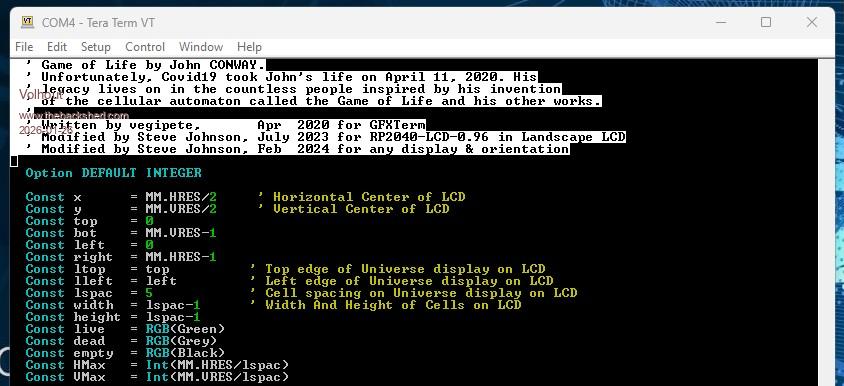
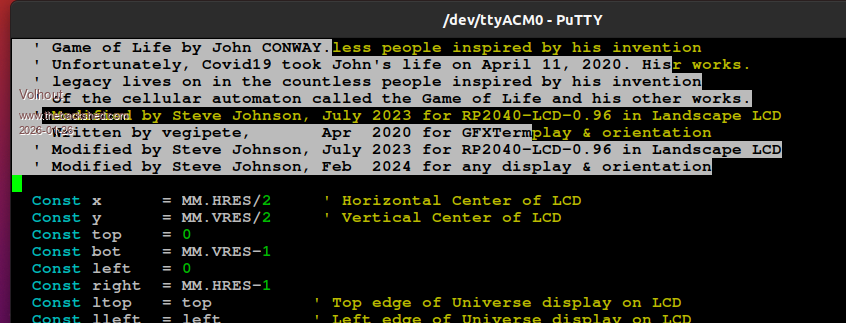
The change in the editor does not work out well for the Linux Putty combination. It works well for Windows Teraterm. See below.
Highlighting with F4 in TeraTerm. Works fine.
Highlighting with F4 in Putty/Linux. At press of F4 the text is shifted up two lines, then highlighting happens as if text was not shifted up.
matherp Guru Joined: 11/12/2012 Location: United KingdomPosts: 12058
Posted: 09:49am 26 Jan 2026
Copy link to clipboard
Print this post
You will need to find whatever setting is needed to overcome this. Probably inferring CR from LF or something like that. Fresh install of putty works perfectly on windows Edited 2026-01-26 19:52 by matherp
Volhout Guru Joined: 05/03/2018 Location: NetherlandsPosts: 6197
Posted: 11:42am 26 Jan 2026
Copy link to clipboard
Print this post
@Peter,
- F4 editor problem, as listed above - File Manager MMCC (linux) cannot transfer files anymore from GEEK to PC
matherp Guru Joined: 11/12/2012 Location: United KingdomPosts: 12058
Posted: 12:02pm 26 Jan 2026
Copy link to clipboard
Print this post
I've no idea what mmcc linux uses to transfer and F4 tests perfectly on windows with both putty and teraterm. I've configured a RP2040 as a geek even though I don't have one and xmodem works perfectly both ways to/from file or memory
bfwolf Senior Member Joined: 03/01/2025 Location: GermanyPosts: 258
Posted: 01:22pm 26 Jan 2026
Copy link to clipboard
Print this post
I just downloaded the new zip file for version 6.02.00: I'm a bit confused... The .uf2 files all have the same timestamp as yesterday's version (January 25, 2036) – but the zip file is a different size, and the manual PDF has a timestamp from today (January 26, 2036)??
So it shouldn't be a browser cache issue with the download – I haven't had that problem in ages anyway.
The new features for cut and paste and a clipboard via Files are very welcome!
Regards.
matherp Guru Joined: 11/12/2012 Location: United KingdomPosts: 12058
Posted: 01:27pm 26 Jan 2026
Copy link to clipboard
Print this post
I sent them to Geoff yesterday. If they have the new functionality, then they are correct.
Page 1 of 5
Print this page
The Back Shed's forum code is written, and hosted, in Australia.

 Notice. New forum software under development. It's going to miss a few functions and look a bit ugly for a while, but I'm working on it full time now as the old forum was too unstable. Couple days, all good. If you notice any issues, please contact me.


 Print this post