Notice. New forum software under development. It's going to miss a few functions and look a bit ugly for a while, but I'm working on it full time now as the old forum was too unstable. Couple days, all good. If you notice any issues, please contact me.
Volhout Guru Joined: 05/03/2018 Location: NetherlandsPosts: 6195
Posted: 07:51am 26 Jan 2026
Copy link to clipboard
Print this post
Hi Jim,
In the Linux version of MMEdit, you have pre-set the line to open MMB4L (files/preferences/external programs).
This pre-set is incorrect (it has been wrong long before, but I never gave this feedback to you).
For MMB4L V0.6 and newer it should be:
-e %q%mmbasic -i %bas%%q% &disown
Thank you for your continued support on MMedit. A great way to work with MMBasic.
Volhout
P.S. The "-i" can be omitted once you have debugged the program, which in my case virtually never happens. The "-i" keeps the terminal open so you can see the error message. Edited 2026-01-26 17:54 by VolhoutPicomiteVGA PETSCII ROBOTS
PeteCotton Guru Joined: 13/08/2020 Location: CanadaPosts: 667
Posted: 04:28pm 26 Jan 2026
Copy link to clipboard
Print this post
Thank you Jim!
TassyJim Guru Joined: 07/08/2011 Location: AustraliaPosts: 6626
Posted: 05:03am 27 Jan 2026
Copy link to clipboard
Print this post
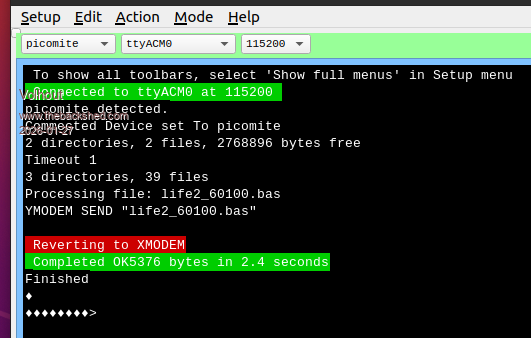
I have uploaded a new copy of V5.4.0 at 0500UTC 27/1/26 Hopefully it has fixed the problem with XMODEM on Linux.
To save downloading the full ZIP, I have attached the MMCC exe file. You may have to set permissions after replacing the old MMCC
Technical info: MMCC looks for the XMODEM SEND xxx command being echoed (looking for error messages). The Linux version does not always see the echoed command. I have yet to find out why so I assume it has been sent OK and send the starting <NAC> anyway.
Turbo46 Guru Joined: 24/12/2017 Location: AustraliaPosts: 1694
Posted: 05:07am 20 Feb 2026
Copy link to clipboard
Print this post
Hi Jim,
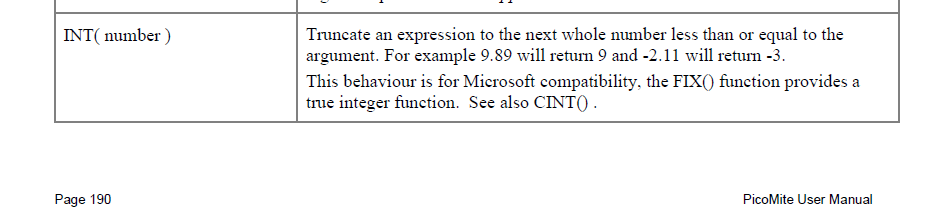
I just noticed that "int" is coloured blue as if it is a keyword. I couldn't find it in any manual but it happens in all versions of the syntax I tried. I can't find it in any manual. Is it correct? The program runs without error.
offset = INT(visibleCount / 2)
BillKeep safe. Live long and prosper.
TassyJim Guru Joined: 07/08/2011 Location: AustraliaPosts: 6626
Posted: 06:15am 20 Feb 2026
Copy link to clipboard
Print this post
INT has been there since the dawn of time, or at least the birth of MMBasic
Turbo46 Guru Joined: 24/12/2017 Location: AustraliaPosts: 1694
Posted: 06:27am 20 Feb 2026
Copy link to clipboard
Print this post
Thanks Jim, Now I can find it everywhere and that's what it's used for in the program. Sorry to waste your time. DOH!
BillKeep safe. Live long and prosper.
Turbo46 Guru Joined: 24/12/2017 Location: AustraliaPosts: 1694
Posted: 06:54am 01 Mar 2026
Copy link to clipboard
Print this post
Hi Jim,
I use MMBasic for DOS and MMB4W in conjunction with MMedit often to develop programs because the write code and test turnaround is so quick. Because the 'Run in DOS' button is so convenient, I was wondering if we could have one for MMB4W? Failing that, would it be possible to have the DOS button's function governed by the syntax selection?
BillKeep safe. Live long and prosper.
Volhout Guru Joined: 05/03/2018 Location: NetherlandsPosts: 6195
Posted: 06:16pm 01 Mar 2026
Copy link to clipboard
Print this post
Jim,
I am not sure about others, but I myself (running MMEDit/MMCC under ubuntu, have converted back to 5.37. 5.37 was absolutely stable in all kind of file transfers, loading from pico to MMEdit, filemanager, etc. Also with the pico 6.02.01b4 version.
5.40 (also with updated MMCC) still occasionally makes mistakes, and once, using the filemanager, I even lost a file. Not a big deal, since plenty of copies. But the mechanism in 5.37 worked better for the pico's I use.
When others are happy with 5.40, do not change anything. I am completely happy with how 5.37 is today, and have no problem with that. It works great. And I do not need token coloring for the new commands I am not going to use (structures etc..).
TassyJim Guru Joined: 07/08/2011 Location: AustraliaPosts: 6626
Posted: 07:59pm 01 Mar 2026
Copy link to clipboard
Print this post
Not easy and I am trying to limit the number of buttons. There are too many. I will think about it.
I don't use Linux very often. I can't properly test serial problems with a VM but I will try and give it some more attention. I now have a laptop dedicated to Linux. I have to work on the text sizes so it fits the buttons etc and improve compatibility with the different versions of Linux.
Turbo46 Guru Joined: 24/12/2017 Location: AustraliaPosts: 1694
Posted: 06:53am 22 Apr 2026
Copy link to clipboard
Print this post
Hi Jim,
Another request (sorry). After having gone through a few series of 'Find Next', 'Replace' 'Find Next' etc. I was wondering if it might be possible to add a 'Replace and Find Next' option? I would never use 'Replace All'.
BillKeep safe. Live long and prosper.
TassyJim Guru Joined: 07/08/2011 Location: AustraliaPosts: 6626
Posted: 07:06am 22 Apr 2026
Copy link to clipboard
Print this post
I will consider it. I often use F11 (Quick Find) when I have a lot of possible matches. Then if I don't see any problems, Replace All is 'safe'
It will be a few weeks before I get back to fiddling with MMEdit.
Turbo46 Guru Joined: 24/12/2017 Location: AustraliaPosts: 1694
Posted: 09:22am 22 Apr 2026
Copy link to clipboard
Print this post
Thanks Jim,
There is more to MMEdit than I will ever use but I did notice that if you select a word it is highlighted over the whole document. I guess that is the same effect.
BillKeep safe. Live long and prosper.
TassyJim Guru Joined: 07/08/2011 Location: AustraliaPosts: 6626
Posted: 06:07am 17 May 2026
Copy link to clipboard
Print this post
This is for Bill and Gerald (Turbo46 and ville56)
Both programs should handle strings faster thanks to a compiler update.
MMEdit The "Find" dialog now has an option "Next after replace" to automatically move to the next occurrence of the search term.
Holding <ctrl> while clicking the "action" button (3rd from right) will run option "0". (Run in DOS by default)
Preferences now has an option "zoom" Allowable range is 100 to 200 percent The toolbar should now scale better on high DPI screens. This was done mainly for Linux installations.
MMCC There is a "zoom" setting similar to the one in MMEdit which sizes the buttons.
The "'nap" directive in the command files now works "' nap x " at the start of a line will run the remainder of the line then wait x seconds before continuing. You don't have any opportunity to cancel the line.
This ZIP only contains the 2 executables for Windows 64 bit. You will need to copy them into your program folder, replacing the originals. The main program download has NOT been updated.
I have a lot more work to do on the Linux versions before releasing a full update.VK7JH MMedit
v.lenzer Senior Member Joined: 04/05/2024 Location: GermanyPosts: 157
Posted: 07:57am 17 May 2026
Copy link to clipboard
Print this post
Hi Jim! Thanks so much for the F7 functionality!!!!!! The indentation works perfectly with it.Best wishes! Joachim
fred777 Senior Member Joined: 01/07/2021 Location: United KingdomPosts: 106
Posted: 11:46am 17 May 2026
Copy link to clipboard
Print this post
Hi Jim!
Thanks for the great new version!
Is there any way to disable the bold and italic attributes, so only colours for the syntax? My eyes aren't what they used to be, so I need to use a thick Font all the time and when that is displayed as bold or italics it looks messed up.
Cheers, Fred
TassyJim Guru Joined: 07/08/2011 Location: AustraliaPosts: 6626
Posted: 12:44am 18 May 2026
Copy link to clipboard
Print this post
Fred, try this version. After running and shutting down MMEdit, there will be two new options in MMEdit5.inf around line 113

 Notice. New forum software under development. It's going to miss a few functions and look a bit ugly for a while, but I'm working on it full time now as the old forum was too unstable. Couple days, all good. If you notice any issues, please contact me.


 Print this post