Notice. New forum software under development. It's going to miss a few functions and look a bit ugly for a while, but I'm working on it full time now as the old forum was too unstable. Couple days, all good. If you notice any issues, please contact me.
tenij000 Senior Member Joined: 30/05/2025 Location: NetherlandsPosts: 107
Posted: 07:21pm 27 Feb 2026
Copy link to clipboard
Print this post
can still use the sd card if only try the hdmi firmware whit out the usb
do then need to do option sdcard ?,GP26,GP27,GP28
Mixtel90 Guru Joined: 05/10/2019 Location: United KingdomPosts: 9238
Posted: 07:29pm 27 Feb 2026
Copy link to clipboard
Print this post
No. There are never 3 arguments for the SDcard.
OPTION RESET HDMIUSB should set everything up, including the SDcard. It's specific to that board. If you are getting an error then what is it?
It's a HDMI USB board so both will be configured along with the sound and the SDcard.
Make sure you are following the instructions when setting it up. Once the USB is configured the socket on the Pico is in Host mode and can't connect to the console.Mick
Bleep Guru Joined: 09/01/2022 Location: United KingdomPosts: 864
Posted: 07:48pm 27 Feb 2026
Copy link to clipboard
Print this post
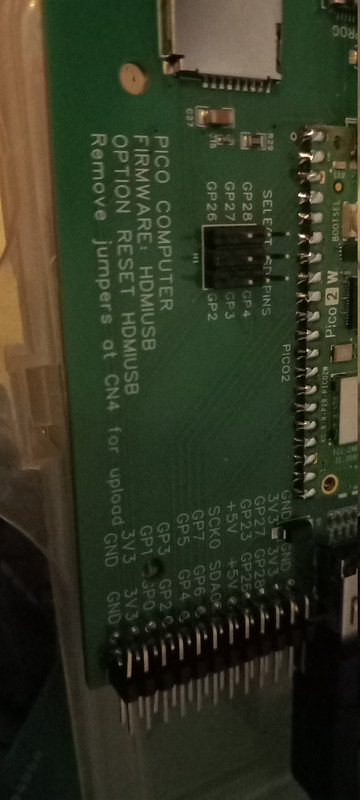
Hi Mick, It depends on the age of the Ref Design, the version with a Pico2 board soldered on was Option Reset HDMIUSB, However there was a later version, with a 2350 directly soldered to the board, which used Option Reset HDMIUSBI2S It has I2S sound. A Photo of the board would make it obvious. Regards, Kevin.
tenij000 Senior Member Joined: 30/05/2025 Location: NetherlandsPosts: 107
Posted: 07:51pm 27 Feb 2026
Copy link to clipboard
Print this post
think fail so hard can only connect the board to micro usb then do firmware on the board no jumpers on board then if do the firmware pico hdmiusb on the board it is over
sofar do usb c cable in the board do the power switch a COM port comes up i connect to it and it fails :( i give up on this picohdmi board maby i can donate my 4 unsoldert boards from jlcb then place all the parts on it missing leds that command says got wrong firmware whit this board so dont think ever gone work Edited 2026-02-28 05:52 by tenij000
Mixtel90 Guru Joined: 05/10/2019 Location: United KingdomPosts: 9238
Posted: 07:53pm 27 Feb 2026
Copy link to clipboard
Print this post
In theory it's this one, but of course he could have built the other. :)
Without the error message, at least, I can't really help any further.
tenij000 Senior Member Joined: 30/05/2025 Location: NetherlandsPosts: 107
Posted: 08:02pm 27 Feb 2026
Copy link to clipboard
Print this post
yes it is
tenij000 Senior Member Joined: 30/05/2025 Location: NetherlandsPosts: 107
Posted: 08:06pm 27 Feb 2026
Copy link to clipboard
Print this post
now stuck here cant login to the board only what working if use the hdmi firmware whit out the usb
Mixtel90 Guru Joined: 05/10/2019 Location: United KingdomPosts: 9238
Posted: 08:19pm 27 Feb 2026
Copy link to clipboard
Print this post
Those boards do work. If you can't install the firmware, and the links at CN4 have been removed, then you are probably trying to install the wrong firmware. You are using a Pico 2 aren't you?
I hope I've got this right... :)
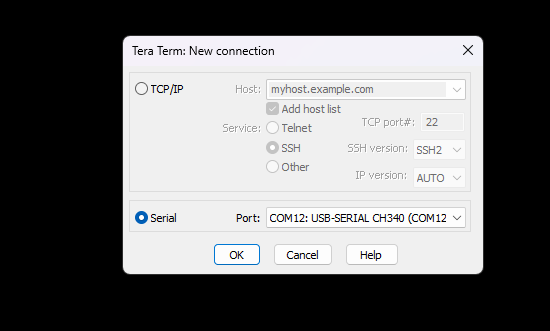
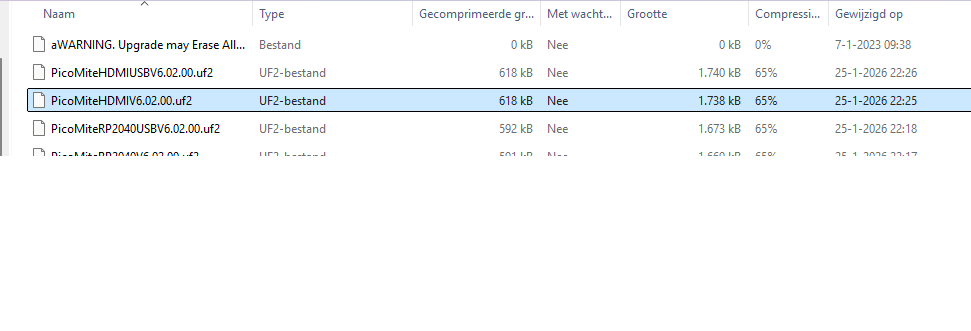
Open File Manager so that you can see the list of MMBasic versions Switch off the Pico board Remove the CN4 links Connect the USB-C on the Pico to the PC Hold down BOOTSEL on the Pico and switch the Pico board on Release BOOTSEL You should see the virtual drive appear Find the correct file and drag it onto the virtual drive. (It will be called PicoMiteHDMIUSB - nothing else will work) You should get a pop-up box while the file copies After a few seconds the Heartbeat LED should start flashing Switch off the Pico board Unplug the USB lead from the Pico and move it to USB2 Replace the links on CN4 1-2 and 3-4 Connect a USB keyboard to one of the USB connectors Switch on the Pico board Start Tera Term and look for the new COM port. Connect to it at 115200 baud You'll probably get a blank screen. Press Enter a couple of times and you should see the ">" prompt. Enter OPTION RESET HDMIUSB Try OPTION LIST and you should see things that make sense. Now you can connect your HDMI display, where you should see the same thing as the console. You may want to change your keyboard language.
At this point the console isn't really being used so you can carry on working with the HDMI display.
I'm sorry if I've messed up any of the above, but It's been ages since I set mine up and my memory isn't what it once was. :)Mick
tenij000 Senior Member Joined: 30/05/2025 Location: NetherlandsPosts: 107
Posted: 08:21pm 27 Feb 2026
Copy link to clipboard
Print this post
maby still use the board if can figure out what that command does
try this firmware
Mixtel90 Guru Joined: 05/10/2019 Location: United KingdomPosts: 9238
Posted: 08:24pm 27 Feb 2026
Copy link to clipboard
Print this post
You can't use the USB display until it's been set up by OPTION RESET HDMIUSB. You will be in the console until then. The console is on USB2, NOT the USB port on the Pico - that's in host mode as soon as MMBasic starts. It's also disconnected from the USB-A ports until you put the CN4 links back.
Use the HDMIUSB firmware and follow my instructions. Don't use the HDMI firmware as there is no default keyboard if you use that. The board is designed for a USB keyboard. Edited 2026-02-28 06:27 by Mixtel90Mick
tenij000 Senior Member Joined: 30/05/2025 Location: NetherlandsPosts: 107
Posted: 08:26pm 27 Feb 2026
Copy link to clipboard
Print this post
PicoMiteHDMI MMBasic RP2350A Edition V6.02.00 OPTION FLASH SIZE 4194304 OPTION COLOURCODE ON OPTION KEYBOARD US OPTION RESOLUTION 640x480 @ 252000KHz
if use the hdmi version but now how do gues the cs pin for the sdcard
Bleep Guru Joined: 09/01/2022 Location: United KingdomPosts: 864
Posted: 08:27pm 27 Feb 2026
Copy link to clipboard
Print this post
As Mick says the Option reset hdmiusb will setup all options. I think another possible problem might be you have not, or not well enough, put solder through the 4 holes on the back of the board, as the instructions say in the first paragraph. These holes need to make contact with the Gold plated pads on the back of the Pico, if they do not, the USB will not work. I fed a reasonable amount of solder onto each hole, while holding the soldering iron in place for a good 5 seconds, if still not working, try for longer. But don't damage the PCB. Regards Kevin. Edited 2026-02-28 06:30 by Bleep
Mixtel90 Guru Joined: 05/10/2019 Location: United KingdomPosts: 9238
Posted: 08:28pm 27 Feb 2026
Copy link to clipboard
Print this post
What's written on the bottom of the PCB? Anything?Mick

 Notice. New forum software under development. It's going to miss a few functions and look a bit ugly for a while, but I'm working on it full time now as the old forum was too unstable. Couple days, all good. If you notice any issues, please contact me.


 Print this post