Notice. New forum software under development. It's going to miss a few functions and look a bit ugly for a while, but I'm working on it full time now as the old forum was too unstable. Couple days, all good. If you notice any issues, please contact me.
matherp Guru Joined: 11/12/2012 Location: United KingdomPosts: 12056
Posted: 06:28pm 09 Apr 2026
Copy link to clipboard
Print this post
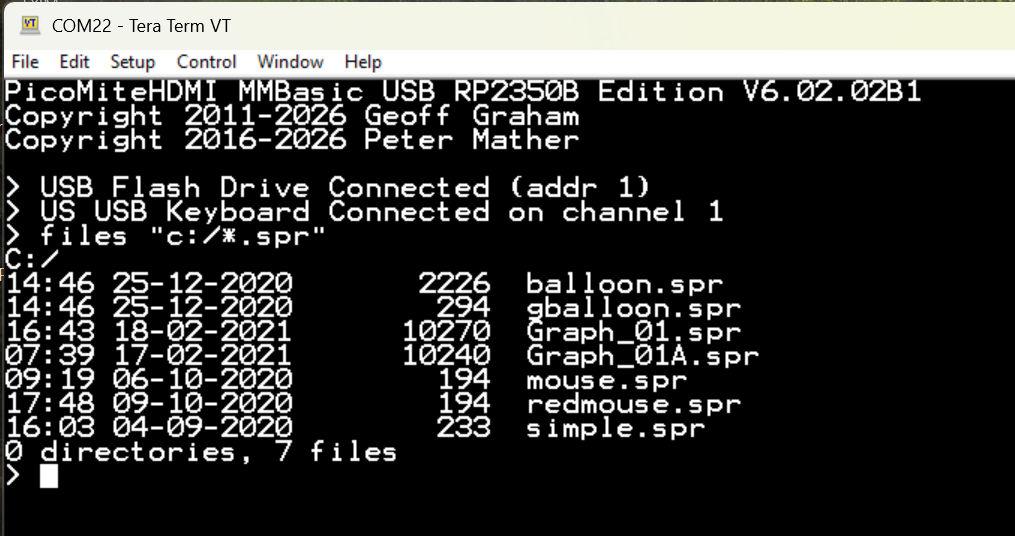
Full support for USB flash drives implemented as drive C: HOWEVER runs like a dead pig
It transpires that a combination of the rp2040/rp2350 USB hardware and TinyUSB limits reads and writes to one 64-byte packet every millisecond. i.e a maximum thoughput of 64Kbytes/second. This means that although it could be used for loading and saving files etc. it is too slow for streaming any sort of audio and, as an example, a bmp file which takes 1.3 seconds to load from sdcard takes over 17 seconds to load from the USB disk. What a waste of a day
Mixtel90 Guru Joined: 05/10/2019 Location: United KingdomPosts: 9238
Posted: 06:55pm 09 Apr 2026
Copy link to clipboard
Print this post
You can't win 'em all. It's not that the singing dog sings badly, it's just amazing that it can sing at all. :) Crikey, at one time 64Kbytes/s would have been considered fast. :)
homa Guru Joined: 05/11/2021 Location: GermanyPosts: 723
Posted: 07:31pm 09 Apr 2026
Copy link to clipboard
Print this post
I don’t see it that way! I think it’s great that it works. Will it still be in the firmware?
bfwolf Senior Member Joined: 03/01/2025 Location: GermanyPosts: 258
Posted: 07:44pm 09 Apr 2026
Copy link to clipboard
Print this post
A dead pig is better than no pig - at least you can make sausage out of it!
That's about 30 times faster than the 1541 (without speedloader) on the C64!
No, seriously and honestly: I don't see it as a wasted effort! Too slow for streaming, but at least it works if you happen to have data on a USB stick!
And since you've already created the basis for a "C:\" drive: How about a RAM disk "D:\" for the RP2350 with PSRAM? Configurable, for example, with "OPTION RAMDISK <size_kB>". That would be fantastic if you could save temporary data (e.g. measurement values) in files! You could then potentially copy them to the SD card step by step.
You know I really appreciate your innovations and ideas!
Regards, bfwolf
javavi Guru Joined: 01/10/2023 Location: UkrainePosts: 621
Posted: 08:22pm 09 Apr 2026
Copy link to clipboard
Print this post
This is awesome!
Have you tried flashing another Pico in boot mode using the PicoMite?
Amnesie Guru Joined: 30/06/2020 Location: GermanyPosts: 763
Posted: 09:17pm 09 Apr 2026
Copy link to clipboard
Print this post
That would be interesting!
Plasmamac Guru Joined: 31/01/2019 Location: GermanyPosts: 620
Posted: 09:30pm 09 Apr 2026
Copy link to clipboard
Print this post
Please dont be Frustrated Matherp you create so much fun for us!Plasma
PhenixRising Guru Joined: 07/11/2023 Location: United KingdomPosts: 2100
Posted: 10:36pm 09 Apr 2026
Copy link to clipboard
Print this post
I sure as heck welcome it.
My part programs are only ~10KB but can take hours to perfect. I'd sooner have a USB drive for backup than a SD card. Edited 2026-04-10 09:10 by PhenixRising
toml_12953 Guru Joined: 13/02/2015 Location: United StatesPosts: 736
Posted: 03:09am 10 Apr 2026
Copy link to clipboard
Print this post
Do you have to turn on the capability to use drive C: with an OPTION or is the USB drive automatically detected?
mozzie Guru Joined: 15/06/2020 Location: AustraliaPosts: 469
Posted: 03:37am 10 Apr 2026
Copy link to clipboard
Print this post
G'day, Agree with all the above, certainly not a wasted effort, the fact its possible is encouraging in itself
For 99% of my applications that speed would not be an issue.
Regards, Lyle.
matherp Guru Joined: 11/12/2012 Location: United KingdomPosts: 12056
Posted: 07:24am 10 Apr 2026
Copy link to clipboard
Print this post
This functionality, if I keep it in, relates to the USB variants of the firmware. i.e. those that run in USB host mode and it just another supported USB device - no configuration needed. It doesn't apply to standard versions (as used on the PicoCalc). The PicoCalc could run the USB variants using the USB port on the Pico as the host connection but AFAIK there is no way to get a reliable serial console on the USB-C port as they have done stange things with the switching of the signals to the USB/UART driving that port. Otherwise you would be faced with a USB/UART stuck off the side port to get a console assuming sensible pins are available there. Edited 2026-04-10 17:26 by matherp
bfwolf Senior Member Joined: 03/01/2025 Location: GermanyPosts: 258
Posted: 08:22am 10 Apr 2026
Copy link to clipboard
Print this post
One thing that crossed my mind yesterday — and this applies equally to SD cards — is how to handle situations where a storage device is physically removed while write operations are in progress. This is a critical moment that can lead not only to data loss but also to the corruption of the (FAT) file system!
How about extending the "DRIVE drive$" command to "DRIVE [REMOVE|CHANGE] drive$", where "DRIVE REMOVE drive$" ensures that all open files are closed, all write operations are stopped, and then the drive letter is locked until the USB drive (or SD card) is removed and possibly reinserted, or until the USB drive (or SD card) is left in place and "DRIVE CHANGE drive$" is executed?
"DRIVE REMOVE drive$" would then close all open files, stop all write operations, and then lock the drive letter until the USB drive (or SD card) is removed and possibly reinserted, or until the USB drive (or SD card) is left in place and "DRIVE CHANGE drive$" is executed.
I remember this problem from the Amiga days, where it could also happen that you ejected a floppy disk too early (or switched off the Amiga). Incidentally, AmigaDOS has long had a "DISKCHANGE" command that forces a reread of the disk. Eventually, someone from the community released a "DISKFLUSH" (or something similar) that wrote all "open" write caches to the floppy disks (and hard drives). This at least "minimized" the risk of disk (and hard drive) errors.
Regards.
phil99 Guru Joined: 11/02/2018 Location: AustraliaPosts: 3416
Posted: 08:47am 10 Apr 2026
Copy link to clipboard
Print this post
Option "B" Rapidly flash the onboard LED (or a LED on another pin) while writing.
To let programs know writing is in progress there could be an MM.INFO(xxx).
Mixtel90 Guru Joined: 05/10/2019 Location: United KingdomPosts: 9238
Posted: 10:56am 10 Apr 2026
Copy link to clipboard
Print this post
There's no safe way to prevent removal of any media during a write operation apart from mechanically or make it inaccessible. There's no point in trying to find a clever solution because there isn't one. :) The best you can do is to use visual indication and hope that the user obeys it. You can, in some cases, use a contact to tell the OS that it's been removed so that it knows to clear the write buffer and cancel the write but the media stands a very good chance of being corrupted and there's nothing you can do about that apart from fire the user.
You can mount/unmount a drive, but that's something different. It usually only tells the OS to read or clear the directory buffer.Mick
bfwolf Senior Member Joined: 03/01/2025 Location: GermanyPosts: 258
Posted: 11:44am 10 Apr 2026
Copy link to clipboard
Print this post
Of course, 100% security is impossible. But you can minimize the risk.
For example, a GPIO interrupt callback (in MMBasic), triggered by a button, could call "DRIVE REMOVE drive$" and perhaps even blink an LED. This would provide visual feedback.
The "unmount" command in Linux, for example, also closes all open files and ensures that all modified buffers are written to the filesystem using sync() before the drive is unmounted.
bfwolf
Mixtel90 Guru Joined: 05/10/2019 Location: United KingdomPosts: 9238
Posted: 02:17pm 10 Apr 2026
Copy link to clipboard
Print this post
The interrupt would fail, the button not close properly or the user ignore it. :) Having a button would mean that someone would depend on it - until it let them down.
The answer is always RTFM in these cases. lol
Of course, the red light will get stuck on at some point, but at least that's erring on the right side. :)
Never underestimate human stupidity. You'll be stupid enough to screw up any safety system yourself at some point, which won't exactly make your day. :)Mick
robert.rozee Guru Joined: 31/12/2012 Location: New ZealandPosts: 2552
Posted: 02:38pm 10 Apr 2026
Copy link to clipboard
Print this post
allowing a single pin to be configured as an "accessing media" pin would (in my opinion!) be the best option, where an LED attached to the pin comes on whenever SD card or USB flash drive activity is happening. the firmware code that controls this LED should keep it illuminated until the SD card or USB flash drive being written to signals that it has finished flushing any on-card or on-drive write cache.
but assuming that mmbasic implements minimal caching, an "accessing media" pin could just as easily be implemented by the user's program turning an LED on/off with pin()= commands on each side of any file write operations. at the command prompt, it would be easy enough to just have mmbasic pause and not return to the > prompt until writing has been completed.
Peter: i see the USB flash drive support as being a really useful thing to keep in the firmware. even if it is slow, it allows a user program to:
a) if a data logging application, prompt the user to plug in a USB flash drive and then transfer saved data (be it held on A: or B:) to the USB flash drive; b) if some sort of media player application, to prompt the user to plug in a USB flash drive and mirror the (for example) music content of the flash drive onto B: at a sedate pace.
and i'm sure there are heaps of other cases too, where transfer speed is of no great importance, but the ease and convenience of plugging a flash drive into a USB socket for data transfer is.
cheers, rob :-) Edited 2026-04-11 00:44 by robert.rozee
Mixtel90 Guru Joined: 05/10/2019 Location: United KingdomPosts: 9238
Posted: 04:06pm 10 Apr 2026
Copy link to clipboard
Print this post
It all depends if the "sedate pace" is acceptable when the SD card is so much faster, A:/ is blindingly fast and Xmodem is pretty reasonable (I haven't tried Ymodem yet). Ultra high speed backup of an SD card is easy enough simply by reading it in a PC. :)Mick

 Notice. New forum software under development. It's going to miss a few functions and look a bit ugly for a while, but I'm working on it full time now as the old forum was too unstable. Couple days, all good. If you notice any issues, please contact me.


 Print this post