Notice. New forum software under development. It's going to miss a few functions and look a bit ugly for a while, but I'm working on it full time now as the old forum was too unstable. Couple days, all good. If you notice any issues, please contact me.
toml_12953 Guru Joined: 13/02/2015 Location: United StatesPosts: 735
Posted: 02:31pm 22 May 2026
Copy link to clipboard
Print this post
Here's the latest on the Pimoroni errors:
The problem with the system rebooting after editing a file seems to be a combination of having both WiFi and PSRAM active at the same time. If I disable either one or both, then I don't get errors. Right now, I'm prioritizing PSRAM so WiFi access is turned off on my two PicoCalc systems. The Pimoroni Pico Plus 2 W has more features than the Raspberry Pi Pico 2W but it seems less stable when overclocked. Edited 2026-05-23 02:14 by toml_12953
matherp Guru Joined: 11/12/2012 Location: United KingdomPosts: 12055
All VGA versions: Implementation of new command GUI CURSOR The GUI CURSOR command provides a mechanism for displaying and manipulating a cursor on the screen. The cursor sits above all other graphics and nothing can overwrite it.
GUI CURSOR ON [cursorno [,x, y [,cursorcolour] ] ] Cursor no can be 0 (Default: mouse type pointer) or 1 (cross), in addition the user can load his own cursor using a SPRITE look-alike file in which case this is cursor no. 2 For cursor numbers 0 and 1 the programmer can override the default white cursor by specifying the colour in the open command.
GUI CURSOR x, y Moves the cursor to x, y. Does not display the cursor if hidden but just updates the location.
GUI CURSOR OFF Turns off the cursor
GUI CURSOR HIDE Hides the cursor but maintains its position
GUI CURSOR SHOW Shows a hidden cursor in its stored position
GUI CURSOR COLOUR cursorcolour Changes the colour of cursor number 0 or 1. Does not impact loaded cursors where its colours are specified by the cursor designer
GUI CURSOR LOAD "fname" Loads a user cursor from a file in the Maximite sprite format with a minor change. The header is now Width, Height, Xoffset, Yoffset. The two offsets determine where on the cursor the pointer is defined to be. So the mouse cursor has offsets 0,0 and the cross has offsets 7,7
GUI CURSOR LINK MOUSE GUI CURSOUR UNLINK MOUSE These commands link and unlink mouse activity to the cursor. When linked the cursor will automatically track the mouse activity. The mouse must be opened using the CONTROLLER MOUSE OPEN command before the cursor is linked.
VGA and HDMI RP2350 versions Full GUI command support including new function CLICK (same as CMM2). Note this command effectively substitutes for the TOUCH function when using an touch LCD screen
CLICK(DOWN) Will return true if the screen is currently being clicked on using the mouse.
CLICK(UP) Will return true if the screen is currently NOT being clicked on.
CLICK(LASTX) Will return the X coordinate of the last location that was clicked on.
CLICK(LASTY) Will return the Y coordinate of the last location that was clicked on.
CLICK(REF) Will return the reference number of the control that is currently being clicked on or zero if no control is currently being clicked on.
CLICK(LASTREF) Will return the reference number of the last control that was clicked on.
Demo program as per the video
''''''''''''''''''''''''''''''''''''''''''''''''''''''''''''''''' ' Demonstration program for the Advanced Graphics ' Rescaled for 640x480 display '''''''''''''''''''''''''''''''''''''''''''''''''''''''''''''''''
Option Explicit Dim ledsY
MODE 3 Option Console Serial Colour RGB(white), RGB(black)
Case r_econ CtrlVal(tb_flow) = Str$(CtrlVal(sw_pmp) * 18.3)
Case r_norm CtrlVal(tb_flow) = Str$(CtrlVal(sw_pmp) * 20.1)
Case r_hi CtrlVal(tb_flow) = Str$(CtrlVal(sw_pmp) * 23.7)
End Select End Sub
' ========================= ' Touch up interrupt ' ========================= Sub TouchUp Select Case Click(LASTREF)
Case pb_test CtrlVal(led_alarm) = 0
End Select End Sub
' ========================= ' Mouse cursor handler ' ========================= Function MM.CURSOR(t As Integer) As Integer Static Float lasttime
If Timer > lasttime + 20 Or Timer < lasttime Then x = Mouse(x,1) y = Mouse(y,1) lb = Mouse(l,1)
lasttime = Timer
GUI Cursor x, y EndIf
MM.CURSOR = -1
If t = 1 Then MM.CURSOR = lb ElseIf t = 2 Then If lb Then MM.CURSOR = x ElseIf t = 3 Then If lb Then MM.CURSOR = y ElseIf t = 4 Then MM.CURSOR = lb Else MM.CURSOR = lb EndIf End Function
' ========================= ' Beeper ' ========================= Sub MM.Beep beeptime As Integer If beeptime And MM.Info(Sound) = "OFF" Then Play Tone 600, 600, beeptime EndIf End Sub
Volhout Guru Joined: 05/03/2018 Location: NetherlandsPosts: 6195
Posted: 05:51pm 22 May 2026
Copy link to clipboard
Print this post
Peter,
60300cr9 seemed to have fixed the PIO problem. But today I took a brand new 2040 zero, programmed it with rc9 mini, and the PIO program would not run. Same issue. I did release the application with 60201 today, so there is no demand for a Quick fix, but be informed that there still is an issue with 60300 and PIO. As if there is something not initialized, that depending the hardware sometimes works.
Volhout
As I type this I pack for holiday, so next week I cannot support. Edited 2026-05-23 03:54 by VolhoutPicomiteVGA PETSCII ROBOTS
terekgabor Senior Member Joined: 02/01/2026 Location: HungaryPosts: 155
Posted: 06:07pm 22 May 2026
Copy link to clipboard
Print this post
Peter,
Soon you can call it v6.04.00
G@bor
mozzie Guru Joined: 15/06/2020 Location: AustraliaPosts: 469
Posted: 07:05pm 22 May 2026
Copy link to clipboard
Print this post
G'day Peter, What can I say except thanks once again, this has been on the wish list to make HDMI touch work for a very long time.
It is amazing what is now possible with the right silicon and the right mind driving the firmware, plus a little help from the AI genie no doubt.
I may have missed something obvious as usual, is there a way to send a screen click from MMBasic? If not would GUI CURSOR x,y,c with c for click 0/1 or a CLICK command be possible?
Regards, Lyle.
mozzie Guru Joined: 15/06/2020 Location: AustraliaPosts: 469
Posted: 08:55pm 22 May 2026
Copy link to clipboard
Print this post
G'day, Should have been in bed hours ago but couldn't resist giving this a try
Initial testing shows this is an awesome concept, can now do HDMI with touch quite easily
Couple of minor bugs plus the previous comment above regarding CLICK:
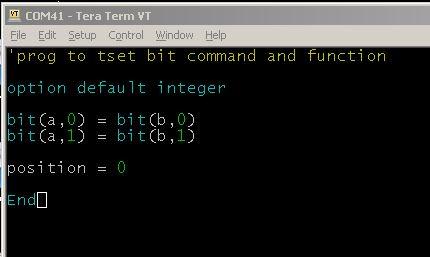
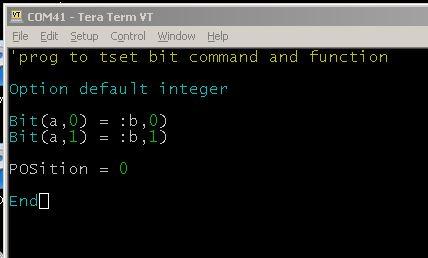
BIT command is replaced with : in programs. pos becomes POS in command and variable names.
The Pico-Zero showed up as a USB drive a couple of times but a pattern is hard to discern.
> option list PicoMiteHDMI MMBasic USB RP2350A Edition V6.03.00RC11 OPTION SERIAL CONSOLE COM2,GP8,GP9 OPTION FLASH SIZE 4194304 OPTION COLOURCODE ON OPTION KEYBOARD US OPTION RESOLUTION 800x480 @ 333000KHz OPTION DISPLAY 40, 100 >
Now its time for bed as the sun comes up
Regards, Lyle.
JanVolk Guru Joined: 28/01/2023 Location: NetherlandsPosts: 420
Posted: 11:10pm 22 May 2026
Copy link to clipboard
Print this post
Peter,
I do see PicoMiteHDMIV6.03.00RC11.uf2 but not PicoMiteHDMIUSBV6.03.00RC11.uf2 in the list?
Sorry. Loaded and unpacked again and it is correct now.
Jan. Edited 2026-05-23 10:28 by JanVolk
matherp Guru Joined: 11/12/2012 Location: United KingdomPosts: 12055
Posted: 06:36am 23 May 2026
Copy link to clipboard
Print this post
Can't replicate - please post a program that demonstrates the issue
ville56 Guru Joined: 08/06/2022 Location: AustriaPosts: 646
Posted: 06:37am 23 May 2026
Copy link to clipboard
Print this post
Peter,
great job, congrats!!! Thank you so much for the time and effort you spend.
Just another idea ... if we could have commands like "GUI CLICK DOWN" and "GUI CLICK UP" which emulates a touch/mouse button action at the current cursor position, it would be possible to control the GUI subsystem remotely, say from inputs of analog pins for the cursor and external hardware for the CLICK action. So one could build its own man-to-GUI interface from whatever data source is available. It could also lead to automation scripts for GUI interaction and other weired stuff.
Gerald 73 de OE1HGA, Gerald
matherp Guru Joined: 11/12/2012 Location: United KingdomPosts: 12055
Posted: 06:40am 23 May 2026
Copy link to clipboard
Print this post
This will happen if the Pico is in boot mode or if you somehow get it into boot mode (communicate at 1200 baud)
ville56 Guru Joined: 08/06/2022 Location: AustriaPosts: 646
Posted: 07:50am 23 May 2026
Copy link to clipboard
Print this post
@Peter,
there is probably an issue with BIT function in RC11:
the BIT function is changed into
as always, forgot the version .... PicoMiteHDMI MMBasic USB RP2350B Edition V6.03.00RC11 Edited 2026-05-23 17:51 by ville56 73 de OE1HGA, Gerald
mozzie Guru Joined: 15/06/2020 Location: AustraliaPosts: 469
Posted: 07:52am 23 May 2026
Copy link to clipboard
Print this post
G'day Peter, Not the original program but typing the following into the editor:
Save and re-open editor becomes:
Also won't work at command prompt:
> bit(a,2)=bit(a,3) Error : Cannot find A > dim a > bit(a,2)=bit(a,3) Error : Invalid syntax >
So it looks like the function is playing up rather than the command.
> option list PicoMiteHDMI MMBasic USB RP2350A Edition V6.03.00RC11 OPTION SERIAL CONSOLE COM2,GP8,GP9 OPTION FLASH SIZE 4194304 OPTION COLOURCODE ON OPTION KEYBOARD US OPTION RESOLUTION 640x480 @ 252000KHz >
Downloaded and reloaded firmware, also did CLEAR_FLASH_RP2350 twice, to be sure, to be sure...
Looks like the Pico-Zero is not resetting properly due to power via the interrupt pull-up, please ignore.
Before I get too far messing around with the Pico-Zero sending touch via USC-CDC, are you considering adding resistive touch support for the GUI functions in the VGI/HDMI firmware or is this a step to far?
P.S. Can anyone remind me how to clear the Cache on WIN7-32bit, had a brain fade and can't remember
Regards, Lyle.
ville56 Guru Joined: 08/06/2022 Location: AustriaPosts: 646
Posted: 08:05am 23 May 2026
Copy link to clipboard
Print this post
is there any hardware available for res-touch with HDMI/VGA monitors that will support that screens (and the controller supported by MMBasic)? 73 de OE1HGA, Gerald
mozzie Guru Joined: 15/06/2020 Location: AustraliaPosts: 469
Posted: 08:13am 23 May 2026
Copy link to clipboard
Print this post
G'day Gerald, There are quite a few available with the XPT2046 resistive touch in 4" to 12" sizes, hence the question on this specific controller, as support is already in the LCD firmware.
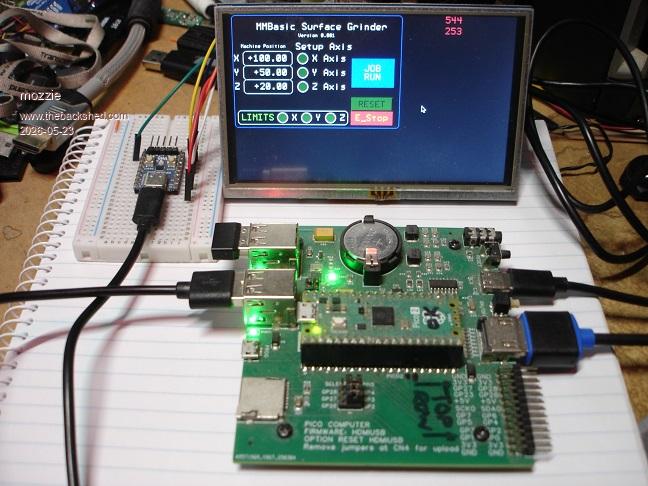
The pic in the post above has a Pico-Zero reading the XPT2046 on the 5" touchscreen and sending the co-ordinates via USB-CDC to the PicoMite HDMIUSB. I guess the advantage of this is you only use 8 pins for the HDMI, none more required for touch etc.
Don't want to waste time on taking this idea further if Peter is thinking of baking it into the firmware.
Regards, Lyle. Edited 2026-05-23 18:13 by mozzie
matherp Guru Joined: 11/12/2012 Location: United KingdomPosts: 12055
Posted: 08:34am 23 May 2026
Copy link to clipboard
Print this post
Bummer, I've run out of function tokens and BIT( is the last one defined. Some nasty surgery needed.
disco4now Guru Joined: 18/12/2014 Location: AustraliaPosts: 1158
Posted: 09:15am 23 May 2026
Copy link to clipboard
Print this post
I was thinking function CWD$ is a likely candidate for an overlaid function, it should not be in use where performance is an issue.F4H7FotSF4xGT
flip Senior Member Joined: 18/07/2016 Location: AustraliaPosts: 135
Posted: 09:27am 23 May 2026
Copy link to clipboard
Print this post
I seem to be having an issue running the demo above from PSRAM
> ram file load 1,"Demo_503b11.bas",o > ram run 1 [33] GUI Caption c_head, "Pump Control", 10, 0 Error : No memory allocated for GUI controls
So I looked for a config in the CMM2 GUI features manual
> OPTION MAXCTRLS 100 Error : Invalid Option >
But not sure...I'm using the HDMI Quad USB board from Silicon Chip. These are my options: PicoMiteHDMI MMBasic USB RP2350B Edition V6.03.00RC11 OPTION SERIAL CONSOLE COM2,GP8,GP9 OPTION SYSTEM I2C GP20,GP21 OPTION FLASH SIZE 16777216 OPTION COLOURCODE ON OPTION KEYBOARD US, 0, 1, 200, 50 OPTION PICO OFF OPTION RESOLUTION 1280x720 @ 372000KHz OPTION DISPLAY 30, 80 OPTION HDMI PINS 1, 3, 5, 7 OPTION SDCARD GP29, GP30, GP31, GP32 OPTION KEYBOARD REPEAT 200,50 OPTION AUDIO I2S GP10,GP22', ON PWM CHANNEL 11 OPTION RTC AUTO ENABLE OPTION COUNT GP0,GP1,GP2,GP3 OPTION MODBUFF ENABLE 512 OPTION PLATFORM HDMIUSBI2S OPTION PSRAM PIN GP47 OPTION HEARTBEAT PIN GP25
Any ideas? I'm sure it's something basic. Regards Phil I tried changing to 640x480 and tried loading into the normal execution memory in case these were causing the issue, but still same error. Next try is some weird copy/paste error. Edited 2026-05-23 19:35 by flip
phil99 Guru Joined: 11/02/2018 Location: AustraliaPosts: 3416
Posted: 09:42am 23 May 2026
Copy link to clipboard
Print this post
From PicoMite Advanced Graphics manual in Extra Documentation folder.
OPTION GUI CONTROLS 75
Amnesie Guru Joined: 30/06/2020 Location: GermanyPosts: 763
Posted: 09:45am 23 May 2026
Copy link to clipboard
Print this post
Wow Peter,
GUI commands are now available with the normal VGA & HDMI versions? This is such a huge benefit, since my own written GUI program needs a lot of program space.
Thank you for making this availavle to the "normal" VGA & HDMI versions!
Greetings Daniel
flip Senior Member Joined: 18/07/2016 Location: AustraliaPosts: 135
Posted: 09:50am 23 May 2026
Copy link to clipboard
Print this post
Thanks phil99 - that fixed it! - I must have had an old copy of the manual Regards Phil Edited 2026-05-23 19:51 by flip
Page 10 of 31
Print this page
The Back Shed's forum code is written, and hosted, in Australia.

 Notice. New forum software under development. It's going to miss a few functions and look a bit ugly for a while, but I'm working on it full time now as the old forum was too unstable. Couple days, all good. If you notice any issues, please contact me.


 Print this post