Notice. New forum software under development. It's going to miss a few functions and look a bit ugly for a while, but I'm working on it full time now as the old forum was too unstable. Couple days, all good. If you notice any issues, please contact me.
Geoffg Guru Joined: 06/06/2011 Location: AustraliaPosts: 3369
Posted: 08:25pm 05 May 2026
Copy link to clipboard
Print this post
This is a typical example of floating point error. Calculation errors in floating-point math are not "bugs" in the language but a fundamental limitation of storing infinite decimals in finite space.
The issue here is that 0.1 cannot be represented exactly in binary. Every time you press a key, a tiny rounding error is added to a. Eventually, you’ll see values like 0.3000000000000001 or 0.6999999999999999.In BASIC dialects (like MMBasic), the most reliable fix is to calculate with integers and scale the output for the display.Geoff Graham - http://geoffg.net
JohnS Guru Joined: 18/11/2011 Location: United KingdomPosts: 4390
Posted: 09:18pm 05 May 2026
Copy link to clipboard
Print this post
Some examples of programming around it often use a small value - search on epsilon (or floating point epsilon) as that's what it tends to be called.
John
DaveJacko Senior Member Joined: 25/07/2019 Location: United KingdomPosts: 107
Posted: 09:42pm 05 May 2026
Copy link to clipboard
Print this post
Thanks for beautify, Peter, great help for hobbyists with older brains and eyes along with fred777 and toml,
I do think that leaving blank lines intact for readability would be better
(more blank lines, for emphasis)
thanks, DaveTry swapping 2 and 3 over
terekgabor Senior Member Joined: 02/01/2026 Location: HungaryPosts: 155
Posted: 05:37am 06 May 2026
Copy link to clipboard
Print this post
@matherp
Peter!
Just a small idea. Can be good if we can use string variable (not only unquoted constant string) for object names in STAR and ASTRO commands.
Better way to build up a kind of epheneris program for example.
G@bor
ville56 Guru Joined: 08/06/2022 Location: AustriaPosts: 646
Posted: 06:50am 06 May 2026
Copy link to clipboard
Print this post
@Peter,
Beautify spoils labels ... in the attached code, after edit/^A/F2 there are spaces in front of the label b_loop: inserted and the code does fail with
[11] If in_str <> "" Then GoTo b_loop Error : Cannot find label
Interestingly, there are seemingly 2 character positions inserted but if there is only one char to remove. The code runs again if the inserted chars (or char?) are removed.
Version is: PicoMite MMBasic RP2350B V6.03.00RC1
failing code is:
' OPTION EXPLICIT OPTION DEFAULT NONE
Option tracecache on 128
b_test("test")
end ' ------------ END main ----------------------------------
sub b_test(in_str as string)
b_loop: print "in b_loop" pause 300 if in_str <> "" then goto b_loop
end sub
73 de OE1HGA, Gerald
matherp Guru Joined: 11/12/2012 Location: United KingdomPosts: 12051
Posted: 07:22am 06 May 2026
Copy link to clipboard
Print this post
Will fix in next RC. I also want to fix the behaviour of program with line numbers. Please can someone post a fully line numbered example for me to test with. Intended behaviour will be:
The F12 Beautify command aligns code using 2-space block indentation. It detects whether a program is line-numbered by examining the first non-comment line:
If that line begins with a line number, the whole program is treated as numbered. All statements are aligned past the widest line number found, and block indentation is added on top of that base column. Otherwise, the program is treated as unnumbered. Any stray numbered lines used purely as GoTo/GoSub targets will be pushed flush to the left margin and will not align with the surrounding block, since they are handled like labels.
Recommendation: in modern, mostly-unnumbered programs prefer named labels (e.g. retry:) over numeric line numbers as branch targets. Labels are also forced flush left by Beautify, but they read more clearly, are not confused with numbered-program formatting, and keep the rest of the block visually consistent.
The F12 Beautify command forces any line that begins with a label to column 0 — including anything written after the label on the same line — so a construct such as: retry: Print "x" will lose the indent of its surrounding block. Writing the label on a line by itself keeps both the label visible at the margin and the following code correctly indented within its Sub, For or If block.
When F12 Beautify is pressed and the program already contains blank lines other than those separating subroutines/functions, the editor asks KEEP BLANK LINES? (Y/N). Choose Y to preserve your blank lines (consecutive blanks are collapsed to one); choose N to strip them all. Either way, a single blank line is always ensured after every End Sub / End Function. Press Esc at the prompt to cancel. Edited 2026-05-06 18:58 by matherp
matherp Guru Joined: 11/12/2012 Location: United KingdomPosts: 12051
terekgabor Senior Member Joined: 02/01/2026 Location: HungaryPosts: 155
Posted: 09:22am 06 May 2026
Copy link to clipboard
Print this post
Peter!
File names hasn’t changed to RC2.
G@bor
fred777 Senior Member Joined: 01/07/2021 Location: United KingdomPosts: 106
Posted: 09:23am 06 May 2026
Copy link to clipboard
Print this post
Getting there
but as DaveJacko says
Lets try to overcome that irrational fear of empty lines.
Empty lines are the quiet breaths of a program— the pauses where thought gathers before becoming logic.
They are the whitespace between heartbeats, where structure reveals itself not by what is written, but by what is allowed to rest.
In their silence, complexity untangles. In their absence, even brilliance feels crowded.
An empty line is a small act of kindness from one mind to the next— a reminder that clarity is not only about words, but about the space that lets them be understood.
matherp Guru Joined: 11/12/2012 Location: United KingdomPosts: 12051
Posted: 09:40am 06 May 2026
Copy link to clipboard
Print this post
RC2 with correct filenames, also fixes bug in comment lines not being removed in the library. Programs in the library should be re-loaded.
toml_12953 Guru Joined: 13/02/2015 Location: United StatesPosts: 735
Posted: 10:53am 06 May 2026
Copy link to clipboard
Print this post
10 DIM X(126),K(2) 20 FUNCTION FNA(X,Y,Z): FNA=X*SIN(Y*0.01745329)*Z-16*Z^2: END FUNCTION 30 PRINT "INPUT MUZZLE VELOCITY (FT/SEC) AND ANGLE (DEGREES)" 40 LET F2=0 50 INPUT M,A 60 LET X(0)=0 70 FOR T=0.2 TO 25 STEP 0.2 80 LET L=INT(5*T+0.001) 90 LET X(L)=FNA(M,A,T) 100 IF X(L)<0 THEN GOTO 150 110 IF X(L)-X(L-1)<=0 AND F2=0 THEN GOTO 250 ELSE GOTO 350 120 LET K(1)=X(L-2) 130 LET W4=T-0.4+J 140 GOTO 280 150 LET W=L-1 160 FOR J=0.01 TO 0.2 STEP 0.01 170 LET K(1)=FNA(M,A,T-0.2+J) 180 IF K(1)<0 THEN GOTO 200 190 NEXT J 200 PRINT "MAXIMUM HEIGHT IS ";K1;" FEET" 210 LET Y=M*COS(A*0.01745329)*(T-0.2+J-0.01) 220 PRINT "RANGE IS ";Y;" FEET" 230 PRINT "TOTAL TIME AIRBORNE IS ";T+J-0.01;" SECONDS" 240 GOTO 360 250 IF X(L-1)-X(L-2)<X(L)-X(L-1) THEN GOTO 120 260 LET K(1)=X(L-1) 270 LET W4=T-0.2+J 280 LET F2=1 290 FOR J=0.01 TO 0.2 STEP 0.01 300 LET K(2)=FNA(M,A,W4) 310 IF K(1)-K(2)<=0 THEN GOTO 340 320 LET K(1)=K(2) 330 NEXT J 340 LET K1=MAX(K(1),K(2)) 350 NEXT T 360 IF K1+10>60 THEN GOTO 470 ELSE LET M1=1 370 FOR D=1 TO 62 380 PRINT TAB(10);"+"; 390 NEXT D 400 PRINT : PRINT "0";TAB(10);"+" 410 FOR N=1 TO W 420 PRINT 0.2*N*M*COS(A*0.01745329);TAB(10);"+";TAB(X(N)*M1+10);"*" 430 NEXT N 440 PRINT "ANYMORE (YES OR NO)"; 450 INPUT A$ 460 IF A$="YES" THEN GOTO 30 ELSE GOTO 500 470 LET M1=1/(INT(K1/60+1)) 480 PRINT "SCALE OF HEIGHT IS 1 SPACE = ";1/M1;" FEET" 490 GOTO 370 500 END
Edited 2026-05-06 21:00 by toml_12953
matherp Guru Joined: 11/12/2012 Location: United KingdomPosts: 12051
Posted: 11:54am 06 May 2026
Copy link to clipboard
Print this post
Thanks, output of B2, On the screen lines 20 to 90 are properly aligned but pasting to TBS removes this.
10 Dim X(126),K(2) 20 Function FNA(X,Y,Z): FNA=X*Sin(Y*0.01745329)*Z-16*Z^2: End Function 30 Print "INPUT MUZZLE VELOCITY (FT/SEC) AND ANGLE (DEGREES)" 40 F2=0 50 Input M,A 60 X(0)=0 70 For T=0.2 To 25 Step 0.2 80 L=Int(5*T+0.001) 90 X(L)=FNA(M,A,T) 100 If X(L)<0 Then GoTo 150 110 If X(L)-X(L-1)<=0 And F2=0 Then GoTo 250 Else GoTo 350 120 K(1)=X(L-2) 130 W4=T-0.4+J 140 GoTo 280 150 W=L-1 160 For J=0.01 To 0.2 Step 0.01 170 K(1)=FNA(M,A,T-0.2+J) 180 If K(1)<0 Then GoTo 200 190 Next J 200 Print "MAXIMUM HEIGHT IS ";K1;" FEET" 210 Y=M*Cos(A*0.01745329)*(T-0.2+J-0.01) 220 Print "RANGE IS ";Y;" FEET" 230 Print "TOTAL TIME AIRBORNE IS ";T+J-0.01;" SECONDS" 240 GoTo 360 250 If X(L-1)-X(L-2)<X(L)-X(L-1) Then GoTo 120 260 K(1)=X(L-1) 270 W4=T-0.2+J 280 F2=1 290 For J=0.01 To 0.2 Step 0.01 300 K(2)=FNA(M,A,W4) 310 If K(1)-K(2)<=0 Then GoTo 340 320 K(1)=K(2) 330 Next J 340 K1=Max(K(1),K(2)) 350 Next T 360 If K1+10>60 Then GoTo 470 Else M1=1 370 For D=1 To 62 380 Print Tab(10);"+"; 390 Next D 400 Print : Print "0";Tab(10);"+" 410 For N=1 To W 420 Print 0.2*N*M*Cos(A*0.01745329);Tab(10);"+";Tab(X(N)*M1+10);"*" 430 Next N 440 Print "ANYMORE (YES OR NO)"; 450 Input A$ 460 If A$="YES" Then GoTo 30 Else GoTo 500 470 M1=1/(Int(K1/60+1)) 480 Print "SCALE OF HEIGHT IS 1 SPACE = ";1/M1;" FEET" 490 GoTo 370 500 End
Edited 2026-05-06 21:56 by matherp
twofingers Guru Joined: 02/06/2014 Location: GermanyPosts: 1782
Posted: 12:07pm 06 May 2026
Copy link to clipboard
Print this post
Just for fun:
' Projectile trajectory calculator Dim Float x(126), k(2), m, a, t, l, f2, w, j, k1, m1, d, n, y, w4 Dim String answer
' Define height calculation function Function CalcHeight(vel As Float, ang As Float, time As Float) As Float CalcHeight = vel * Sin(ang * 0.01745329) * time - 16 * time^2 End Function
Do Print "INPUT MUZZLE VELOCITY (FT/SEC) AND ANGLE (DEGREES)" Input m, a f2 = 0 x(0) = 0
' Calculate trajectory For t = 0.2 To 25 Step 0.2 l = Int(5 * t + 0.001) x(l) = CalcHeight(m, a, t)
If x(l) < 0 Then w = l - 1 ' Peak search if ground hit For j = 0.01 To 0.2 Step 0.01 k(1) = CalcHeight(m, a, t - 0.2 + j) If k(1) < 0 Then Exit For Next j Print "MAXIMUM HEIGHT IS "; k1; " FEET" y = m * Cos(a * 0.01745329) * (t - 0.2 + j - 0.01) Print "RANGE IS "; y; " FEET" Print "TOTAL TIME AIRBORNE IS "; t + j - 0.01; " SECONDS" Exit For EndIf
' Logic for finding peak or continuing If x(l) - x(l - 1) <= 0 And f2 = 0 Then If (x(l - 1) - x(l - 2)) < (x(l) - x(l - 1)) Then k(1) = x(l - 2) w4 = t - 0.4 + j f2 = 1 Else k(1) = x(l - 1) w4 = t - 0.2 + j f2 = 1 EndIf
' Refine peak calculation For j = 0.01 To 0.2 Step 0.01 k(2) = CalcHeight(m, a, w4) If k(1) - k(2) <= 0 Then Exit For k(1) = k(2) Next j k1 = Max(k(1), k(2)) EndIf Next t
' Charting Logic m1 = 1 If k1 + 10 > 60 Then m1 = 1 / (Int(k1 / 60 + 1)) Print "SCALE OF HEIGHT IS 1 SPACE = "; 1 / m1; " FEET" EndIf
For d = 1 To 62 Print Tab(10); "+"; Next d
Print Print "0"; Tab(10); "+" For n = 1 To w Print 0.2 * n * m * Cos(a * 0.01745329); Tab(10); "+"; Tab(x(n) * m1 + 10); "*" Next n
Print "ANYMORE (YES OR NO)"; Input answer Loop Until UCase$(answer) <> "YES" End
toml_12953 Guru Joined: 13/02/2015 Location: United StatesPosts: 735
Posted: 12:10pm 06 May 2026
Copy link to clipboard
Print this post
LOAD"mybasprog" used to work. Now we need LOAD"mybasprog.bas"
Is that a conscious decision?
EDIT: On one of my PicoCalcs it still works the old way. I nuked both before loading RC2 so I don't know what's going on. Edited 2026-05-06 22:26 by toml_12953
matherp Guru Joined: 11/12/2012 Location: United KingdomPosts: 12051
Posted: 12:27pm 06 May 2026
Copy link to clipboard
Print this post
Still works for me
ville56 Guru Joined: 08/06/2022 Location: AustriaPosts: 646
Posted: 04:00pm 06 May 2026
Copy link to clipboard
Print this post
Peter,
is there any reason why a label has to start at position 1 in a line? Actually it cannot have any whitespace before the label name.
In V6.02.01 it works fine when a label has some leading spaces. 73 de OE1HGA, Gerald
JanVolk Guru Joined: 28/01/2023 Location: NetherlandsPosts: 420
Posted: 04:00pm 06 May 2026
Copy link to clipboard
Print this post
Is the display for MM.Info(version) still correct?
> option list PicoMite MMBasic RP2350A V6.03.00RC2 OPTION SYSTEM I2C GP20,GP21 OPTION FLASH SIZE 4194304 OPTION COLOR CODE ON OPTION HEARTBEAT OFF OPTION PICO OFF OPTION CPU SPEED (KHz) 200000 OPTION DISPLAY 50, 100 OPTION SDCARD GP22, GP6, GP7, GP4 OPTION RTC AUTO ENABLE OPTION F1 help OPTION F5 list commands OPTION F6 list functions OPTION F7 list pins OPTION F8 list system i2c OPTION F9 fm
Jan.
bfwolf Senior Member Joined: 03/01/2025 Location: GermanyPosts: 258
Posted: 04:13pm 06 May 2026
Copy link to clipboard
Print this post
From the manual:
So if it worked before, it was more likely "unintentionally". bfwolf Edited 2026-05-07 02:14 by bfwolf
toml_12953 Guru Joined: 13/02/2015 Location: United StatesPosts: 735
Posted: 04:19pm 06 May 2026
Copy link to clipboard
Print this post
I swapped the SD card between the systems and the problem followed. I formatted the problem SD card and copied all the files from the good one to it. Problem gone. I have no idea what could have been happening but at least it's fixed for now.
javavi Guru Joined: 01/10/2023 Location: UkrainePosts: 621
Posted: 05:39pm 06 May 2026
Copy link to clipboard
Print this post
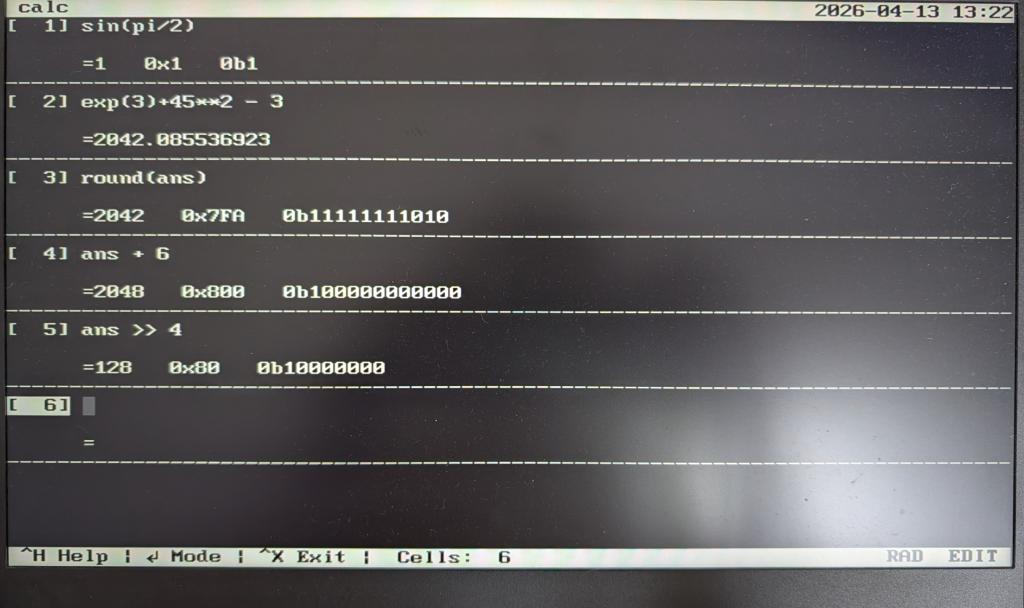
@matherp Peter, Since things are moving forward, can I ask too? Is it possible to make a built-in calculator for PicoMite, using the CALC command? A calculator like the one in PicoTop https://github.com/7west/PicoTop
Page 2 of 31
Print this page
The Back Shed's forum code is written, and hosted, in Australia.

 Notice. New forum software under development. It's going to miss a few functions and look a bit ugly for a while, but I'm working on it full time now as the old forum was too unstable. Couple days, all good. If you notice any issues, please contact me.


 Print this post