Notice. New forum software under development. It's going to miss a few functions and look a bit ugly for a while, but I'm working on it full time now as the old forum was too unstable. Couple days, all good. If you notice any issues, please contact me.
Volhout Guru Joined: 05/03/2018 Location: NetherlandsPosts: 6197
Posted: 10:50am 06 Nov 2025
Copy link to clipboard
Print this post
No, this was on linux (Ubuntu 20.04). And it was the "previous" 5.3.6 build, not today's one (I understand that that is only an update to MMCC).
Volhout (I also have a system running Ubuntu 24.04 at home, and I will take this evening to load MMedit 5.3.6 on it and confirm, since it currently has 5.3.3). I hope my issue is not due compatibility between current MMedit builds and the "old" linux 20.04, since 20.04 has always been very reliable for me. Edited 2025-11-06 20:50 by VolhoutPicomiteVGA PETSCII ROBOTS
TassyJim Guru Joined: 07/08/2011 Location: AustraliaPosts: 6626
Posted: 08:37pm 06 Nov 2025
Copy link to clipboard
Print this post
Thanks for that. I can rule out any funny Windows thing that's the cause. That leaves me as the problem.
My Linux VM is 20.4 but I have recently loaded 24.04 on a spare PC. This enabled me to fix the serial port issue and a few other things. The test MMCC was compiled on that PC but I have gone back to the VM so I will stay with a combination that I know works.
TassyJim Guru Joined: 07/08/2011 Location: AustraliaPosts: 6626
Posted: 07:39am 14 Dec 2025
Copy link to clipboard
Print this post
V5.3.7 Dec 2025 numerous bug fixes AUTOSAVE N now works correctly with CRLF line endings Linux now finds existing USB com ports Note: if you are using fixed COM ports, you will have to add them to a list in the MMCC.inf file.
MMEdit5_32_64.exe If you are installing on a 64bit OS, the 64bit will be installed otherwise the 32bit version is used. Not for XP.
MMedit5_XP_portable.zip Extract to a writable location. OK for XP and later. The portable version writes to the application subdirectories only.
MMedit5.tar.gz Suitable for Ubuntu 20.4 and probably later. Also suitable for RPi Bookworm and Trixie
I have made changes to the Linux install scripts in a futile attempt to make it easier for Linux beginners.
Linux install.txt Extract the files to a location that has permission to execute. My preferred location is /home/user/mmedit5/
All executable files should have retained their execute permission but your installation may be different.
In your GUI File Manager, navigate to the installation directory and "Open in Terminal" or equivalent.
If the installation is on a RPi - ONLY on RPi systems. From a command prompt run ./set-rpi.sh This has to be run for all updates.
The first time MMEdit is run, there are a few support files required. From a command prompt run ./getrequired.sh This is not required for updates. Depending on your version of Linux, these files may already be present.
To create desktop shortcuts, From a command prompt run ./dtopscuts.sh This is not required for updates.
The above scripts can be run from the GUI file manager but a command prompt will give more feedback.
Turbo46 Guru Joined: 24/12/2017 Location: AustraliaPosts: 1694
Posted: 02:40am 16 Jan 2026
Copy link to clipboard
Print this post
Hi Jim, I'm working with MMBasic for DOS and there are some keywords not being highlighted:
Const Randomize While Exit
I have added them to dos.tkn and restarted MMEdit (the latest) but that did not work. I had the idea that they are all in the one file now but if that's right I can't find it.
That was under c:\program file but I found another dos.tkn under c:\users. Is that the one I should be changing?
BillKeep safe. Live long and prosper.
Turbo46 Guru Joined: 24/12/2017 Location: AustraliaPosts: 1694
Posted: 02:54am 16 Jan 2026
Copy link to clipboard
Print this post
I changed that one as it seemed the most logical choice and it worked.
pwillard Guru Joined: 07/06/2022 Location: United StatesPosts: 347
Posted: 04:58pm 16 Jan 2026
Copy link to clipboard
Print this post
I've been having a lockup issue with MMCC on Windows lately... so hopefully the latest update will fix it. (Though I'm in the process of converting all my Windows systems to Linux, as I'm just *so over it* losing control of my own PC)
TassyJim Guru Joined: 07/08/2011 Location: AustraliaPosts: 6626
Posted: 03:19am 17 Jan 2026
Copy link to clipboard
Print this post
I have found a few places where an infinite loop might be created. There still may be more to find.
I experience lockups very rarely and never (so far) when in debug mode. This makes it difficult to be confident that I have fixed the problem.
There have been a very small number of reports of MMEdit/MMCC failing but I know that doesn't mean there isn't a problem.
TassyJim Guru Joined: 07/08/2011 Location: AustraliaPosts: 6626
Posted: 03:33am 17 Jan 2026
Copy link to clipboard
Print this post
The TKN file you are using can be found in the data folder location in Help/About.
I am gradually adding all keywords into a 'master' file kw_list.txt I use this list to recreate the tkn files automatically. I still need to add all the DOS commands to the master file so I update that dos.tkn manually for now.
boznz Newbie Joined: 09/01/2026 Location: New ZealandPosts: 7
Posted: 11:28pm 17 Jan 2026
Copy link to clipboard
Print this post
Can confirm works with Kubuntu 24.04 LTS on X86
Might want to clarify the Linux executable "MMEdit" supports both ARM and x86, As a brand new Linux newbie (Converted from Windows 11 yesterday ) I shot straight past the warning message (Confused as my MMBasic target is a RPi PICO) and ran the set-rpi.sh on auto pilot
Once I got my brain back in gear it worked great.
Chopperp Guru Joined: 03/01/2018 Location: AustraliaPosts: 1139
Posted: 12:32am 18 Jan 2026
Copy link to clipboard
Print this post
Hi Jim
On V5.3.7 Using the "Replace with" feature in Find for probably the first time. I did a Search for & Replace with which worked. (Both Replace & Replace all) but I found if I (accidently) click the Replace button when the search went back to the start of the document again the "Replace with" string gets inserted at the beginning of the first line which is commented out. Undo fixes that, but something to be aware of.
Thanks again for MMEDit.
BrianChopperP
TassyJim Guru Joined: 07/08/2011 Location: AustraliaPosts: 6626
Posted: 05:49am 18 Jan 2026
Copy link to clipboard
Print this post
I didn't think you could get any flavour of Ubuntu 24.04 in 32 bit.
MMEdit is compiled on x64 The only ARM processor targeted is for the RPi 64 bit.
I will try and make the install instructions clearer.
Turbo46 Guru Joined: 24/12/2017 Location: AustraliaPosts: 1694
Posted: 12:29am 22 Jan 2026
Copy link to clipboard
Print this post
Another couple of problems:
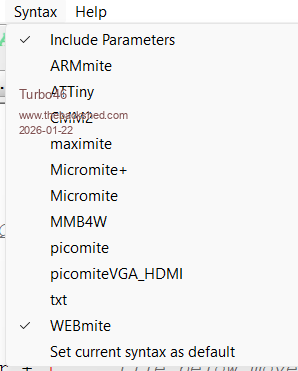
DOS is not a choice anymore?
Sometimes SUBs or FUNCTIONs are not colour coded in a program and sometimes they are and I haven't found the way to get them highlighted.Keep safe. Live long and prosper.
TassyJim Guru Joined: 07/08/2011 Location: AustraliaPosts: 6626
Posted: 03:30am 22 Jan 2026
Copy link to clipboard
Print this post
DOS should definitely be in the list. During the last update, some TKN files were scrapped (renamed to TKO) I can't see how it would happen, but perhaps doing your changes caused MMEdit to reject the DOS.tkn file. Did you have it open in a text editor when MMEdit started?
Either way, I have been redoing some of the files and have finished the DOS.tkn so here it is
DOS.zip With MMEdit shut down, unzip it into your data folder.
MMEdit will scan the data folder next start and add any .tkn files it finds (including the new DOS.tkn file).
There were a lot of keywords that should not have been in the DOS list. I hope I haven't lost any in the process.
The introduction of Structures has meant a major rewrite of parts of the syntax sections so I hope I have fixed whatever is causing some of your SUBs not getting highlighted. If you can send me a couple of examples of code with incorrectly formatted sections, I would appreciate it.
If I only use my programming style to test with, I will miss a lot of scenarios.
I hope to release the next version this weekend.VK7JH MMedit
Turbo46 Guru Joined: 24/12/2017 Location: AustraliaPosts: 1694
Posted: 04:02am 22 Jan 2026
Copy link to clipboard
Print this post
Haha I knew it must have been something stupid I had done. When I edited the DOS.tkn file in Notepad it saved it as DOS.tkn.txt and I didn't notice that then nor that the DOS option wasn't there.
I corrected the filename and Voila! it was back to normal
Having said that I'm not really sure how it happened because the changes did work after I made them. Maybe I did have the file open in Notepad and it automatically saved the .tkn as a .txt file when I closed it?
Anyway I have replaced it with your DOS.tkn file and all is good now.
Thanks BillKeep safe. Live long and prosper.
TassyJim Guru Joined: 07/08/2011 Location: AustraliaPosts: 6626
Posted: 05:05am 22 Jan 2026
Copy link to clipboard
Print this post
That DOS.tkn file is missing a couple of lines at the start. Try this version instead.

 Notice. New forum software under development. It's going to miss a few functions and look a bit ugly for a while, but I'm working on it full time now as the old forum was too unstable. Couple days, all good. If you notice any issues, please contact me.


 Print this post