Home
JAQForum Ver 24.01
Log In or Join  
Active Topics
Local Time 05:33 01 Jan 2026 Privacy Policy
Jump to

Notice. New forum software under development. It's going to miss a few functions and look a bit ugly for a while, but I'm working on it full time now as the old forum was too unstable. Couple days, all good. If you notice any issues, please contact me.

Forum Index : Microcontroller and PC projects : Pico Radar

     Page 3 of 7    
Author Message
Pluto
Guru

Joined: 09/06/2017
Location: Finland
Posts: 407
Posted: 06:43pm 28 Nov 2025
Copy link to clipboard 
Print this post

Gerald many thanks for the clarification.

Pluto
 
TassyJim

Guru

Joined: 07/08/2011
Location: Australia
Posts: 6412
Posted: 02:55am 29 Nov 2025
Copy link to clipboard 
Print this post

I have been testing the RD-03D. The basic commands are the same.
I didn't have a display so this code is for a VT100 terminal.

 ' RD-03D radar module VT display
 OPTION EXPLICIT
 OPTION DEFAULT INTEGER
 OPTION BASE 0
 
 DIM record$, rec$
 DIM debug = 1
 DIM cmdDelay = 50
 DIM Xscale = 80
 DIM Yscale = 160
 DIM multi = 1
 DIM x1,x2,x3,y1,y2,y3,v1,v2,v3,prec1,prec2,prec3
 DIM dataAvailable
 DIM hdr$= hex2str$("AAFF0300")
 DIM foot$ = Hex2Str$("55CC")
 DIM cmdHdr$ = hex2str$("FDFCFBFA")
 DIM cmdFoot$ = hex2str$("04030201")
 DIM enableConf$ = hex2str$("FDFCFBFA0400FF00010004030201")
 DIM endConf$ = hex2str$("FDFCFBFA0200FE0004030201")
 DIM ackEnableConf$ = hex2str$("FDFCFBFA0800FF010100400004030201")
 DIM ackEndConf$ = hex2str$("FDFCFBFA0400FE01000004030201")
 DIM singleTarget$ = hex2str$("FDFCFBFA0200800004030201")
 DIM ackSingleTarget$ = hex2str$("FDFCFBFA04008001000004030201")
 DIM multiTarget$ = hex2str$("FDFCFBFA0200900004030201")
 DIM ackMultiTarget$ = hex2str$("FDFCFBFA04009001000004030201")
 
 
 SETPIN GP1, GP0, COM1
 OPEN "com1: 256000" AS #3
 PRINT CHR$(27)+"[2J";
 IF multi THEN setmulti ELSE setsingle
 IF debug THEN
   PAUSE 4000
 ENDIF
 CLOSE #3
 SETPIN GP1, GP0, COM1
 OPEN "com1: 256000, 1024,radar,10" AS #3
 DO
   rec$ = INPUT$(255,#3)
 LOOP UNTIL LEN(rec$) = 0
 PRINT CHR$(27)+"[2J";CHR$(27)+"[1;40H";
 
 DO
   IF dataAvailable THEN processIt
   'pause 10
   IF INKEY$="c" THEN PRINT CHR$(27)+"[2J";
   IF INKEY$="d" THEN debug = 1 - debug
 LOOP
 
SUB radar
 LOCAL st,fin, lenr
 
 lenr = LEN(rec$)
 rec$ = rec$+INPUT$(255-lenr,#3)
 st = INSTR(rec$,hdr$)
 IF st THEN
   rec$= MID$(rec$,st)
   fin = INSTR(rec$, foot$)
   IF fin THEN
     record$ = LEFT$(rec$,fin+1)
     rec$ = "" 'mid$(rec$,fin+2)
     dataAvailable = 1
   ENDIF
 ENDIF
 
END SUB
 
SUB processIt
 STATIC n
 dataAvailable = 0
 x1 = Signed16(STR2BIN(UINT16,MID$(record$,5,2)))
 y1 = Signed16(STR2BIN(UINT16,MID$(record$,7,2)))
 v1 = Signed16(STR2BIN(UINT16,MID$(record$,9,2)))
 prec1 = STR2BIN(UINT16,MID$(record$,11,2))
 ' if multi then
 x2 = Signed16(STR2BIN(UINT16,MID$(record$,13,2)))
 y2 = Signed16(STR2BIN(UINT16,MID$(record$,15,2)))
 v2 = Signed16(STR2BIN(UINT16,MID$(record$,17,2)))
 prec2 = STR2BIN(UINT16,MID$(record$,19,2))
 
 x3 = Signed16(STR2BIN(UINT16,MID$(record$,21,2)))
 y3 = Signed16(STR2BIN(UINT16,MID$(record$,23,2)))
 v3 = Signed16(STR2BIN(UINT16,MID$(record$,25,2)))
 prec3 = STR2BIN(UINT16,MID$(record$,27,2))
 ' endif
 INC n
 IF prec1 > 0 AND(n MOD 5) = 0 THEN
   plotit x1,y1,x2,y2
   IF debug THEN
     PRINT CHR$(27)+"[36;2H";x1,y1,v1,prec1,x2,y2,v2,x3,y3,v3
     ' for n = 1 to len(record$)
     '   print hex$(asc(mid$(record$,n,1)),2);
     ' next n
   ENDIF
 ENDIF
 
END SUB
 
FUNCTION Signed16(u AS INTEGER) AS INTEGER
 IF u AND &h8000 THEN Signed16 = u AND &h7FFF ELSE Signed16 = -u
END FUNCTION
 
FUNCTION Hex2Str$(txt$)
 LOCAL h
 FOR h = 1 TO LEN(txt$) STEP 2
   Hex2Str$=Hex2Str$+CHR$(VAL("&h"+MID$(txt$,h,2)))
 NEXT h
END FUNCTION
 
SUB plotit ax1, ay1, ax2,ay2
 LOCAL bx1,by1,bx2,by2
 STATIC cx1=40,cy1,cx2=40,cy2
 bx1 = ax1/Xscale +40
 by1 = ay1/Yscale
 PRINT CHR$(27)+"["+STR$(cy1)+";"+STR$(cx1)+"H"+"1";
 PRINT CHR$(27)+"["+STR$(by1)+";"+STR$(bx1)+"H"+"*";
 cx1=bx1
 cy1=by1
 IF ax2 THEN
   bx2 = ax2/Xscale +40
   by2 = ay2/Yscale
   PRINT CHR$(27)+"["+STR$(cy2)+";"+STR$(cx2)+"H"+"2";
   PRINT CHR$(27)+"["+STR$(by2)+";"+STR$(bx2)+"H"+"*";
   cx2=bx2
   cy2=by2
 ENDIF
END SUB
 
SUB setsingle
 LOCAL n
 LOCAL junk$
 junk$ = INPUT$(255,#3)
 PRINT #3, enableconf$;
 PAUSE cmdDelay
 junk$ = INPUT$(255,#3)
 IF debug THEN
   IF junk$ = ackEnableConf$ THEN
     PRINT "ACK conf OK"
   ELSE
     FOR n = 1 TO LEN(junk$)
       PRINT HEX$(ASC(MID$(junk$,n,1)),2);
     NEXT n
   ENDIF
   PRINT
 ENDIF
 PRINT #3, singleTarget$;
 PAUSE cmdDelay
 junk$ = INPUT$(255,#3)
 IF debug THEN
   IF junk$ = ackSingleTarget$ THEN
     PRINT "ACK single OK"
   ELSE
     FOR n = 1 TO LEN(junk$)
       PRINT HEX$(ASC(MID$(junk$,n,1)),2);
     NEXT n
   ENDIF
   PRINT
 ENDIF
 PRINT #3, endconf$;
 PAUSE cmdDelay
 junk$ = INPUT$(255,#3)
END SUB
 
SUB setmulti
 LOCAL junk$, n
 junk$ = INPUT$(255,#3)
 PRINT #3, enableconf$;
 PAUSE cmdDelay
 junk$ = INPUT$(255,#3)
 PRINT #3, multiTarget$;
 PAUSE cmdDelay
 junk$ = INPUT$(255,#3)
 IF debug THEN
   IF junk$ = ackMultiTarget$ THEN
     PRINT "ACK multi OK"
   ELSE
     FOR n = 1 TO LEN(junk$)
       PRINT HEX$(ASC(MID$(junk$,n,1)),2);
     NEXT n
     PRINT
   ENDIF
 ENDIF
 PRINT #3, endconf$;
 PAUSE cmdDelay
 junk$ = INPUT$(255,#3)
END SUB


No comments in the code yet. Sorry.

A sample readout after we wandered about the house this morning.
It looks like a Poodle!
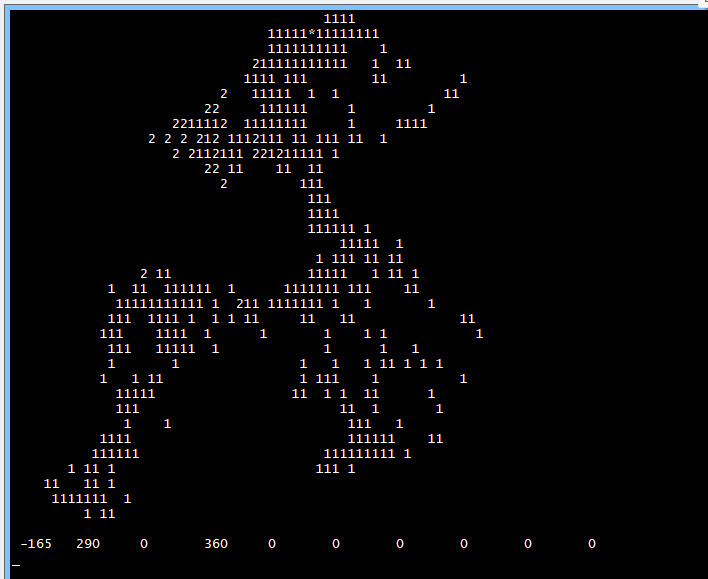


The radar goes through walls better that I had expected but I will set it up in a better location and use a Webmite + Telnet.

Jim
VK7JH
MMedit
 
v.lenzer
Regular Member

Joined: 04/05/2024
Location: Germany
Posts: 89
Posted: 03:31pm 30 Nov 2025
Copy link to clipboard 
Print this post

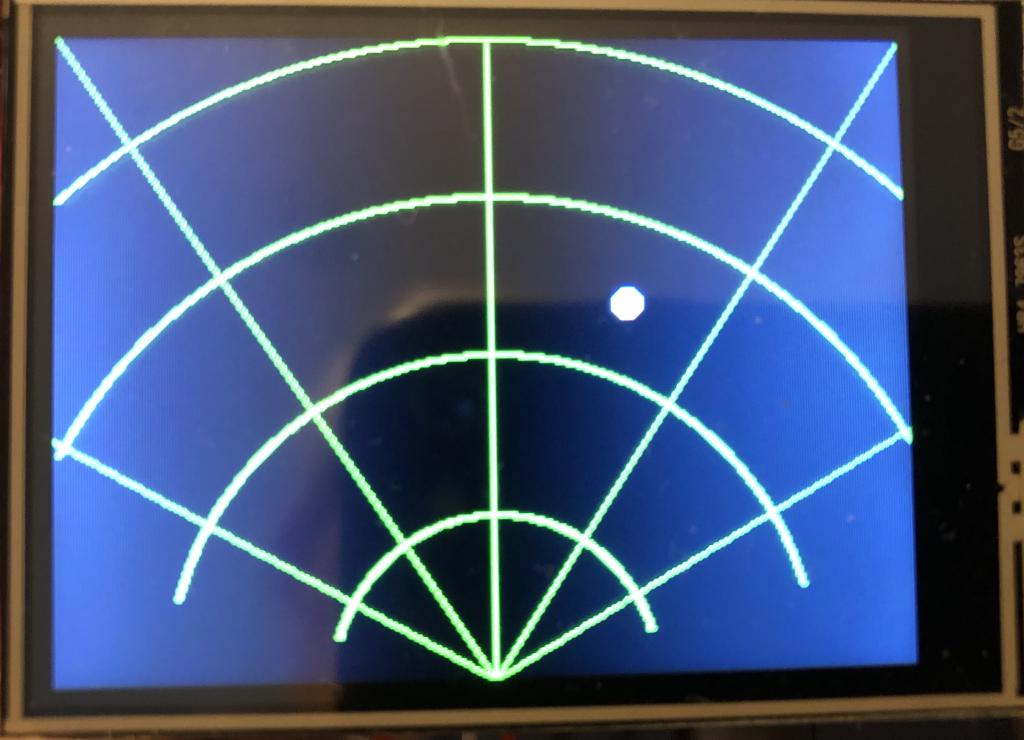
Hi Gerald! I've drawn a radar grid for it. Works perfectly.

Best wishes! Joachim
 
v.lenzer
Regular Member

Joined: 04/05/2024
Location: Germany
Posts: 89
Posted: 03:45pm 30 Nov 2025
Copy link to clipboard 
Print this post

Hi TassyJim! Your code also works perfectly with an LP2450. I just had to swap GP0 and GP1.
Best wishes! Joachim
 
Wolfgang
Regular Member

Joined: 03/11/2021
Location: Germany
Posts: 74
Posted: 04:35pm 30 Nov 2025
Copy link to clipboard 
Print this post

Very impressive, I'm impatiently awaiting my LD2450

Wolfgang
 
ville56
Guru

Joined: 08/06/2022
Location: Austria
Posts: 366
Posted: 05:28pm 30 Nov 2025
Copy link to clipboard 
Print this post

Now that the basic problems are solved, Andrew can start constructing his cat repellent device, but just for 3 cats at a time ...
Or with 3 sensors and a software that negotiates area filtering between them, so up to 9 cats can be tracked ...  
                                                                 
73 de OE1HGA, Gerald
 
TassyJim

Guru

Joined: 07/08/2011
Location: Australia
Posts: 6412
Posted: 07:21pm 30 Nov 2025
Copy link to clipboard 
Print this post

I can confirm that the radar will detect a small 5kG dog so cats should be doable. AS long as they keep moving.

Jim
VK7JH
MMedit
 
palcal

Guru

Joined: 12/10/2011
Location: Australia
Posts: 2027
Posted: 10:52pm 06 Dec 2025
Copy link to clipboard 
Print this post

@ v.lenzer,  would you mind sharing your code.
Thanks.
"It is better to be ignorant and ask a stupid question than to be plain Stupid and not ask at all"
 
v.lenzer
Regular Member

Joined: 04/05/2024
Location: Germany
Posts: 89
Posted: 09:52am 07 Dec 2025
Copy link to clipboard 
Print this post

This is my first version of the radar program. I haven't changed much. After starting, it automatically switches to display mode (line 121). However, the menu remains on the console. The "single person mode" is also set (line 133). The pins for TXD and RXD are gp0 and gp1. The radar grid is drawn in sub_radr_net and called in line 290. The program is based on LD2450LD-V2.1.bas. In version 2.3, the radar dot wasn't stable enough for me when nothing was moving.

I can't guarantee that everything is correct, but it works perfectly. The mobile app was also helpful. It allows you to check if the radar is reliably detecting and which mode is selected.

I'm currently working on getting the settings menu onto the touchscreen. I think that will work.


Radar_v.1.bas.zip
Best wishes! Joachim
 
palcal

Guru

Joined: 12/10/2011
Location: Australia
Posts: 2027
Posted: 08:03pm 07 Dec 2025
Copy link to clipboard 
Print this post

Thanks for that.
"It is better to be ignorant and ask a stupid question than to be plain Stupid and not ask at all"
 
palcal

Guru

Joined: 12/10/2011
Location: Australia
Posts: 2027
Posted: 10:23pm 07 Dec 2025
Copy link to clipboard 
Print this post

Got it working but the dot on the screen does not seem to follow a moving person as it should, in fact it does move much at all. I am using the RD-03 maybe that makes a difference. Range is less than 1 metre.
I found an article on a local suppliers web site here in Aust. how it works and code in MicoPyhton.
Here

Thanks for the code Gerald and Joachim, great work.
Edited 2025-12-08 09:58 by palcal
"It is better to be ignorant and ask a stupid question than to be plain Stupid and not ask at all"
 
ville56
Guru

Joined: 08/06/2022
Location: Austria
Posts: 366
Posted: 05:16am 08 Dec 2025
Copy link to clipboard 
Print this post

RD-03 is the same sensor. Have you checked Vcc/Gnd and rx/tx lines. If you connect the sensor to a serial-to-USB adapter and supply it with 5V you should see data comeing with 256000 baud. But this default can be changed permanently, so you better check. A scope or a logic analyzer may also help

Gerald
                                                                 
73 de OE1HGA, Gerald
 
palcal

Guru

Joined: 12/10/2011
Location: Australia
Posts: 2027
Posted: 05:50am 08 Dec 2025
Copy link to clipboard 
Print this post

It is working, the dot moves but not like it should, it just wanders slightly around the zero position on the display.
Here are a couple of screen shots


When sitting infront of it the dot hovers around the zero mark, when I move to a position about 3 metres away the dot moves down about 2 lines on the grid, ie about half way, but only down the left hand side.
It keeps losing sync. I don't know what that means.

.
Edited 2025-12-08 16:05 by palcal
"It is better to be ignorant and ask a stupid question than to be plain Stupid and not ask at all"
 
phil99

Guru

Joined: 11/02/2018
Location: Australia
Posts: 2900
Posted: 07:25am 08 Dec 2025
Copy link to clipboard 
Print this post

  Quote  It keeps losing sync. I don't know what that means.
My guess is its Tx baud rate is different to your RX baud rate. With a MicroMite connected to TeraTerm at the wrong baud rate you can get random characters on the screen and it looks like your program is getting that.
  Quote  If you connect the sensor to a serial-to-USB adapter and supply it with 5V you should see data coming with 256000 baud.
Use TeraTerm and experiment with different baud rates until the data looks sensible then adjust the program to use that baud rate.
 
palcal

Guru

Joined: 12/10/2011
Location: Australia
Posts: 2027
Posted: 08:19am 08 Dec 2025
Copy link to clipboard 
Print this post

Thanks for that Phil, I'll try in the morning.
"It is better to be ignorant and ask a stupid question than to be plain Stupid and not ask at all"
 
ville56
Guru

Joined: 08/06/2022
Location: Austria
Posts: 366
Posted: 08:39am 08 Dec 2025
Copy link to clipboard 
Print this post

sync lost means that the expected header chars are not received and the app waits for them to come by again. Seems like there are characters lost from the serial line. The serial line itself seems to be setup properly and the senor deliveres data, otherwise you would not get sync lost/sync established messages. If the range-sensitivity is too low, you can use a different scaling factor for calibration. I've set it up for 6 meters for full display, but it seems that the distance readout from the sensor is not very accurate as I measured 3 meters in y-axis distance as being about 1/4 of the display distance only. Didn't dig deeper as I think this can be calibrated out.

The lost chars may be because of too low cpu speed or too much time consumed for other code like display update. I've run that on a pico2 RP2450 with 300 Mhz and didn't lose chars except when switching from single to multi-target mode. Could be that the display thakes too much time for drawing the lines/ball. Had a SPI display with standard driver. so nothing really fast....

If I find some time theses days I can try to run that on a pico 1 with low cpu speed and see what the behavior is.

Edit: scaling factors are calculated in lines 103/104, the divisor is the maximum length in mm.

Gerald
Edited 2025-12-08 18:53 by ville56
                                                                 
73 de OE1HGA, Gerald
 
v.lenzer
Regular Member

Joined: 04/05/2024
Location: Germany
Posts: 89
Posted: 08:46am 08 Dec 2025
Copy link to clipboard 
Print this post

I'm getting these error messages too. I think it's actually related to the image rendering. I didn't pay much attention to it because the display still worked. I'll try it at 300 MHz today. And please note: I was using Gerald's version 2.1.
Best wishes! Joachim
 
ville56
Guru

Joined: 08/06/2022
Location: Austria
Posts: 366
Posted: 09:04am 08 Dec 2025
Copy link to clipboard 
Print this post

try to comment out line 315 (radar_net) just to see if this cures the sync issue. If so, there is too much cputime spent in drawing the grid. Maybe you then could try to use layers, one for the grid and one for the ball(s). This also applies to V2.1.

As I already wrote, V2.1 uses even more cpu, as all the definitions for the header/trailer and data items are dynamic and also trailers are checked. So, yes, it may be a bit overengineered for this purpose .... but Jims very slick approach could be a good basis for low cpu usage.
                                                                 
73 de OE1HGA, Gerald
 
v.lenzer
Regular Member

Joined: 04/05/2024
Location: Germany
Posts: 89
Posted: 02:47pm 08 Dec 2025
Copy link to clipboard 
Print this post

The distance between arcs is approximately 2 meters with these settings:

const v_fact = mm.vres/8000
const h_fact = mm.hres/6200

At least, that's what my tests showed.

Attempts with GUI SETUP and GUI PAGE didn't yield good results. While it works, the lines are deleted from the radar point. Now I need to look into the LAYERS issue.
Best wishes! Joachim
 
ville56
Guru

Joined: 08/06/2022
Location: Austria
Posts: 366
Posted: 03:50pm 08 Dec 2025
Copy link to clipboard 
Print this post

just measured the time used for "radar_grid" drawing the grid:

pico 2, 100Mhz: 69 mSec
pico 2, 250Mhz: 32 mSec

so with a pico 2 there is still some headroom, even with 100 Mhz. Have no free Pico 1 at hand but I think it can become tight ...

The interval of measurements taken by the sensor is 100 mSec, so if the processing time in total exceeds this 100mSec synch will be lost and must be regained with the following data packet(s).

Drawing the grid and the ball should be redesigned ... layers, sprites, ... have not enough experiance with graphics but I'm sure there are experts in this forum.

Gerald
                                                                 
73 de OE1HGA, Gerald
 
     Page 3 of 7    
Print this page
The Back Shed's forum code is written, and hosted, in Australia.
© JAQ Software 2026