Notice. New forum software under development. It's going to miss a few functions and look a bit ugly for a while, but I'm working on it full time now as the old forum was too unstable. Couple days, all good. If you notice any issues, please contact me.
Bryan1 Guru Joined: 22/02/2006 Location: AustraliaPosts: 2297
Posted: 06:54am 19 Nov 2025
Copy link to clipboard
Print this post
Eh Keepis a huge thanks for introducing me to Zorin-18 I found my other 32gig SDCard so got and downloaded Zorin and used win32iskmanager and a total of 10 minutes past from starting the download to walking upto my shed and loading it on my ol linux laptop. Got the OS all loaded and now I'm on the laptop just using my phone as a hotspot.
The wifi didn't come straight on so just had to try hidden network and it worked
The more I'm looking around the more I'm starting to think this is the easiest OS to get around and just think I did notice this OS is made by Paddy and Mick over in Ireland
Regards Bryan
KeepIS Guru Joined: 13/10/2014 Location: AustraliaPosts: 2284
Posted: 05:12am 24 Nov 2025
Copy link to clipboard
Print this post
FYI: On my quest to find a Linux distro that "I" really like, I decided to try a Debian based Linux.
I made a USB ISO of the just released MX version, the MX 25 distro, amazed at how fast it booted, the quick response and the extremely low CPU and memory usage.
This distro is seriously impressive to me, the user configuration is on another level and for a new release that they were bug fixing just a few weeks for release, it has run faultlessly.
I used it for a few days installed on an external USB drive. Liked it SOooo much that I decided to use the option to take a system snapshot to an ISO backup.
The backup ISO can be placed on a USB device and booted and Installed.
The ISO installs the current MX 25 system backup state just as you would do a normal full MX 25 ISO install with all install options.
BTW the full system ISO snapshot is seriously fast to backup.
After booting with the ISO, I had the experimental option in the Install menu to install the new system over an existing Linux installation, which again worked perfectly, all triple boot options including Windows were correctly handled, only some minor cleanup of the Home directory, which I can eliminate if I ever have to restore the OS. Every installed app and desktop modifications I had made were perfect.
The ability make almost any desktop layout you could want, along with the depth of system commands via GUI system Menus is brilliant, and full very large quality feature rich application list is included.NANO:Inverter V 8.4ks - Linux AvrDude GUI script V4.1
Bryan1 Guru Joined: 22/02/2006 Location: AustraliaPosts: 2297
Posted: 06:45am 24 Nov 2025
Copy link to clipboard
Print this post
Eh Keepis maybe you can help me out with this.....
Yesterday decided to load up the code for the 2 nano's so got onto Zorin and downloaded the arduino software, now after going thru a few hurdles finally got the software to try and load only to find a message permission not granted on ttyusb1 and trying to google the fix wasn't any help what so ever.
It has been years since I was in the terminal and I am thinking chown #user/ ttyusb1 may do the trick but I didn't want to risk breaking the OS.
So then deiced to load on my win10 computer only to it won't work either as it tried to load but after a minute the error message comes up saying can't connect.
Now the settings I used was Nano and the old programmer, I also did try other ones with no luck either.
It has been awhile since I programmed a nano and that was on ubuntu22 on my old laptop that just worked. Edited 2025-11-24 17:05 by Bryan1
KeepIS Guru Joined: 13/10/2014 Location: AustraliaPosts: 2284
Posted: 08:32am 24 Nov 2025
Copy link to clipboard
Print this post
I'll have stab, I'm only a few weeks into Linux, so likely better ways to do this.
With the Nano plugged in:
sudo dmesg | grep tty Produces something like this:
[ 0.160063] printk: legacy console [tty0] enabled [ 4716.829617] usb 1-2: ch341-uart converter now attached to ttyUSB0
Just to verify you have the correct port, obviously mine is ttyUSB0.
sudo chmod 666 /dev/ttyUSB0
If it still causes a problem check that dialout and plugdev groups are assigned to you.
groups "your username" . Will list all groups assigned to your username
JohnS Guru Joined: 18/11/2011 Location: United KingdomPosts: 4391
Posted: 10:38am 24 Nov 2025
Copy link to clipboard
Print this post
These kinds of USB device are likely to be one of /dev/ttyACM0 /dev/ttyUSB0
(if you have more than one then the 0 will be 0 or 1 or ...)
Chances are that ls -l /dev/ttyACM0 (or ls -l /dev/ttyUSB0)
will show its group as dialout or plugdev
and that is why your user needs to be a member of the group.
The rest of the permissions should already be OK i.e. you should not need any sudo chmod 666 command.
If you add a group (e.g. in a GUI) to a user, you'll have to log out & back in for it to take effect. (Annoying, yes, a bit.)
John
robert.rozee Guru Joined: 31/12/2012 Location: New ZealandPosts: 2552
Posted: 10:48am 24 Nov 2025
Copy link to clipboard
Print this post
open a command/terminal window and type in the following:
sudo adduser $USER dialout
next, type in the following two lines:
sudo apt purge modemmanager sudo apt autoremove
finally, log out and then log in again. or (even easier) shut down linux and then start it up again. this step is necessary for the adduser command to take effect. now you should permanently have access to ALL serial port devices.
the two apt lines are to remove the scourge of modemmanager, an application that is a dinosaur left over from the days of dialup modems, and has no place on any modern computer - it unhelpfully tries sending AT commands to serial ports at the most inconvenient possible times.
note: the above lines are CASE SENSITIVE. in fact, everything in linux is case sensitive. so when you mentioned "ttyusb1" above you actually meant "ttyUSB1". get the case wrong, and things will not work, so be wary.
cheers, rob :-) Edited 2025-11-24 20:51 by robert.rozee
KeepIS Guru Joined: 13/10/2014 Location: AustraliaPosts: 2284
Posted: 09:35pm 24 Nov 2025
Copy link to clipboard
Print this post
Good point, and I was pleasantly surprised at just how much detail is in the manual and the supplied FAQ, I have both on the desktop, it's a nice change from others distros with either no manual or a manual that tells you basically nothing.NANO:Inverter V 8.4ks - Linux AvrDude GUI script V4.1
Grogster Admin Group Joined: 31/12/2012 Location: New ZealandPosts: 10073
Posted: 11:40pm 24 Nov 2025
Copy link to clipboard
Print this post
Agreed.
In my use of Linux in the past month, and extensive use of various VCP devices, I can say that any PIC32/1455-based ICSP/VCP chips I.D. as ACM0, and something else like a CP2102 I.D. as USB0.
As far as the DIALOUT group thing is concerned, in LMDE6 that I setup, I never needed to do this, as Mint appears to setup full access to serial ports by default for any user - which is useful, as then you don't have to try to work out WHY the serial ports won't talk to you in Linux, they just work as they would in Windoze.
Other distros such as MX, obviously don't provide for that automatically, so you are then required to do A LITTLE BIT of hoop-jumping to gain that access. But like most thing, once you know how, it's not a problem. Edited 2025-11-25 09:44 by GrogsterSmoke makes things work. When the smoke gets out, it stops!
KeepIS Guru Joined: 13/10/2014 Location: AustraliaPosts: 2284
Posted: 01:37am 25 Nov 2025
Copy link to clipboard
Print this post
FYI: Linux MX does provide it automatically, no hoop jumping needed, so does Ubuntu.
Bryan1 was having trouble getting his to work on Ubuntu, so it was a quick try of a few things just to to see if it would work before going deeper, and it does work on Zorin "Ubuntu".
The PIC32/1455-based ICSP/VCP was simple to get working. As was the USBasp programmer board for the IDE and AvrDude command line programmer. All are run via a desktop Icon.
I was going to ask Bryan1 what version of the Arduino IDE he was using?
The Arduino IDE V2.x I used works beautifully, it programs the Hex file via the USBasp programmer board and it does not change the Fuses settings or try to reload the bootloader, which it did on the Windows version.
Unlike the windows version - this Linux version programs the HEX output extremely fast, almost as fast as the standalone version of AvrDude, which is now only needed to set the lock and EEprom Fuses to stop the User data of EEprom from being overwritten in the Nano when programming VIA the Arduino IDE.
The IDE version of AvrDude in Win changes the Lock settings, does an EEprom erase and this cannot be changed. OK it can, but it's forced to revert back to default AVR settings for the IDE every time you load the IDE.NANO:Inverter V 8.4ks - Linux AvrDude GUI script V4.1
KeepIS Guru Joined: 13/10/2014 Location: AustraliaPosts: 2284
Posted: 03:50am 25 Nov 2025
Copy link to clipboard
Print this post
I've been wishing for a backup application similar to Acornis in Windows, the speed of creating an image is amazing.
The Snapshot backup utility is as fast and 100% simpler, and it does what I want, makes a bootable ISO that runs Linux MX from a small USB flash drive, it's indistinguishable from my current fully installed Linux MX, and it allows me to install it anywhere, or make any repairs with every repair option and app available, and it still has a fast response even from a crappy flash drive.
To create a full current state MX system ISO, with the exception of the "Virtual Box" directory as it has a 25GB Windows 11 Pro VM, as I have it backed separately on another drive.
Time taken is 1 minute and 25 seconds, including CRC verify. "Fast compression" selected from the options for a size of 9.2GB. It can back up to the MX system Drive or to an NTFS drive, I used the Later, disk R/W speed was lmited to 500Mb/s by the Samsung 870 EVO SSD backup disk, which it runs at during the backup, the OS drive has R/W speeds in the 3 to 7GB/s.
FYI the first time I did this I had two Win11 VM's, it took 9 minutes to make a compressed verified 48GB ISO
Windows is basically RIP now.
The default password app installed in MX is brilliant, I spend hours trying to find something on the Net but most were crap, so I gave up for lack of time and placed it on my todo list. Now I'm slowly moving my user, passwords and Net launch data over from the Windows VM,
I think some new users will be put off by the default sidebar and Icon layout. A tip is to remember that Right click is your friend, or the Left Windows keyboard button etc, all will bring up the Application Menu in various list formats.
With a few tweaks you can have any layout you want.
BTW you also have a GUI backup app using rsync for automated Home settings file backups if required, and it's also much better the the other OS's I tried.
With the snapshot ISO, you have the option of making a bootable ISO of your installation without Hardware dependency, and just like a typical install ISO, it sorts that out on install, this means I can set this up for family etc, and install it ready to go instantly on their PC, almost nothing to do.NANO:Inverter V 8.4ks - Linux AvrDude GUI script V4.1
Grogster Admin Group Joined: 31/12/2012 Location: New ZealandPosts: 10073
Posted: 05:06am 25 Nov 2025
Copy link to clipboard
Print this post
Yes, I even have my iDrive account up and running under Linux now, for daily incremental backups. The Linux version of the iDrive thing, is actually setup and run as a new terminal command idrive.
As with MANY applications in Linux, this is all text-based, not a GUI in sight, but I am getting more and more used to "Text-mode" in the Linux terminal, to do all sorts of useful stuff.
All it took, was a decent enough push from Microsoft, and W11's crazy setup, accounts and various other things about it, was my starter for ten, and now I'm away laughing.
Before, had I run into any problem like that in Linux, I would INSTANTLY fall-back on Windows, and abandon Linux. Now, if I have a problem in Linux, I like to research it and find a solution. It all helps me to learn more Linux too, so it's no bad thing.
Many apps have Linux versions these daze, including the CUBE programmer from ST for the CMM2 chips, GFXterm, MMEDIT, Etcher, iDrive, VLC Media Player, YouTube downloader(ytDownloader is fab!), PDF readers, Libre Office suite, HandBrake video transcoder....
iDrive did fight me a LITTLE to get running right, but iDrive support were excellent, and they sorted out the issue within a few emails, and away it went in the background.
So iDrive is doing automatic backups to the cloud, I do manual backups to a flash-drive and my NAS, and Timeshift does regular system backups, so I think things are reasonably well under control.Smoke makes things work. When the smoke gets out, it stops!
KeepIS Guru Joined: 13/10/2014 Location: AustraliaPosts: 2284
Posted: 06:18am 25 Nov 2025
Copy link to clipboard
Print this post
It looks like most of the later distors have the favourites, like Libre Office, VLC, Timeshift, Thunderbird, Firefox or Brave etc.
I installed ST Cube and other apps we use for programming, it was nice to see them made for Linux as well.
While I do like terminal commands and continue to document the ones I've used over this learning period with the other distros, and I will continue to lean more because I like to know what each GUI interface command actually does.
I agree with your thoughts with Windows, but I must add that Win11 has been virtually 100% rock solid for me, and I have abused the sh#t out of it over the years of programming and testing.
However it's now a virus/spyware application.
I know why we don't have a "true" virus/spyware removal program, it would immediately delete Windows
I was actually amazed to see some figures that indicated Windows itself is now a tiny percentage of the MS income stream, and now that more Laptops and PCs are coming out with Linux installed, and added to the s%it way they are trying to shove Win11 down our throats, it's hopefully going to be less and less as time goes on.
Bryan1 Guru Joined: 22/02/2006 Location: AustraliaPosts: 2297
Posted: 06:53am 25 Nov 2025
Copy link to clipboard
Print this post
G'Day Guy's first the arduino version is 2.3.6 so typed in the command Rob suggested and the result back was
fatal dialout groups already exist
Now for sudo purge modemanager the result back was no files found
So booted up the arduino software and it's on /dev/ttyUSB0 and showing connected so loaded up the lcd code and same thing permission denied then remembered I had to do a reboot only to find when selecting tools and seeing the port is highlighted it is still the same permission denied
JohnS Guru Joined: 18/11/2011 Location: United KingdomPosts: 4391
Posted: 07:38am 25 Nov 2025
Copy link to clipboard
Print this post
I think rob's made a mistake.
I haven't needed to do this so bear with me if the following is also wrong (I'm not on Zorin, either)...
Instead of sudo adduser $USER dialout
I think you want sudo usermod -G dialout $USER
If you'd like to see what the idea is man usermod
will show you the usermod command (in rather a lot of detail).
John
Bryan1 Guru Joined: 22/02/2006 Location: AustraliaPosts: 2297
Posted: 07:44am 25 Nov 2025
Copy link to clipboard
Print this post
Thanks for that tip John well it is getting close to dinner time and I downloaded MX which I'll burn the iso on a 32gig SDCard tomorrow night. As for first looks in Zorin it does look crippled in more ways than one.
So tomorrow night after work will see what this MX version looks like and behave
Regards Bryan
dddns Guru Joined: 20/09/2024 Location: GermanyPosts: 924
Posted: 08:00am 25 Nov 2025
Copy link to clipboard
Print this post
adduser / deluser can be used as well.
man adduser
I think the most convenient way is to use the GUI "users and groups" in system management
Revlac Guru Joined: 31/12/2016 Location: AustraliaPosts: 1309
Posted: 08:21am 25 Nov 2025
Copy link to clipboard
Print this post
Bryan, I used ubuntu 22.4 Some time back I run into a similar issue, Some issue with britty blocking the port CH340 driver or something. sudo apt remove britty Not sure if this is the issue someone may know or will have to look it up, it was only a problem on Ubuntu 22 I could be a bit off target with this one, its been a long time.
Linux MX might well be my next OS choice. Cheers Aaron Off The Grid
KeepIS Guru Joined: 13/10/2014 Location: AustraliaPosts: 2284
Posted: 08:30am 25 Nov 2025
Copy link to clipboard
Print this post
FYI the version I'm using is this:
MX-25_Xfce_ahs_sysvinit_x64, an “Advanced Hardware Support” release for very recent hardware, with 6.16 kernel and newer graphics drivers and firmware. 64 bit only. For newer hardware.
KeepIS Guru Joined: 13/10/2014 Location: AustraliaPosts: 2284
Posted: 09:31am 25 Nov 2025
Copy link to clipboard
Print this post
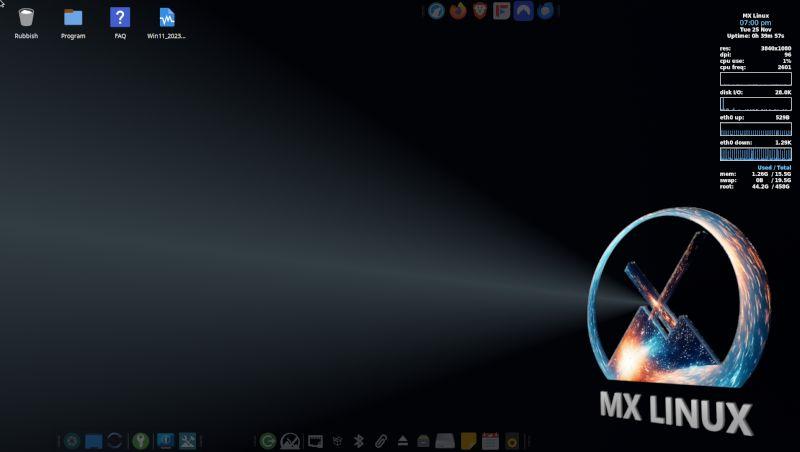
FYI below is a Screen grab of my Desktop on the main monitor: It looks rich and liquid in real life. Nothing like the drab Screen grab.
I added a few Task Bars and set the Opacity to 30% until mouse over, and they auto hide if covered by any part of a window, for me this keeps the desktop looking uncluttered.
Unlike MS Windows "hide the taskbar" crap, which if so flaky, this Linux implementation is just perfect.
Why do I personally like this ?:
Because when I'm at full screen in any app, especially a browser or programming IDE, I don't want to task switch, change virtual desktops, press a reveal desktop key or any other time wasting crap to launch or find something.
I usually want access to the File system, folder or another app to look something up or save copied information to a file etc. This is brilliant for me, just move the mouse to the top or bottom of screen for the taskbar I want to use, task bar changes to 100% Opacity as it comes to the foreground.
Most may hate this, but whatever floats your boat, as the saying goes, that's why I like Linux, I/we can make it our own to suite us.

 Notice. New forum software under development. It's going to miss a few functions and look a bit ugly for a while, but I'm working on it full time now as the old forum was too unstable. Couple days, all good. If you notice any issues, please contact me.


 Print this post
 I found my other 32gig SDCard so got and downloaded Zorin and used win32iskmanager and a total of 10 minutes past from starting the download to walking upto my shed and loading it on my ol linux laptop. Got the OS all loaded and now I'm on the laptop just using my phone as a hotspot.