Notice. New forum software under development. It's going to miss a few functions and look a bit ugly for a while, but I'm working on it full time now as the old forum was too unstable. Couple days, all good. If you notice any issues, please contact me.
matherp Guru Joined: 11/12/2012 Location: United KingdomPosts: 12059
Posted: 04:45pm 07 Jan 2026
Copy link to clipboard
Print this post
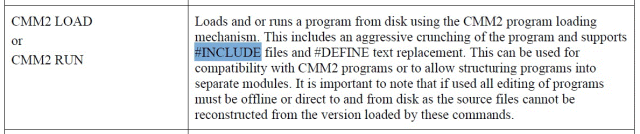
#include only works within a file being loaded by CMM2 LOAD or CMM2 RUN
Volhout Guru Joined: 05/03/2018 Location: NetherlandsPosts: 6197
Posted: 06:54pm 07 Jan 2026
Copy link to clipboard
Print this post
@Peter,
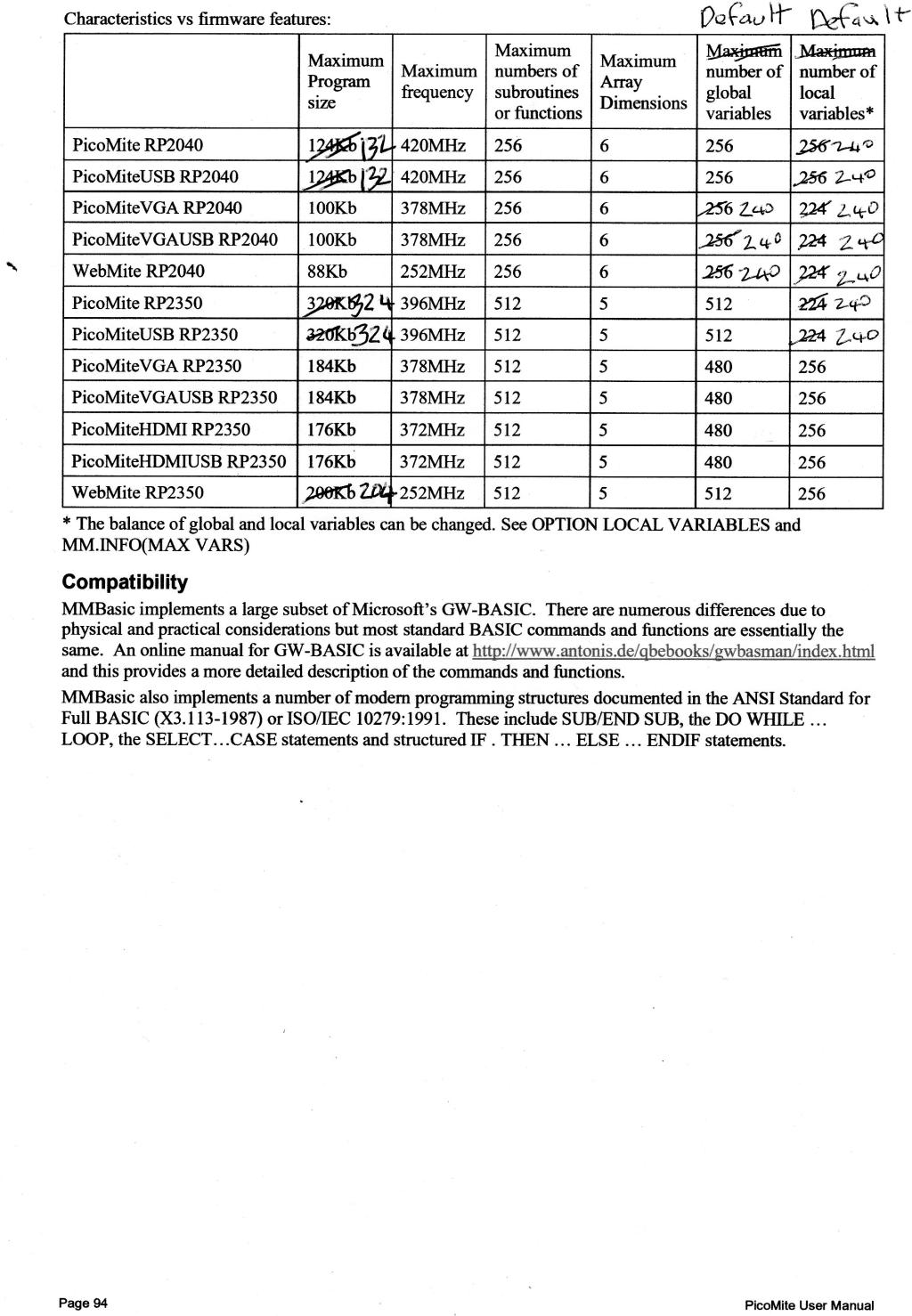
The thermal camera does work on VGA, but not on Game*Mite. In the RP2040 (non VGA) there is not enough heap memory. Currently (6.02.00rc2) there is 151kbyte.
It runs when there is 160kbyte heap. It requires minimal 158kbyte. It needs a framebuffer for the LCD (38kbyte), so 120kbyte for data. On VGA that is not needed, and with 126kbyte there is sufficient memory. But on Game*Mite not.
Is there any way to gain that heap space? Honestly ... 6.01.00 also does not have sufficient heap(150k), I have missed that. Older version have more heap.
Volhout (I have tested the camera on a RP2350 equiped Game*Mite, and overlooked the memory restrictions of the RP2040) Edited 2026-01-08 04:59 by VolhoutPicomiteVGA PETSCII ROBOTS
matherp Guru Joined: 11/12/2012 Location: United KingdomPosts: 12059
Posted: 07:16pm 07 Jan 2026
Copy link to clipboard
Print this post
The only way to free up more is to slow it down by moving functions out of ram. This is why there is apparently more for VGA - it runs slower. 6.00.00 had 4K more but to get 12K would be basically moving everything out of RAM. Just checked - even 5.08.00 only had 8K more. Are you sure the application hasn't grown? Edited 2026-01-08 05:19 by matherp
Volhout Guru Joined: 05/03/2018 Location: NetherlandsPosts: 6197
Posted: 07:46pm 07 Jan 2026
Copy link to clipboard
Print this post
@Peter,
The camera was developed on 5.09.00 that had 160k (note that that was in fall 2024, so just a year ago...so much has happened in a year). I have a note in the program that there is only 2 kbyte free when running. Hence the 158kbyte. I am not sure we should work on slowing Pico down. Maybe I should spend some time looking at the options to use memory more efficient in this particular program (if at all possible), or use REDIM to re-use arrays for other purposes.
I know the program already splits the math in odd and even pixels to minimize memory usage, but maybe there is more that can be tuned. Since other programs seem to work, I suggest to leave this program (in current state) behind.
Thank you,
Volhout
P.S. I am sure the application has not grown it's memory requirements, since these are 1:1 related to a/ screen size, b/ sensor size, c/interpolation factor d/math dictated by the datasheet of the chip. And these have not changed (arrays with dimensions).
FYI, this is the array bank needed
'arrays with calibration values per pixel (192) dim Po1(191) 'offset subbank 1 dim Po0(191) 'offset subbank 0 dim Pa(191) 'alpha dim Pkt(191) 'temperature impact dim Pkv(191) 'voltage impact dim Vir(191) 'voltage from sensor element and after conversion temperature dim Toffs(191):math set 2,Toffs()'Temperature offsets for manual calibration
'debugging to see how much heap memory left, tune array dimension until error message 'dim vzz(250) '2kb free on PicoMite (non-VGA)
'define the colors dim col%(15) 'always need assign 15 colors, default=0 (black)
'scaling buffers and math matrices dim f_t(191),f_v(191) 'scratchpad temp/voltage size%=5 'pixel size x_off%=size%:if selfie=0 then x_off%=-x_off% dim Toa(15,11) 'this is Vir() in 2D form for math dim c(15,44) 'array for intermediate results math dim d(11,44),b_e(30,15),b_o(30,15) 'conversion arrays for scaling dim x_s%(1394),y_s%(1394) 'arrays for screen coordinates fill_matrix 'fill conversion matrices dim scrn_2D(30,44) '2D buffer for math dim scrn_1De(1394),scrn_1Do(1394) 'even/odd 1D arrays for 61x45 screen
EDIT: I may be able to combine scrn_1De() and scrn_1Do() and save 1395x8 = 11kbyte heap with minimal loss in performance for Game*Mite. But the VGA version needs it since I do not have a framebuffer and must rely on very fast plotting of 2790 boxes (without soo much screen flicker). So that means the display routines will become different (if VGA then, else,...) Edited 2026-01-08 06:13 by VolhoutPicomiteVGA PETSCII ROBOTS
Volhout Guru Joined: 05/03/2018 Location: NetherlandsPosts: 6197
Posted: 08:38pm 07 Jan 2026
Copy link to clipboard
Print this post
@Peter,
Has anything changed with the COLOR MAP command in 6.02.00 ? I have adapted the thermometer to use less heap, and now I get this error message on the Game*Mite (EDIT: also on 2040 VGA).
col%() contains RGB(magenta) format values. scrn_1Ds() input contains analog values (float) from 0 to 15 scrn_1Ds() output should contain colors for plotting (ranked selected from col%())
Volhout
EDIT: there is something not okay if I look at the manual, this code should work. The manual now prescribes integer arrays, but even that does not work.
dim a%(100) dim col%(15)=(0,0,0,0,0,0,0,0,0,0,80,80,80,80,80,80) for i=0 to 100:a%(i)=i:next
matherp Guru Joined: 11/12/2012 Location: United KingdomPosts: 12059
Posted: 10:52pm 07 Jan 2026
Copy link to clipboard
Print this post
Colour map is VGA only should work with either float or integers. I'll check it tomorrow but your code appears to be wrong. inarray should only have values in the range 0-15. 160K in 5.9 includes the variable hash table. The heap size was 128K same as 6.01.00. I should be able to get the heap back to that for 6.02.00 by re-engineering GUI controls which has always been a disaster Edited 2026-01-08 08:56 by matherp
Volhout Guru Joined: 05/03/2018 Location: NetherlandsPosts: 6197
Posted: 06:06am 08 Jan 2026
Copy link to clipboard
Print this post
Peter,
Inarray is scaled 0..15. In essence the colour map does this
for I =0 to 1394 Array(I) = col%(Array(i)) Next
But faster
I am not sure you should introduce risk in the 6.02.00 by making changes to GUI controls, or heap size. I already changed the camera program to work with the available memory. Other programs are fine with the memory footprint. But I would appreciate a fast solution to above math. Maybe Colour Map can be made available in non-VGA versions also, as it was before.
Volhout
P.S. from the Pico user manual it is not clear that COLOUR MAP is VGA only (or did I overlook something ?). Edited 2026-01-08 17:21 by VolhoutPicomiteVGA PETSCII ROBOTS
matherp Guru Joined: 11/12/2012 Location: United KingdomPosts: 12059
Posted: 08:33am 08 Jan 2026
Copy link to clipboard
Print this post
It has never been available other than in VGA versions but I can make it available to match the manual which was incorrect Please provide me with a simple complete test program
Volhout Guru Joined: 05/03/2018 Location: NetherlandsPosts: 6197
Posted: 09:00am 08 Jan 2026
Copy link to clipboard
Print this post
Sorry to disagree. The Thermal Camera uses it, also for Game*Mite (there is no other code than that one), and I have seen the program work yesterday on an older release on a Game*Mite. My tea was 65 degrees C.
It would be fine to have it back, unless there is another way to achieve the same using a MATH function (now I have separated VGA and LCD, it is easy to use different commands for LCD).
Test code for colour map on LCD (tested on ILI9341, running 5.09.00rc5 that supports colour map on lcd).
framebuffer create framebuffer write F
dim col%(15)=(0,0,0,0,0,0,0,0,0,0,0,0,rgb(white),rgb(green),rgb(cyan),rgb(red)) dim indx(3)=(12,13,14,15) dim paint(3)
colour map indx(),paint(),col%()
for i=0 to 3 box i*64,0,64,64,1,paint(i),paint(i) next
Enables the colour map command for all versions Reworks memory usage for some variants
The RC3 details for inclusion in the next manual are as follows
Volhout Guru Joined: 05/03/2018 Location: NetherlandsPosts: 6197
Posted: 10:56am 08 Jan 2026
Copy link to clipboard
Print this post
@Peter,
RC3 colour map works in LCD, heap size is 159kbyte (even the unaltered Thermal Camera works on LCD with this version). I quickly checked Petscii on LCD, and that works as well. Looks like you optimizing and tuning really payed of. Excellent work !
I'm new here on the forum, I've been testing the new versions of picomite, and I have a question.
Up until version V6.01.00RC9, which was the last one I tested, it was possible to create up to 199 GUI controls in the version with a touch display, in the current version it is limited to 99. Will this remain the case or will it revert to 199?
Volhout Guru Joined: 05/03/2018 Location: NetherlandsPosts: 6197
Posted: 11:18am 08 Jan 2026
Copy link to clipboard
Print this post
@Peter,
This is a remark on RC3 on VGA, so I am not sure if I caused it, or if it has been there already.
In javavi's VGA demo programs he uses the function MAP() in combination with COLOR. That demo program crashes now (black screen, no error message, so maybe it continues running, but the screen and terminal show nothing).
MODE 2 Map Reset For U=0 To 159 x1=U/128-1.25 For V=0 To 239 y1=V/128-1 X=0:Y=X:Z=-2.4 Do k=Sqr(X*X+Z*Z)-2 d=1-Sqr(k*k+Y*Y) X=X+x1*d:Y=Y+y1*d:Z=Z+d Loop Until d<.005 v1=Atn(Z/X):u1=Atn(Y/k) sColor(): Pixel U,V v1=3.13-v1 sColor(): Pixel 319-U,V Next Next
Sub sColor() p=Sin(Int((u1+v1)*40)*99)*98 c=15 And ((u1-v1+p)*24*Abs(Sin(p))) Color Map(c) End Sub
Dim integer cr(15)=(0,15,7,1,0,0,0,0,0,0,0,0,0,0,0,0) Dim integer cm(15)=(0,1,2,3,4,5,6,7,8,9,10,11,12,13,14,15) Colour Map cm(),cm() Do T=cm(0):Tr=cr(0) For i=0 To 14:cm(i)=cm(i+1):cr(i)=cr(i+1):Next cm(15)=T:cr(15)=Tr a=int(16*rnd()):cm(a)=cr(a) For i=0 To 15:Map(i)=cm(i):Next Map Set Pause 50 Loop
Note the use of COLOR Map(c) to set the ink color, and COLOUR MAP cm(),cm() to change the pallet. To me this is completely confusing. And maybe also to RC3.
Volhout
EDIT: in VGA the color map MAP() is not reset when you (re)start a program. So when it is corrupted (by above program) you can only fix it with CPU RESTART or manual MAP RESET. It is not automatically restored.
EDIT2: in case MMBasic parses from left to right, the color map issue is extremely confusing to it. COLOUR MAP is the same in bot cases, and only with the trailing character "(" it knows that MAP is a function, and that it must go back to process the COLOR command first. When the trailing character is a " " space, it knows COLOR MAP is a command as such, and not the combination of a command and a function. Edited 2026-01-08 21:41 by VolhoutPicomiteVGA PETSCII ROBOTS
matherp Guru Joined: 11/12/2012 Location: United KingdomPosts: 12059
Posted: 12:26pm 08 Jan 2026
Copy link to clipboard
Print this post
Just run the program on a virgin 2040 VGA and it works and then goes black once it starts animating - this happens on RC3 and 6.0.01. If you then CTRL-C and type MAP RESET the screen comes back so I suspect there is a Basic bug that is ending with the map all black. However, on RC3 I get an all blue pattern whereas on 6.00.02 I get a coloured pattern so there is something wrong/different in RC3 which I need to fix.
Note: in RC3 GUI controls can now be max 200
matherp Guru Joined: 11/12/2012 Location: United KingdomPosts: 12059
Posted: 02:10pm 08 Jan 2026
Copy link to clipboard
Print this post
I've updated RC3 to fix a stupid bug in the VGA MAP command trying to fit a UINT32 into a UINT8. Don't know when the bug was introduced but probably in 6.01.00

 Notice. New forum software under development. It's going to miss a few functions and look a bit ugly for a while, but I'm working on it full time now as the old forum was too unstable. Couple days, all good. If you notice any issues, please contact me.


 Print this post