Notice. New forum software under development. It's going to miss a few functions and look a bit ugly for a while, but I'm working on it full time now as the old forum was too unstable. Couple days, all good. If you notice any issues, please contact me.
matherp Guru Joined: 11/12/2012 Location: United KingdomPosts: 11779
Posted: 07:51am 17 Aug 2026
Copy link to clipboard
Print this post
Symptoms, repeatability, keyboard used anything that might actually be useful to me instead of just "doesn't work"
toml_12953 Guru Joined: 13/02/2015 Location: United StatesPosts: 713
Posted: 04:06pm 17 Aug 2026
Copy link to clipboard
Print this post
They're the same problems as in my previous messages in this thread. They're 100% repeatable. I can use the computers from a serial terminal but when I try to run HDMI video and USB keyboard I can't use either Pico Computer 3 at all. In some cases, as soon as the login: prompt appears, it starts repeating over and over requiring a power down. Sometimes I actually get to log in but very soon after either the keyboard is not seen or the last character I type repeats over and over. After a power off/on, the disk is checked for errors and says immediate reboot required. The system reboots and when it comes back, there's no keyboard. I have to turn off the power and turn it back on to get the keyboard to be recognized. I have used several USB keyboards on two different Pico Computer 3s. The exact same problems occur on each.
matherp Guru Joined: 11/12/2012 Location: United KingdomPosts: 11779
Posted: 04:20pm 17 Aug 2026
Copy link to clipboard
Print this post
Have you done the pcb mod? If not please try it on one of your boards. I can't replicate your problem but all my boards are now modded.
toml_12953 Guru Joined: 13/02/2015 Location: United StatesPosts: 713
Posted: 03:09am 18 Aug 2026
Copy link to clipboard
Print this post
One has the mod, the other doesn't.
mozzie Guru Joined: 15/06/2020 Location: AustraliaPosts: 424
Posted: 04:25am 18 Aug 2026
Copy link to clipboard
Print this post
G'day Toml_12953, I hope this is not stating the obvious but have you tried a different USB lead?
I have had this problem with several boards running MMBasic and it has nearly always been voltage drop on the USB lead from PC-Pico, one looks really heavy duty but will nearly always fail, and a cheap skinny no-name jobby is bullet proof. Also different USB ports seem to output more juice than others.
Really depends on how much expensive copper is hiding under the cheap plastic. YMMV.
Regards, Lyle.
Bryan1 Guru Joined: 22/02/2006 Location: AustraliaPosts: 2227
Posted: 04:46am 18 Aug 2026
Copy link to clipboard
Print this post
edit: wrong thread Edited 2026-08-18 17:08 by Bryan1
toml_12953 Guru Joined: 13/02/2015 Location: United StatesPosts: 713
Posted: 10:14am 18 Aug 2026
Copy link to clipboard
Print this post
I haven't so far but will try a different power supply later today and report back. Thanks for the suggestion!
karlelch Guru Joined: 30/10/2014 Location: GermanyPosts: 353
Posted: 10:22am 18 Aug 2026
Copy link to clipboard
Print this post
Post Preview
Close Hi Peter,
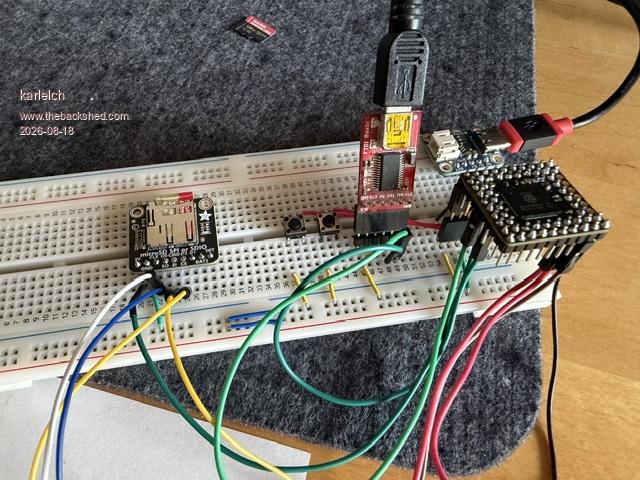
I'm trying to run FUSIX on a minimal hardware, using a PGA2350 (see picture below).
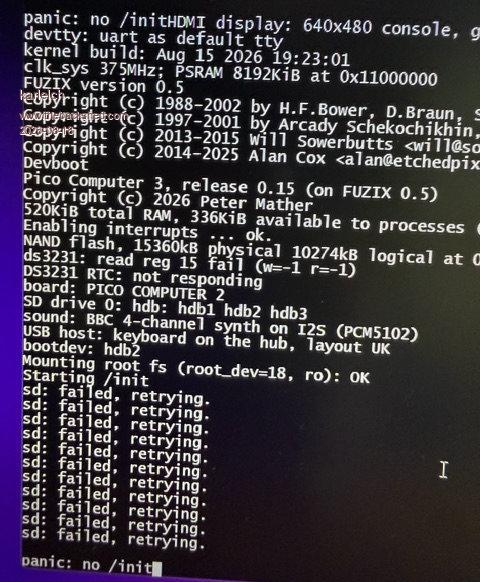
It starts booting but then after mounting the SSD, it fails (see below).
I haven't tried a different SD card (will do) and the wiring may be a bit too hacky, but is there anything else on the software side that I might have missed?
One more thing: Currently the presence of the clock chip is used to determine if it is running on a PC2 or PC3. I don't need the clock (at least now) but I would like to use the "true" SPI connection to the SD card reader as the PC3 is offereing. Would it be possible to add another way to set the pins/mode for the SD card reader? Or check in addition if a so far unused pin is high for this test?
Cool project!
Thanks Thomas
Close
matherp Guru Joined: 11/12/2012 Location: United KingdomPosts: 11779
Posted: 10:32am 18 Aug 2026
Copy link to clipboard
Print this post
If you don't have a RTC and GP27 isn't wired use the PC2 sdcard wiring. If you connect a RTC and GP27 to the 32K output then the firmware will know it is running on a PC3 and you must use its sdcard wiring. You can uses SPI for the SDcard unless you connect and RTC, This was a mistake of mine on the PC2 but MMBasic, MicroPython and now Fuzix work round it using a bitbanged sdcard driver. I don't think this is particularly any slower. In both the PC2 and PC3 you really should have a RTC as this is used for timestamping files etc. Edited 2026-08-18 20:33 by matherp
karlelch Guru Joined: 30/10/2014 Location: GermanyPosts: 353
Posted: 10:41am 18 Aug 2026
Copy link to clipboard
Print this post
Ok, thanks. Then I'll first try to get it working with the SD card in "PC2 mode" and then add an RTC - I should still have one somewhere.
toml_12953 Guru Joined: 13/02/2015 Location: United StatesPosts: 713
Posted: 10:42am 18 Aug 2026
Copy link to clipboard
Print this post
What a difference! I had been using a "45W CanaKit" power supply which has always worked on other Pis in the past but at your suggestion I switched to a different power supply and have been running for a while now with no problems at all. Now this thing is really useful. Thanks, moz!
matherp Guru Joined: 11/12/2012 Location: United KingdomPosts: 11779
Posted: 02:00pm 18 Aug 2026
Copy link to clipboard
Print this post
v0.16 is now available https://github.com/UKTailwind/FUZIX/releases/tag/pc3-v0.16 This was a fun one. The challenge was to create a version of Martin and Harm's Petscii robots that could be compiled and run under Fuzix. This required some additional functionality building into the transpiler and compiler but the major job was getting all the bits, images/ sound/ logic working together. This is now working and Petscii is included in the /root/MMBasic folder. You can use the USB keyboard to run it or 8 switches between pins GP34-GP41 and GND will mimic the Game*Mite. I just tested with a Game*Mite PCB with just the switches mounted and flying leads from the J10 header
PhenixRising Guru Joined: 07/11/2023 Location: United KingdomPosts: 2056
Posted: 02:11pm 18 Aug 2026
Copy link to clipboard
Print this post
I was starting to have matherp-update withdrawals
toml_12953 Guru Joined: 13/02/2015 Location: United StatesPosts: 713
Posted: 03:47am 19 Aug 2026
Copy link to clipboard
Print this post
Two observations.
1) In the code below, there's no way to stop the MMBasic program. Ctrl-C is ignored.
2) When entering mmedit, the function key line takes quite a while to become visible unless the cursor is moved.
100 PRINT "INPUT THE REST MASS OF THE BODY IN KILOS:" 110 INPUT M 120 GOTO 170 130 PRINT "RELATIVE MASS","VELOCITY(MPS)","% OF C" 140 PRINT 150 GOTO 210 160 PRINT 170 LET C=2.997925*10^8 180 PRINT "VELOCITY OF LIGHT IS ";C;" METERS/SEC!" 190 PRINT 200 GOTO 130 210 FOR V=0 TO 3E8 STEP 10 220 LET R=M*SQR(1/(1-(V^2/C^2))) 230 PRINT R,V,(100*V)/C;"%" 240 NEXT V 250 END
matherp Guru Joined: 11/12/2012 Location: United KingdomPosts: 11779
Posted: 07:24am 19 Aug 2026
Copy link to clipboard
Print this post
ctlr-C works for me using exactly your program
UPDATE
When using teraterm but not a connected USB keyboard. Found and fixed. Edited 2026-08-19 18:35 by matherp
toml_12953 Guru Joined: 13/02/2015 Location: United StatesPosts: 713
Posted: 11:40am 19 Aug 2026
Copy link to clipboard
Print this post
In V17 when a program is beautified, the message in red flashes on and off too fast to read.
matherp Guru Joined: 11/12/2012 Location: United KingdomPosts: 11779
Posted: 11:46am 19 Aug 2026
Copy link to clipboard
Print this post
That one I really can't replicate. Please post a basic program that demonstrates the issue. The only message should be " KEEP BLANK LINERS? (Y/N) " in black on a red background which is what I see
toml_12953 Guru Joined: 13/02/2015 Location: United StatesPosts: 713
Posted: 02:55pm 19 Aug 2026
Copy link to clipboard
Print this post
After the beautification is done there's a message that it's done (something like Program Beautified or something like that) That's the message that disappears too quickly to see.
matherp Guru Joined: 11/12/2012 Location: United KingdomPosts: 11779
Posted: 03:32pm 19 Aug 2026
Copy link to clipboard
Print this post
I've tracked it down. It is because you are the only person (in the world?) who insists on still using line numbers . I've fixed it if you want to re-download v0.17
toml_12953 Guru Joined: 13/02/2015 Location: United StatesPosts: 713
Posted: 08:42pm 19 Aug 2026
Copy link to clipboard
Print this post
What can I say? I don't have the time to convert over 3000 programs!
but that's the same as the version I have. Is there another place to look for it? Edited 2026-08-20 07:46 by toml_12953
Footnote added 2026-08-20 20:25 by toml_12953 OK, I see that it was the card image that changed, not the uf2 file. I updated my SD card and everything is fine again. Thanks!
Page 6 of 8
Print this page
The Back Shed's forum code is written, and hosted, in Australia.

 Notice. New forum software under development. It's going to miss a few functions and look a bit ugly for a while, but I'm working on it full time now as the old forum was too unstable. Couple days, all good. If you notice any issues, please contact me.


 Print this post


 . I've fixed it if you want to re-download v0.17
