Notice. New forum software under development. It's going to miss a few functions and look a bit ugly for a while, but I'm working on it full time now as the old forum was too unstable. Couple days, all good. If you notice any issues, please contact me.
OK, I understand this might be a stretch! I have a RP2350B computer which was working perfectly, but has suddenly stopped! I built it from a Silicon Chip kit, and it hasn't ever missed a beat - until yesterday. I've been using Tera term and a USB cable to power it, and transfer information. Yesterday, when I plugged it in, and chose the USB serial option, it would not show the >. Ive tried following the information in the original Silicon Chip article - setting the the DVDD pot to 6K; setting switches to 'disable'; pressing the boot switch and uploading the 'çlear flash' UF2 file. Then Ive reset the DVDD pot to 18K etc. But all to no avail. However, if I press the 'reset' button on the rear, I do get some strange 'hieroglyphics' appear on the screen. On close inspection, I can't see any 'mechanical' issues - solder pads etc, and both red and green LEDs are on. If anyone has any suggestions on what to try or where to monitor - anything, really, Id be very grateful! As I said, it was working *exactly* as anticipated before plugging it in yesterday..... Suggestions? Many thanks to everyone!
PhenixRising Guru Joined: 07/11/2023 Location: United KingdomPosts: 2147
Posted: 08:50am 28 Oct 2026
Copy link to clipboard
Print this post
I think a few of us have experienced something similar in the past. Mine wouldn't work in any USB port. I fiddled with deleting the USB ports and letting them re-establish themselves. Don't remember if that was the actual cure because I did lots of things but it eventually started working.
mozzie Guru Joined: 15/06/2020 Location: AustraliaPosts: 503
Posted: 09:19am 28 Oct 2026
Copy link to clipboard
Print this post
G'day Mikeinnc, The mention of hieroglyphics makes me wonder if the baud rate in Tera-Term has become incorrectly set. I would check this first.
Setup -> Serial Port -> 115200 8 n 1
What version of Windows are you running, has it done an update.
So can you confirm: The RP2350 does show up as a drive and you can download the clear flash uf2 The drive reappears and you can download the PicoMiteHDMIUSB firmware is the heartbeat LED flashing? You can connect to the PicoMite in Tera-Term but not communicate.
Lyle, you are a champion! I'm using WIN11 and setting up the TeraTerm port did the trick! Certainly, the other issues you mentioned all appeared to be OK - except I don't appear to see a flashing LED? There is a green and a red one- they are both on. I must admit I did wonder if it was a speed issue, but the documentation says that anything other than 1200 b/s works. It clearly doesn't! But, yes - all is good now. Thank you again!
And I must say a big thank you to all of the other very helpful replies. Its so good to know that I'm not alone out there!
Mike
mozzie Guru Joined: 15/06/2020 Location: AustraliaPosts: 503
Posted: 04:16am 29 Oct 2026
Copy link to clipboard
Print this post
G'day Mike, First of all, welcome to the forum. I hope you'll find (as I have) the breadth of knowledge here and willingness to help is second to none.
Been tripped up by this numerous times in the past. It should be printed in big bold type in the article somewhere and also above my monitor
For future reference: If using a NON-USB firmware variant (IE: plugging direct into the Micro-USB on the PICO / board) the baud rate is ignored except for possibly 1200bps If using a USB firmware variant then the console is via a serial link (CH340 etc) and the baud rate needs to be set, normally 115200
This has also been slightly confused now we have the HDMIBTH variant that is USB but not named as such.
Also if you plug the Pico in to a different USB port it can be assigned a new COM port with the wrong settings.
Regards, Lyle.
mozzie Guru Joined: 15/06/2020 Location: AustraliaPosts: 503
Posted: 01:54am 30 Oct 2026
Copy link to clipboard
Print this post
G'day Mike, The heartbeat LED is wired to GP25 on that board, the same pin as the PICO modules, however the firmware for the RP2350B does not assume this pin is connected to an LED or set it as the heartbeat. This explains why its not working on a firmware update.
Once you have it working, try OPTION HEARTBEAT GP25 to get it flashing.
I think OPTION RESET HDMIUSBI2S or similar sets all the options at once. Also OPTION RESET LIST lists the possible options for that firmware.
Thank you so much Lyle. Yes, the flashing Red LED is now working - thank goodness. There is something amiss with the serial connection, though. By default, TeraTerm sets it at 9600 b/s - and it doesn't work! It should do - as you say, any speed is OK other than 1200 b/s. But it's not! What I do - thanks to your suggestion - is to set the serial port speed to 115200 and its OK. I wonder if this is a situation that has been changed, but not commented on? Ive downloaded and set the MMBasic firmware again, and ensured that I followed the instructions for OPTION setting as per the Silicon Chip original article, and this may have been what set the blinking LED. I certainly hadn't noticed it before. I cant recall going through these issues when I first set it up - but it might just be an age thing!! But I really appreciate all the help you've given. Thanks again!
BTW, the firmware Ive been loading is PicoMiteHDMIUSBV6.00.03.uf2 The original article has the .00 and .03 round the other way (PicoMiteHDMIUSBV6.03.00) but this seems to be OK!
phil99 Guru Joined: 11/02/2018 Location: AustraliaPosts: 3427
Posted: 07:41am 30 Oct 2026
Copy link to clipboard
Print this post
Other versions of the PicoMite firmware use the Pico USB port as a virtual com port. As it isn't a real serial port the selected speed doesn't matter (other than 1200 which is used to switch to firmware loading mode). The port runs at whatever speed USB can manage.
The reason you need to use 115200 baud is USB versions of the firmware can't use the Pico USB port for the console as it is being used to drive the USB hub. Your console is connected to a USB-to-TTL serial adapter connected to a serial port on the Pico. That requires the baud rate to be manually set to the same speed at both ends. The default firmware setting is 115200 but you can change it with an Option setting, then change the terminal to match.
mozzie Guru Joined: 15/06/2020 Location: AustraliaPosts: 503
Posted: 09:28am 30 Oct 2026
Copy link to clipboard
Print this post
G'day Mike, As pointed out above, any version of the firmware that allows USB devices to connect to the RP2350 via its internal USB connection use a serial console via a USB converter. This needs to be at 115200 unless changed via OPTION BAUDRATE.
So PicoMiteHDMI USB V6.00.03.uf2 is a USB variant.
It is also quite old now so is missing some of the latest Pico MMbasic goodness. Perfectly suitable if it does what you require.
If you set the console connection to 115200 in TeraTerm then:
Setup -> Save Setup... as TERATERM.INI it should stay set to that on next launch.
Once again this can be an ongoing cause of confusion, especially when you have a desk covered in USB and NON-USB devices.
Regards, Lyle.
mozzie Guru Joined: 15/06/2020 Location: AustraliaPosts: 503
Posted: 09:50am 30 Oct 2026
Copy link to clipboard
Print this post
G'day, To clarify the situation:
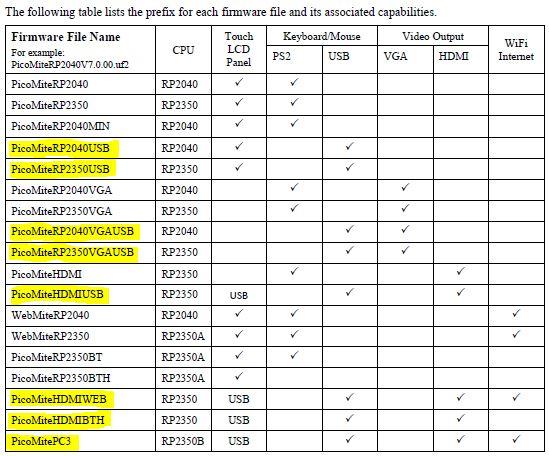
Firmware highlighted in yellow use a serial converter for the console and will need the baud set to 115200 in Tera-Term unless changed with OPTION BAUDRATE on the device.
All others can use any baud rate except 1200 (need to test his)
This is from the latest manual (V7.00.00 PG12) but it should be relevant to all previous versions as well.
This once again assumes I have understood correctly, no guarantees
Regards, Lyle.
Mixtel90 Guru Joined: 05/10/2019 Location: United KingdomPosts: 9319
Posted: 10:25am 30 Oct 2026
Copy link to clipboard
Print this post
By the serial converter mentioned above has to be connected to COM2 on GP8 and GP9. If a "foreign" board has used these for something else then it's hardware hacking time. :)Mick
phil99 Guru Joined: 11/02/2018 Location: AustraliaPosts: 3427
Posted: 10:35am 30 Oct 2026
Copy link to clipboard
Print this post
Haven't used it for several years so gave it a try with loading PicoMite MMBasic RP2350B V7.00.00RC6 Non USB firmware. 1200 baud does switch it to a virtual USB drive. You must then close TeraTerm or change its baudrate to enable the Pico to return to normal after loading the firmware. Also it didn't like my ancient USB hub, had to plug directly into the computer.
PS. On this firmware the LED requires OPTION HEARTBEAT ON to get it flashing. Edited 2026-10-31 06:37 by phil99
Thanks everyone! Yes, I think I understand the issues with the USB hub. Ive setup the serial link (via USB port) connected to the USB-C port on the device, and saved it, as suggested. I closed Tera-term and restarted and it worked immediately! I certainly can't see any greater versions of the firmware, though? As I said previously, Ive loaded PicoMiteHDMIUSBV6.00.03.uf2 and it appears to do everything I want it to - well, at least, for now! On Geoff's Projects page (https://geoffg.net/picomite.html), this is the latest version - or am I missing something else? Again, thanks for all the helpful replies. Its very much appreciated!
mozzie Guru Joined: 15/06/2020 Location: AustraliaPosts: 503
Posted: 05:30am 31 Oct 2026
Copy link to clipboard
Print this post
G'day Mike, No offence mate but it's possible you may have your 00's and 03's mixed up.
The original article references PicoMite V06 00 03
Just looked on Geoffs site and PicoMite V06 03 00 is shown in the download section at the bottom of the PicoMite page.
Might also be an idea to clear your downloads folder, the file is always called "PicoMite_Firmware.zip" and some have had problems if it already exists, something to do with "Cache" but its over my head, hopefully someone will explain it one day.
PicoMite V06 03 00 is almost the last stable release so if you are running that you are fairly up to date, V07 00 00 rc6 is still experimental at this point.
Hope this helps.
Regards, Lyle.
P.S. oops, PicoMite V06 03 01 was also a release. Edited 2026-10-31 15:32 by mozzie
Thanks Lyle. Ive got the original article in front of me and Geoff clearly says "Extract the file PicoMiteHDMIUSBV6.00.03.uf2 (or a later version) from the ZIP" (Silicon Chip magazine - Nov 2025 - page 35 - middle column - about half way down). Ive downloaded the PicoMite_Firmware.zip (again!) and extracted the files in the zip and I can clearly see in the /Firmware directory a file named 'PicoMiteHDMIUSBV6.03.00.uf2' which is probably the correct name.
Now, that's not important - its obviously a naming error in the original article and everything is working successfully, as I've said before. That's the firmware Ive loaded - I'm confident it's correct!
The most important issue is that, thanks to you and others, its working! Yay!
Kind regards
Mike
mozzie Guru Joined: 15/06/2020 Location: AustraliaPosts: 503
Posted: 03:43am 01 Nov 2026
Copy link to clipboard
Print this post
G'day Mike, My apologies, I had misunderstood your meaning and should have made my previous post clearer.
PicoMite V6.00.03 was released around the time of the SC article (07/2025) and was the current firmware at that time. There is an archive section on Geoffs site that contains many but V6.00.03 is unfortunately not one of them. If you would like a copy of that particular firmware I can post it here.
PicoMite V6.03.00 was released around 12 month later (07/2026) and is close to the last stable firmware release available, it will work on your RP2350 computer as well and contains a lot more MMbasic goodies. This is the version on Geoffs website.
Hopefully this clarifies the situation, both V6.00.03 and V6.03.00 exist.
Most importantly, good to hear your RP2350 is working.

 Notice. New forum software under development. It's going to miss a few functions and look a bit ugly for a while, but I'm working on it full time now as the old forum was too unstable. Couple days, all good. If you notice any issues, please contact me.


 Print this post