
| Menu | JAQForum Ver 26.09 |
| Menu | JAQForum Ver 26.09 |
Forum Index : Microcontroller and PC projects : PicoMiteVGA DEMO
  Page 14 of 14 |
||||||
Here is a CSub version. This gets it down to 35mS, to be honest you might as well stick with your original and replace the 'Sprite' For 'Blit' which gives 45mS all in standard Basic. Option Default None Option Explicit MODE 2 'MODE 7 for MMB4W Randomize (Timer) CLS Dim Integer tt,f,fire(160,20),fire2(160,20),ranr(2048) Dim Integer rp,y,y1,yy,xx,ff(160),aa(160),bb(160) For f=0 To 2047:ranr(f)=Int(Rnd*4):Next 'Prepare source Dither 0,RGB(RED):Box 8,0,8,2,,RGB(RED) Dither 8,RGB(255,64,0):Box 16,0,8,2,,RGB(255,64,0) Dither 16,RGB(255,128,0):Box 24,0,8,2,,RGB(255,128,0) Dither 24,RGB(yellow):Box 32,0,8,2,,RGB(yellow) Dither 32,RGB(White):Box 40,0,2,2,,RGB(White) For f=0 To 20:Blit read f+1,f*2,0,2,2:Next '------ CLS 0 Box 0,238,320,2,,RGB(white) For f=0 To 160:fire(f,20)=20:Next Do tt=Timer rp=Int(Rnd*2048) For y=0 To 19 y1=y+1 yy=198+(y<<1) xx=0 animate For f=0 To 159 If ff(f) Then Blit Write ff(f),aa(f),bb(f),0 Next Next Print @(0,0);Timer-tt;" " 'Pause 20' for MMB4W Loop '------ /* ' --- mmb2csub: animate replaced by a CSUB; original follows Sub animate Local Integer f,r,x,xr,fr For x=0 To 159 r=ranr(rp) xr=(x+(r)) Mod 160 fr=fire(xr,y1)-r:If fr <0 Then fr=0 ff(x)=0:If fire2(x,y)<> fr Then fire(x,y)=fr:fire2(x,y)=fr:ff(x)=fr+1:aa(x)=xx:bb(x)=yy Inc xx,2:Inc rp: If rp>2047 Then rp=0 Next End Sub */ '------ Sub dither x As Integer,col As Integer Pixel x+2,0,col:Pixel x+4,0,col:Pixel x+6,0,col Pixel x+7,0,col:Pixel x+5,1,col:Pixel x+7,1,col End Sub ' --- mmb2csub: generated code for animate ' The wrapper keeps the original name, so call sites are unchanged. Sub animate Local Integer __gt(10) __gt(0) = Peek(VARADDR aa%()) __gt(1) = Peek(VARADDR bb%()) __gt(2) = Peek(VARADDR ff%()) __gt(3) = Peek(VARADDR fire%()) __gt(4) = Peek(VARADDR fire2%()) __gt(5) = Peek(VARADDR ranr%()) __gt(6) = Peek(VARADDR rp%) __gt(7) = Peek(VARADDR xx%) __gt(8) = Peek(VARADDR y%) __gt(9) = Peek(VARADDR y1%) __gt(10) = Peek(VARADDR yy%) animateK __gt() End Sub CSUB animateK INTEGER 00000000 'animateK 4646B5F0 465746DE 4D7E2200 682BB5C0 69DBB08A 6FDB6801 601A605A 69DA682B 6FD46B03 60E1469A 61216881 61616901 61A16981 61E16A01 62636A81 62216B83 469B62A3 62E36C03 6C834698 63239307 6D036826 63639308 D1002E00 6863E0BB 23009309 92002200 46539301 46C24F65 E0499303 18EB9D04 9B059304 9B0400DD C303195B 681B4653 009B4698 015B4443 00DB4443 197618F6 2501C603 46632600 41711940 465BC303 9B06CB03 191B68DB 9B08C303 6853CB03 C303191B 21002002 CB0C465B 414B1812 20014659 2100C10C CB0C9B03 414B1812 DC042B00 2180D105 428A0109 2200D301 99032300 C10C2400 9A019900 18C92301 683B4162 92019100 6FDC69DB D05929A0 330168A3 059B60A3 683BD103 6A9B69DB 683B4798 69DA9903 6FD36809 6A1B00C9 CB18185B 99019800 18C00026 24A44161 59140064 22A0001D 47A02300 9907683B 680969DB 008B6FDA 9206185B 6994015B 00DB185B 00C018E3 CB03181B 002B9404 1AC00034 320C41A1 DA012900 21002000 25009B00 689300DC 469C2600 466344A4 4653C360 9D00681B 009B4698 015B4443 69164443 950500DB 46A818F5 464544A0 4285682D E761D000 686D4645 D000428D E77FE75C 2B009B01 2000D1A2 9B092100 B00A6063 46BBBCE0 46A846B2 2780BDF0 6B13017F 47980038 6020682B 6FDB69DB 682B605E 6FDC69DB 93096863 D80042BB 6066E733 69DB682B E72C6FDC E000ED08 End CSUB Edited 2026-11-11 05:54 by Bleep |
||||||
 Thank you for your support Kevin... Up until now, I've equated Sprite and Blit in my mind Exchanging the "SPRITE" with "BLIT" speed up from ~80 mS to ~50mS Using your CSUB Version speeds up ~50mS to ~29mS = 34FpS  So you can really call it an animation |
||||||
Hi Kevin, Martin, Since RP2040 VGA does not provide COMPILE, and mine runs at 252MHz, there is a large difference between the normal version and the CSUB version. Normal with Sprite : 580ms Normal with Blit : 520ms CSUB version : 200ms Volhout |
||||||
Currently, the program calculates using 160x20, or 3,200 cells per frame. The sprites are 2x2-pixel blocks. If the sprites were enlarged to 4x4, only 800 calculations per frame would be needed. While this would lower the resolution, it should quadruple the speed. |
||||||
Javavi, I have been obcessed with the maze program you posted few posts back. It is a very nide "screen saver" with nicely balanced PAUSE statements, so it is entertaining to watch. Not to fast, not to slow. And the slightly offset green line once a solution is found is also giving a feeling of depth. Graphically very nice. But what intrigues me is the algorithm use. The maze is generated using Wilsons algorithm (randomly removing walls until a loop is detected, then closing the loop, and starting a new path at random -not visited- location. This creates a so called "perfect maze". A maze where any location has a path to any other location. So a maze is generated from random numbers. Then there is the solver. The solver walks a path until hits a crossing (a "choice") and at that crossing it takes a randomly chosen direction. Until it hits a dead end. Then it walks back until the last crossing, and takes another direction. A simple algorithm, and essentially you only need to remember the "choices" that where the last ones taken. But maze creation is random, and solving is random. So it is very unpredictable what will happen. Below are some of the extreme runs. 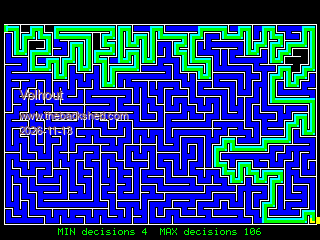 This is a maze with many crossings, and in solving it the solver took 101 (out of 106) wrong choices. 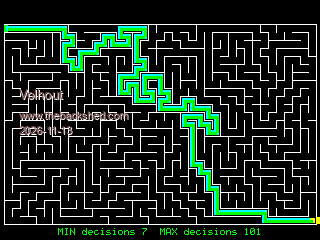 This is a maze that has only few crossings in the shortest path, and the solver took 4 out of 4 choices immediately correct (that is statistically not special). Volhout Edited 2026-11-13 19:02 by Volhout |
||||||
Hi Martin, Attached is the flame demo, again, which I have managed to squeeze a bit more speed out of, now about 26.5mS on a 2350 @ 378Mhz. Presumably will also speed up the 2040 as well. Regards Kevin flamedemoc.zip |
||||||
 Stellar Steam 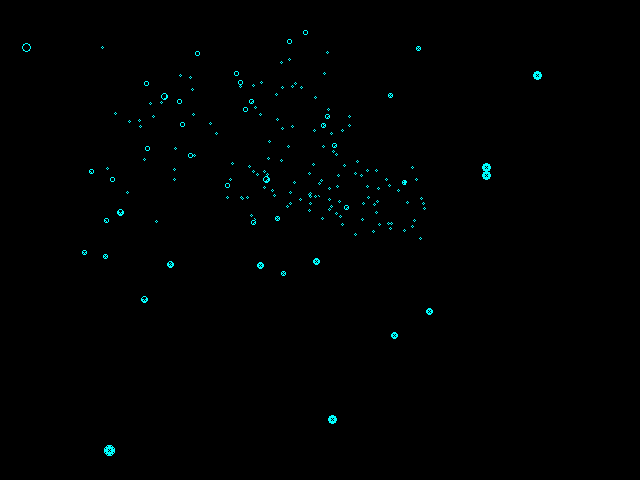 MODE 1 Color RGB(Cyan) CLS Type star_t x As Integer y As Integer z As Integer End Type Dim astar(300) As star_t Dim oldstar(300) As star_t For i=0 To 300 astar(i).x = Rnd * MM.HRES astar(i).y = Rnd * MM.VRES astar(i).z = Rnd * MM.HRES\2 Next Do For i=0 To 300 If astar(i).z<1 Then astar(i).z=300 Else astar(i).z=astar(i).z-1 For p%=0 To oldstar(i).z Circle oldstar(i).x, oldstar(i).y, p%,,,0,0 If astar(i).z<>300 Then x0=Int(2*astar(i).z+astar(i).x/(1+astar(i).z/30)) y0=Int(astar(i).z+astar(i).y/(1+astar(i).z/30)) Circle x0, y0, p% EndIf Next oldstar(i).x = x0 oldstar(i).y = y0 oldstar(i).z = 5/(1+astar(i).z/20) Next Loop While Inkey$="" Edited 2026-11-19 04:31 by javavi |
||||||
| Page 14 of 14 |
||||||
 |
The Back Shed's forum code is written, and hosted, in Australia. |


