
| Menu | JAQForum Ver 19.10.27 |
| Menu | JAQForum Ver 19.10.27 |
Forum Index : Microcontroller and PC projects : On the Road again
  Page 4 of 5 Page 4 of 5   |
||||||
Thank you, with 252MHz I had something like 22.5 FPS to have a better speed experience, you might play with the Value of the spt Variable which controlls the speed of the colorchange bcol%(dst,f%)=col%(7-3*((Sin((((120-f%)/40)^3)+dst*.75))>0)):Next :Next :dst=0:spt=1.5 .... Sub Mov_sky dir% If dir%=0 Then spt=1.5:Exit Sub 'driving straight so sky doesn't change spt=2 but not higher than 3.?? as there are only 8 animation states and it would look like running backwards.. Maybee I should double them ? Edited 2022-11-05 01:23 by Martin H. |
||||||
non vga mmb does not have a triangle function. |
||||||
 There from the very first versions |
||||||
Thanks, I found it TRIANGLE X1, Y1, X2, Y2, X3, Y3 [, C [, FILL]] not under drawing commands. sorry. |
||||||
since you have already used the Maze program on your NonVGA Pico, your statement cannot be correct. Here the triangle function was used to draw the walls.  Edited 2022-11-08 13:47 by Martin H. |
||||||
Your code did not "run" on lcd but as you say the errors were not triangle commands. Triangle is not mentioned under drawing commands in the non vga manual but is there in the list of commands, page 118. Lcd is not the same as vga but some games could work but adapting to touch control? I was thinking of android phone games. I do not want to wire buttons to control a lcd game if touch could be used instead. The touch lcd is well implemented and when calibrated is accurate. I will try to adapt vga to lcd but it is fun using lcd graphics with mmbasic. cheers. |
||||||
You barely wait 2 years and there is already progress here too  I have adapted the example to the new sprite routines so that the tires are no longer transparent.  Sprites used in the Demo I also halved the vertical resolution of the road and reduced the frame rate to 25, so there is still about 1/3 CPU time left, which could be used to calculate the controls of the game. 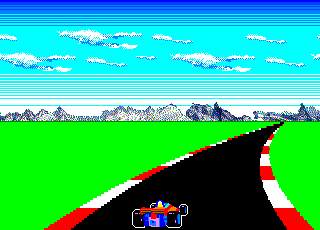 For the track, I also tried to recreate the route from Fuji Speedway. 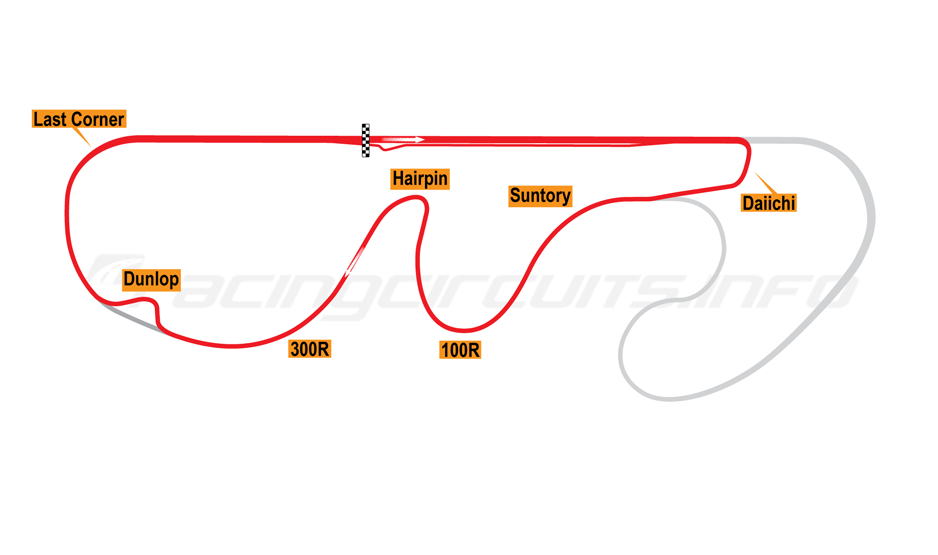 RoadAgain.zip this Version is for Picomite VGA MMBasic 5.07, I will test it on Game*Mite later have fun Martin Edited 2024-07-19 21:28 by Martin H. Footnote added 2024-07-19 21:43 by Martin H. MMBasic 5.08.00, not MMBasic 5.07 |
||||||
Thank you Martin, another test-case for MMB4L  . .Best wishes, Tom |
||||||
oh yes, I'm curious in this version you still can use the Keys "o" & "p" to move the Background under the Car |
||||||
Hi Martin, It works on V5.09.00 when you replace the Sprite commands (not the Sprite Read, Sprite Write, but the Sprite Mv%,....) with Blit. In line 102,104,105,109,111,112 By the way.. good work. Also the background looks nice. And that with rather small bmp file. Regards, Volhout Edited 2024-07-19 23:18 by Volhout |
||||||
Volhout on V5.08.00 it replaces Blit with Sprite as soon as you close the Editor (same token)But thanks for the hint  Cheers Martin Edited 2024-07-19 23:26 by Martin H. |
||||||
Had to correct the SPRITE -> BLIT command and add the line: If Mm.Device$ = "MMB4L" Then Option Simulate "PicoMiteVGA" and it works just fine in my development version of MMB4L (on a Pi4 in this case) ...... if only getting CMM2 simulation working was so easy. Very nice Martin, thankyou, Tom |
||||||
just tested on Game*Mite, but my Display or 2nd Pico CPU crashes after a view seconds And displays strange Colors Update from Version 5.08.00 to 5.09.00RC5 didn't fix it Unfortunately, the Pico is soldered in, so I can't swap it for a test run Edited 2024-07-20 03:47 by Martin H. |
||||||
Crash after a few seconds was solved bij changing Sprite into Blit in the build in editor. Strange enough the Sprite command crashing was the second command in a line. So line 102 and 105 crashed the program, but line 104 did not. If you can confirm the same, it is structural, and Peter may know why. Volhout Edited 2024-07-20 04:35 by Volhout |
||||||
there is a differece betwen those SPRITE COMMANDS first we have the SPRITE READ #b, x, y, w, h SPRITE WRITE #b, x, y, orientation which works fine. The Problem are the "SPRITE x1, y1, x2, y2, w, h" commands, that you have to manualy rename to BLIT for MMBasic Version 5.09.xx Cheers Martin Edited 2024-07-21 18:31 by Martin H. |
||||||
What I tried to explain, and apparenty failed to achieve, is that line 102 and line 105 need manual re-naming of the SPRITE x1, y1, x2, y2, w, h to BLIT x1, y1, x2, y2, w, h. But strange enough line 104 you can keep SPRITE x1, y1, x2, y2, w, h. And that may be caused by the fact that line 104 has SPRITE x1, y1, x2, y2, w, h as the first command on that line. In line 102 and 105 it is the second command, preceded by a column ":". Volhout |
||||||
As I described in another thread , performance was significantly improved by replacing the BOX commands with BLIT RESIZE This should make it perfectly possible to show up road signs and objects at the side of the road without losing speed. I’ve drawn a little something to illustrate this. 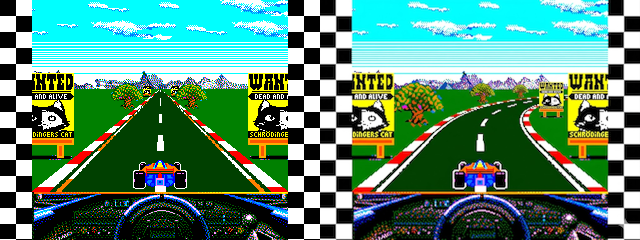 I've already designed a few important RGB121 signs instead of traditional billboards  At the moment, I’m trying to figure out how to make signs that are closer move faster than those that are further away. Well, I’ve got time over the Easter holidays to find that out Cheers Martin Edited 2026-04-03 19:03 by Martin H. |
||||||
|
||||||
Ah.... Fame at last. :) |
||||||
If anyone else would like a sign, please let me know Edited 2026-04-04 02:08 by Martin H. |
||||||
| Page 4 of 5 |
||||||
 |
The Back Shed's forum code is written, and hosted, in Australia. |


