Notice. New forum software under development. It's going to miss a few functions and look a bit ugly for a while, but I'm working on it full time now as the old forum was too unstable. Couple days, all good. If you notice any issues, please contact me.
jvanderberg Regular Member Joined: 06/05/2026 Location: United StatesPosts: 86
Posted: 05:18pm 24 May 2026
Copy link to clipboard
Print this post
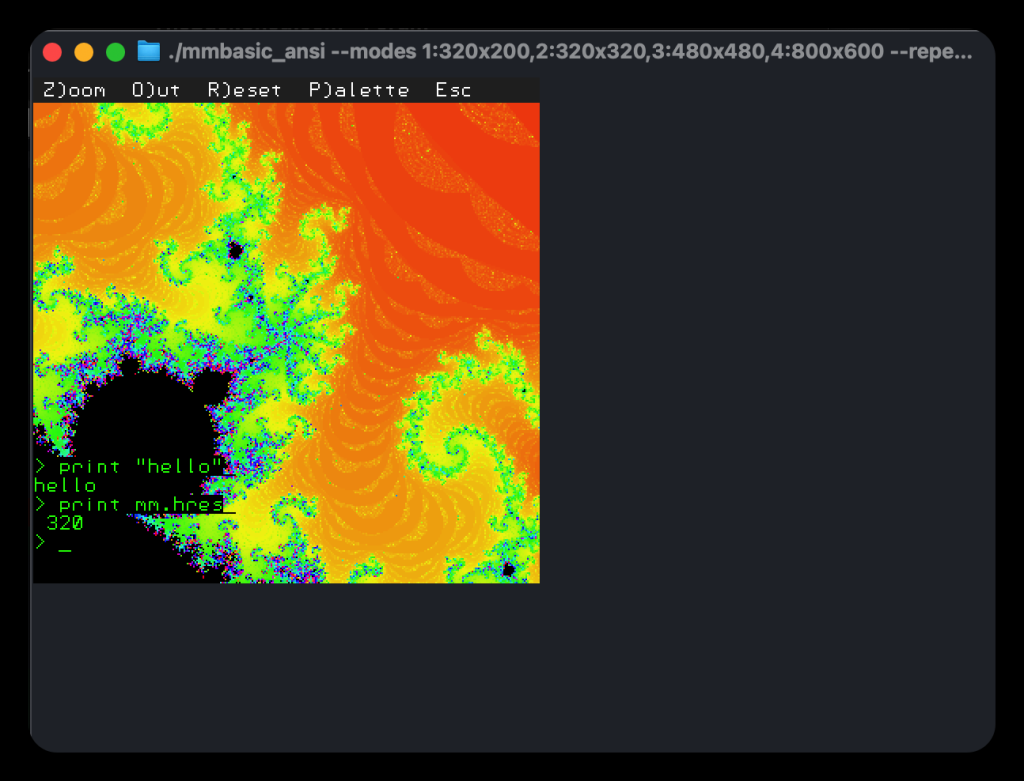
As part of my MMBasic Anywhere work to make MMBasic more portable, I made a version that compiled and ran locally on my mac, for testing purposes. But that was only text mode, which is a bit boring.
So I did something a bit silly and made a version with full graphics mode, in a terminal. It uses half-block rendering, so each text block is two pixels, vertically stacked. This works better in modern terminals, and with a terminal font that's as close as possible to being twice as tall as it is wide. And you have to zoom way out.
The current working directory is shared as the B: drive in MMBasic. Most stuff should work, but I am sure some things are broken.
al18 Senior Member Joined: 06/07/2019 Location: United StatesPosts: 252
Posted: 07:55pm 24 May 2026
Copy link to clipboard
Print this post
Assuming the MacOS universal works on Intel Macs and Mx series Macs. Will the program run on MacOS Catalina?
Looking forward to trying your program out. Edited 2026-05-25 05:56 by al18
jvanderberg Regular Member Joined: 06/05/2026 Location: United StatesPosts: 86
Posted: 11:20pm 24 May 2026
Copy link to clipboard
Print this post
The macOS build is intended for modern macOS. Catalina support has not been verified yet. It may work. It's a terminal app that doesn't use much in the way of fancy APIs.
hhtg1968 Senior Member Joined: 25/05/2023 Location: GermanyPosts: 248
Posted: 06:35am 25 May 2026
Copy link to clipboard
Print this post
hello. i am not a terminal expert...
or i am to silly.
hhtg1968 Senior Member Joined: 25/05/2023 Location: GermanyPosts: 248
Posted: 06:36am 25 May 2026
Copy link to clipboard
Print this post
perhaps ist not correct to use "sudo" with "./"
i try further...
jvanderberg Regular Member Joined: 06/05/2026 Location: United StatesPosts: 86
Posted: 12:52pm 25 May 2026
Copy link to clipboard
Print this post
I've updated it to make it executable by default, something got lost in the build.
But you will face another hurdle, the mac really does not want you to run sus software from the internet, so run this after you download:
The first line removes the internet quarantine from the directory, the second make double sure the executable is well, executable.
This is now documented in the readme that comes in the zip file.
robert.rozee Guru Joined: 31/12/2012 Location: New ZealandPosts: 2552
Posted: 03:09pm 25 May 2026
Copy link to clipboard
Print this post
have downloaded mmbasic_ansi-linux-x64.zip on a couple of machines running 64-bit Linux Mint and was able to run it with 'varying' success.
first problem was a series of GLIBC error messages:
./mmbasic_ansi: /lib/x86_64-linux-gnu/libc.so.6: version `GLIBC_2.33' not found (required by ./mmbasic_ansi) ./mmbasic_ansi: /lib/x86_64-linux-gnu/libc.so.6: version `GLIBC_2.34' not found (required by ./mmbasic_ansi) ./mmbasic_ansi: /lib/x86_64-linux-gnu/libm.so.6: version `GLIBC_2.38' not found (required by ./mmbasic_ansi) ./mmbasic_ansi: /lib/x86_64-linux-gnu/libm.so.6: version `GLIBC_2.29' not found (required by ./mmbasic_ansi)
this is caused by the binary being built in such a way that it will only run on a machine having the same or later version of libc (GLIBC) installed as was on the machine it was built on. you can check the installed version by typing ldd --version.
there are a couple of solutions to this problem: 1. when linking, specify to use unversioned or base GLIBC symbols, or, 2. build the binary on a VM that is running an older version of Linux. Mint 19.3 is a good choice (uses libc version 2.27) that i have used in the past.
second problem (on another machine) was getting open a terminal window that was (a) large enough and (b) using a small enough font, such that i could view the graphic rendition of the font in half-block characters. while i made some small progress, on the whole i failed abysmally here! i did get some readable text, but not in a way that the editor was usable or with the whole area used by mmbasic was viewable.
is there any chance you could create a build that is non-graphical and just uses the terminal screen as normal text at 80x24? this would allow for easily testing out the rest of the (non-graphics) features of your version of mmbasic.
the third problem, which i only briefly encountered, is that pressing ctrl-Z at the end of an autosave command just pushes mmbasic into the background. can/have you mapped the ctrl-Z key function to another keycode?
despite the above problems, i was still pretty impressed with your efforts!
cheers, rob :-) Edited 2026-05-26 01:11 by robert.rozee
jvanderberg Regular Member Joined: 06/05/2026 Location: United StatesPosts: 86
Posted: 05:09pm 25 May 2026
Copy link to clipboard
Print this post
Ok, I've rebuilt it so it should be more libc version tolerant. I don't really have the means to test this well without some trouble, so let me know what you think.
--console-only launches mmbasic_ansi with a console only terminal, no graphics. Any graphics programs will just appear to hang at the console until the program exits. The editor works just fine, and the environment responds to terminal resizes.
I think I addressed the control-Z issue, let me know.
Just re-download it.
hhtg1968 Senior Member Joined: 25/05/2023 Location: GermanyPosts: 248
Posted: 05:09pm 25 May 2026
Copy link to clipboard
Print this post
@jvanderberg:
i followed your instruction:
... bad cpu type
(i have an intel mac)
jvanderberg Regular Member Joined: 06/05/2026 Location: United StatesPosts: 86
Posted: 11:50pm 25 May 2026
Copy link to clipboard
Print this post
There was an issue with the build, it should now create a universal binary - I am not at all sure it will run on very old MacOS, but let me know how it goes.
hhtg1968 Senior Member Joined: 25/05/2023 Location: GermanyPosts: 248
Posted: 07:25am 26 May 2026
Copy link to clipboard
Print this post
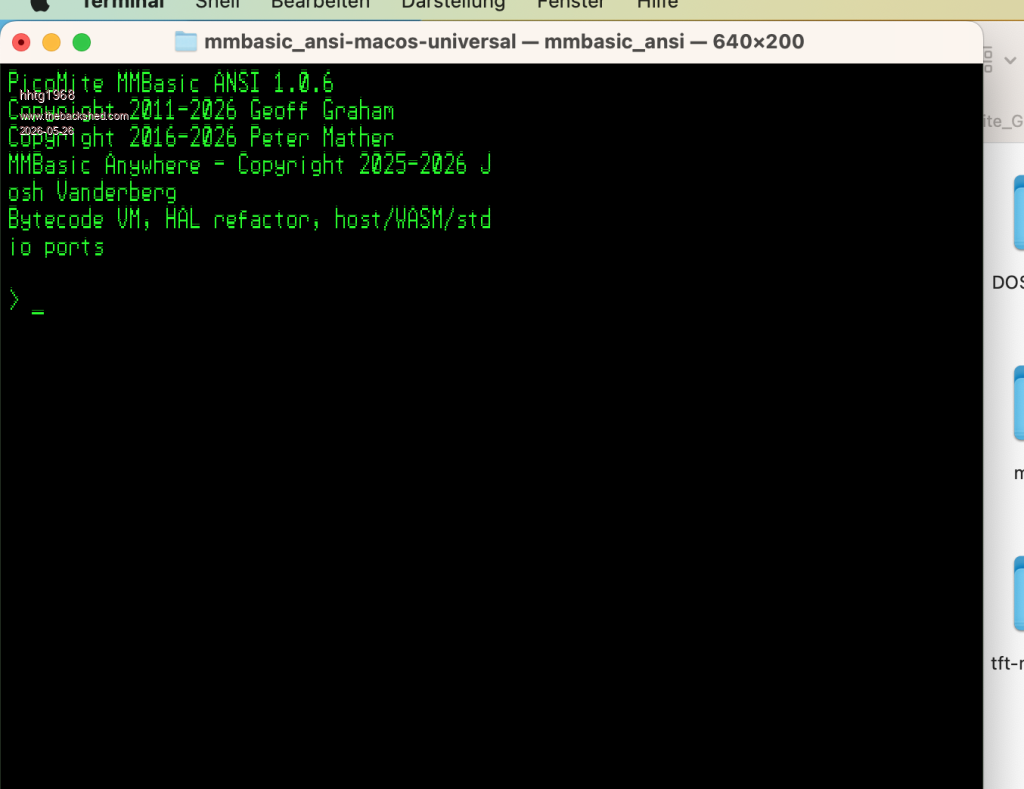
i have a macbook retine 2017 with macos 13 ventura...
hhtg1968 Senior Member Joined: 25/05/2023 Location: GermanyPosts: 248
Posted: 07:40am 26 May 2026
Copy link to clipboard
Print this post
first successful tests...
hhtg1968 Senior Member Joined: 25/05/2023 Location: GermanyPosts: 248
Posted: 07:44am 26 May 2026
Copy link to clipboard
Print this post
i will further try to get better resolutions etc.
@jvanderberg: thanx a lot...
robert.rozee Guru Joined: 31/12/2012 Location: New ZealandPosts: 2552
Posted: 11:44am 26 May 2026
Copy link to clipboard
Print this post
libc problems fixed, it now runs happily under linux mint 19.3 and using the --console-only parameter produces usable output.
but while ctrl-Z is fixed, both ctrl-C and ctrl-D are not handled and terminate mmbasic. the problems with ctrl-C and -D, as well as the original with ctrl-Z can all be fixed by placing the terminal in RAW mode. the following pascal (FPC) code does this, taken from a serial-over-TCP/IP VT102 emulation hack i wrote a few years back:
program talkto;
uses sysutils, termIO, BaseUnix;
var tios, SAVEDtios:termios;
begin TCGetAttr(0, tios); SAVEDtios:=tios; CFMakeRaw(tios); TCSetAttr(0, TCSANOW, tios); // place console in RAW mode
repeat // main loop, use break to exit until false;
TCSetAttr(0, TCSANOW, SAVEDtios) // restore console state end.
hopefully converting this into C should be simple!
btw, option list seems to not work. i tested by setting and resetting option colourcode on/off where option list produced no output no matter what the setting was.
if desired, you could make options persistent by saving them in a .ini file of the same name and location as the mmbasic binary. this .ini file could then also hold settings such as --console-only. but this is all just a suggestion!
cheers, rob :-) Edited 2026-05-26 21:49 by robert.rozee
jvanderberg Regular Member Joined: 06/05/2026 Location: United StatesPosts: 86
Posted: 12:13pm 26 May 2026
Copy link to clipboard
Print this post
I want to point out that though this appears a kind of novelty, the point here is that the core interpreter is running the exact same code as the microcontroller version. It's a single code base that builds a web emulator, a console version, and PicoCalc/PicoMite builds, HDMI/VGA builds, the ESP32 build, and now even a port to the pocket386.
jvanderberg Regular Member Joined: 06/05/2026 Location: United StatesPosts: 86
Posted: 12:40pm 26 May 2026
Copy link to clipboard
Print this post
Thanks for the feedback. These should now be fixed. Edited 2026-05-27 03:59 by jvanderberg
robert.rozee Guru Joined: 31/12/2012 Location: New ZealandPosts: 2552
Posted: 02:36pm 27 May 2026
Copy link to clipboard
Print this post
unfortunately autosave now appears (under Linux) to no longer work, when pasting in a large basic program it appears to only save the last half dozen or so lines of what is pasted in (and indeed, these last dozen lines are the only ones displayed on screen). also:
- pressing ctrl-C should terminate an autosave without saving anything. instead, the ctrl-C appears to be ignored;
- after pressing ctrl-Z the message "Error : Invalid character:" or "Error : Unknown command" is displayed, although this message seems to have no effect.
using autosave and just typing at the keyboard appears to work, with everything accepted and saved. although the error message when you press ctrl-Z still comes up.
cheers, rob :-) Edited 2026-05-28 00:37 by robert.rozee
jvanderberg Regular Member Joined: 06/05/2026 Location: United StatesPosts: 86
Posted: 06:45pm 27 May 2026
Copy link to clipboard
Print this post
Ok. Sorry. These should now really be fixed. I added a test suite around them and manually tested as well. An issue is that this gets into shared code with the MCU versions. It can be a bit brittle.
robert.rozee Guru Joined: 31/12/2012 Location: New ZealandPosts: 2552
Posted: 10:04pm 27 May 2026
Copy link to clipboard
Print this post
all seems to be working correctly now
cheers, rob :-)
Frank N. Furter Guru Joined: 28/05/2012 Location: GermanyPosts: 1156
Posted: 08:15am 28 May 2026
Copy link to clipboard
Print this post
Unfortunately, I'm having problems with my Linux Mint. I have to set the console to full screen and the font size so small that I can't read it anymore just to be able to start the program in 640x480 resolution. Then it runs very slowly. If I launch it without specifying a “resolution,” I still have to expand the window to full screen, and the font in MMBASIC is then much too large...
Frank
Page 1 of 6
Print this page
The Back Shed's forum code is written, and hosted, in Australia.

 Notice. New forum software under development. It's going to miss a few functions and look a bit ugly for a while, but I'm working on it full time now as the old forum was too unstable. Couple days, all good. If you notice any issues, please contact me.


 Print this post